AI for UX UI Design Mastery
Introduction to AI in UX/UI
What Is AI, Anyway?
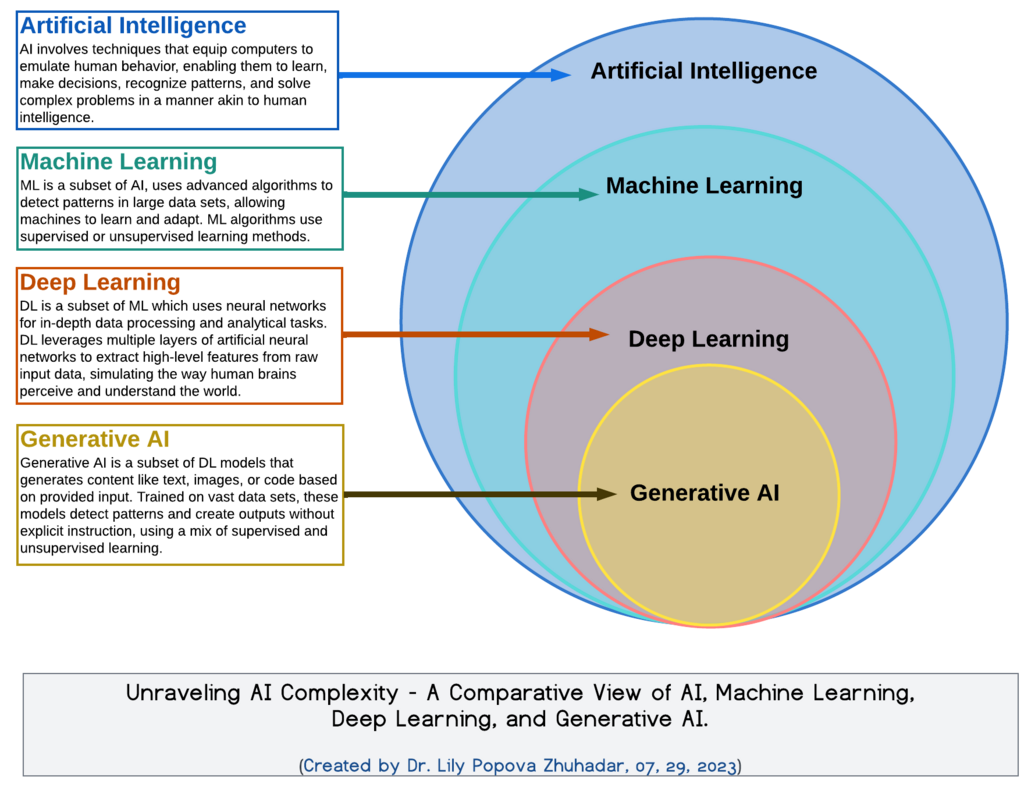
Artificial Intelligence, or AI, is the ability of a computer or robot to perform tasks that normally require human intelligence. Think of things like learning from experience, understanding language, recognizing patterns, and making decisions.
Artificial Intelligence
noun
The theory and development of computer systems able to perform tasks that normally require human intelligence, such as visual perception, speech recognition, decision-making, and translation between languages.
AI isn't a new idea. The concept has been around since the 1950s, but for a long time, it was mostly theoretical. Early AI could handle very specific, rule-based tasks, like playing a game of chess. But it lacked flexibility.
Today, thanks to massive amounts of data and powerful computers, AI has evolved. Modern systems can learn and adapt. They're not just following a rigid set of instructions; they're identifying patterns and making predictions. This leap is what has allowed AI to move from research labs into the tools we use every day, including those for design.
AI Meets Design
So, how does this powerful technology fit into the world of User Experience (UX) and User Interface (UI) design? The core of UX/UI is understanding people and creating products that are easy and enjoyable to use. AI is changing how designers achieve this goal.
Traditionally, a designer's process involves a lot of manual work: conducting user research, sketching wireframes, building prototypes, and testing them with users. Each step requires time, effort, and interpretation. AI is starting to act as a powerful assistant in this process.
AI isn't here to replace designers. It's here to give them superpowers, automating the tedious parts of the job so they can focus on what matters most: solving user problems creatively.
For example, instead of manually sifting through hundreds of user survey responses, a designer can use an AI to quickly identify the most common themes and pain points. Instead of spending hours creating dozens of slightly different button designs, they can ask an AI to generate variations in seconds. This fundamentally changes the design workflow, making it faster and more data-driven.
The Benefits of an AI Partnership
Integrating AI into the design process brings several key advantages. It's more than just working faster; it's about working smarter.
Enhanced Efficiency Many design tasks are repetitive. Think creating icons, resizing images for different devices, or building out a design system. AI can automate these tasks, freeing up designers to focus on bigger-picture strategy and creative problem-solving.
Boosted Creativity Ever feel stuck in a creative rut? AI can act as a brainstorming partner. It can generate mood boards, suggest color palettes, or even draft initial layout ideas. This gives designers a starting point to react to and build upon, helping to break through creative blocks and explore more possibilities than they could on their own.
Deeper User Insights Good design is user-centered. AI can analyze vast amounts of user data, like click patterns, session recordings, and support tickets, to uncover insights that a human might miss. This allows for the creation of highly personalized experiences that adapt to individual user needs, making products feel more intuitive and helpful.
Navigating the Ethical Questions
With great power comes great responsibility. As we integrate AI into design, we must also consider the ethical implications. AI systems are trained on data, and if that data contains biases, the AI can perpetuate or even amplify them.
Imagine an AI that helps screen job applicants' resumes. If its training data historically favored candidates from certain backgrounds, it might unfairly penalize qualified candidates from other groups. In design, this could manifest as an AI creating interfaces that are less accessible to users with disabilities or that reflect cultural stereotypes.
A key challenge for designers is ensuring that the AI tools they use are fair, transparent, and respectful of user privacy. It's our job to ask critical questions about where the data comes from and how the AI makes its decisions.
Another concern is data privacy. AI often needs user data to create personalized experiences. Designers must be transparent with users about what data is being collected and how it's being used. Building trust is essential. Users need to feel in control of their information.
The goal is to use AI as a tool to enhance human-centered design, not to replace it. This means keeping the human designer in the loop to guide the AI, check its work for bias, and make the final creative and ethical judgments.
Now, let's test your understanding of these core concepts.
What is the key difference between early AI and modern AI systems as described in the text?
According to the text, how is AI fundamentally changing the traditional UX/UI design workflow?