AI Engineering for Software Developers
Python Basics
A New Way to Write
Coming from Java or JavaScript, Python might feel like a breath of fresh air. The language is designed for readability and simplicity, which means you'll write less code to get the same job done. Two major differences will stand out immediately: indentation and dynamic typing.
First, Python uses whitespace to define code blocks. Where you'd use curly braces {} in Java or JavaScript for a function or loop, Python uses a new line and an indent. It might seem strange at first, but it forces clean, readable code. There are no semicolons at the end of lines, either.
Second, Python is dynamically typed. You don't need to declare a variable's type, like String name = "Alex"; in Java. You just assign the value, and Python figures it out. This is similar to JavaScript's let or const.
# Python
name = "Alex"
age = 30

# JavaScript equivalent
// let name = "Alex";
// let age = 30;

# Java equivalent
// String name = "Alex";
// int age = 30;
This approach makes the code cleaner and often faster to write. The trade-off is that some errors that would be caught by a Java compiler might only appear when you run the Python code.
Python's Building Blocks
Python comes with several built-in data structures that you'll use constantly. They're similar to structures you already know, but with some unique Python flavors.
Lists are mutable, ordered sequences of elements. They work much like arrays in JavaScript or
ArrayListsin Java. You can add, remove, or change items after the list is created.
my_list = [1, "apple", 3.14]
print(my_list[1])  # Access element at index 1

my_list[0] = "banana" # Change an element
my_list.append(True) # Add an element to the end
print(my_list)
Tuples are immutable, ordered sequences. Once you create a tuple, you can't change it. Think of them as a read-only list. They're useful for data that shouldn't be modified, like coordinates or configuration settings.
my_tuple = (10, 20, "hello")
print(my_tuple[0]) # Access elements just like a list

# The following line would cause an error:
# my_tuple[0] = 5
Dictionaries are unordered collections of key-value pairs. They are Python's version of hashmaps or JavaScript objects. Keys must be unique and are typically strings or numbers.
my_dict = {"name": "Alex", "age": 30}

print(my_dict["name"]) # Access a value by its key

my_dict["city"] = "New York" # Add a new key-value pair
print(my_dict)
Controlling the Flow
Control structures in Python are straightforward and readable, thanks again to the clean syntax. Conditionals are handled with if, elif (Python's else if), and else. Notice the lack of parentheses around the conditions.
score = 85

if score >= 90:
    print("Grade: A")
elif score >= 80:
    print("Grade: B")
else:
    print("Grade: C or lower")
Loops are also very intuitive. The for loop in Python is especially powerful. Instead of managing an index variable like in a classic Java for loop, you typically loop directly over the items in a sequence.
# Loop through the items in a list
fruits = ["apple", "banana", "cherry"]
for fruit in fruits:
    print(fruit)

# If you need an index, use enumerate()
for index, fruit in enumerate(fruits):
    print(f"Index {index}: {fruit}")
Essential AI Libraries
One of Python's greatest strengths is its massive ecosystem of third-party libraries. For AI, two are absolutely fundamental: NumPy and pandas.
A module is simply a file containing Python code. You use the import statement to bring that code into your current program. This is how you access powerful libraries.
Python is highly recommended for beginners because of its extensive libraries like TensorFlow, PyTorch, and Scikit-learn, which simplify AI development.
NumPy (Numerical Python) is the cornerstone for numerical computing. It provides a high-performance multidimensional array object and tools for working with these arrays. In AI, data is almost always represented as arrays of numbers (vectors, matrices, tensors), and NumPy makes operating on them incredibly fast and efficient.
import numpy as np # 'np' is the standard alias

# Create a NumPy array from a Python list
a = np.array([1, 2, 3, 4])
print(a)

# Perform a mathematical operation on the whole array
b = a * 2
print(b)
Pandas is built on top of NumPy and is the go-to tool for data manipulation and analysis. It introduces a data structure called the DataFrame, which is essentially a table or spreadsheet in your code. You can load data from files (like CSVs), clean it, transform it, and analyze it with ease.
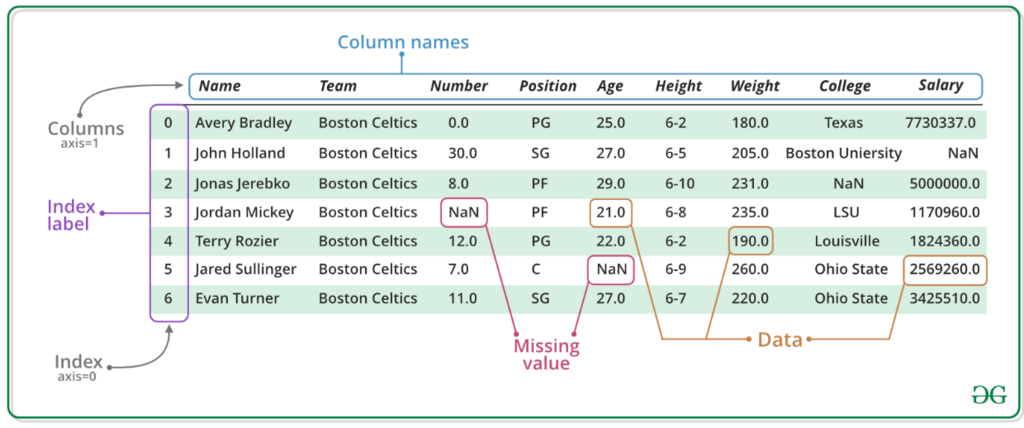
import pandas as pd # 'pd' is the standard alias

# Create a DataFrame from a dictionary
data = {'Name': ['Alice', 'Bob', 'Charlie'],
        'Age': [25, 30, 35]}
df = pd.DataFrame(data)

print(df)
With these basics, you're ready to start handling the kinds of data used in AI projects. Let's review what we've covered.
What is the primary way Python defines code blocks (e.g., the body of a loop or an if statement)?
A developer from a Java background writes the following Python code: String name = "Alex";. What is the result?