AI Automation Fundamentals and Practical Workflows
Automation Architecture Principles
The Brain and the Body
Think of an AI automation not as a single entity, but as a partnership between a brain and a body. The brain is the Large Language Model (LLM), like GPT-4. It does the thinking: it analyzes, decides, summarizes, and classifies. The body is the workflow automation tool, such as Zapier or Make. It does the doing: connecting to other applications and performing physical actions like sending an email, updating a spreadsheet, or creating a calendar event.
This separation is crucial. The LLM doesn't have a direct line to your Google Calendar. Instead, it processes information and hands off a clear instruction, like "Create an event for a project kickoff next Tuesday at 10 AM." The workflow tool takes that instruction and uses its pre-built connections to actually create the event. Decoupling the intelligence (the 'what') from the logic (the 'how') creates systems that are flexible, scalable, and easier to manage.
The Automation Blueprint
Standard automation follows a simple Trigger-Action model. A new email arrives (trigger), and a notification is sent to Slack (action). AI automation introduces a critical middle step: intelligence. The model becomes Trigger-Intelligence-Action.
- Trigger: An event occurs in an application. A customer submits a support ticket, a new lead fills out a form, or a file is added to Dropbox.
- Intelligence: The data from that trigger is sent to an LLM. The AI might classify the support ticket's urgency, summarize the new lead's request, or extract key details from the document.
- Action: The output from the AI—the intelligence—is then used to execute a specific, context-aware action. The urgent ticket is routed to a senior engineer, the lead summary is added to a with a new task, and the extracted document details are logged in a database.
This framework transforms automation from a set of rigid, pre-programmed rules into a dynamic system that can interpret and respond to nuance.
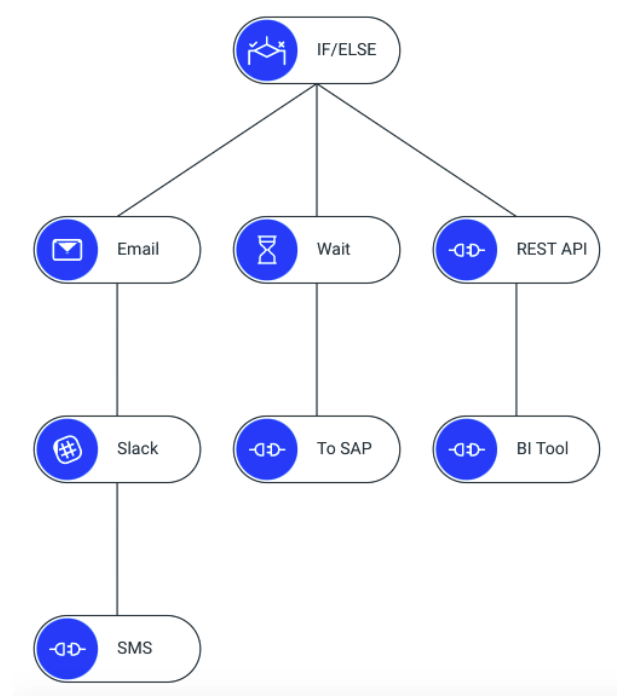
The simplest workflows are linear, following a straight path from A to B to C. A new email triggers a summary which updates a single spreadsheet row. But the real power of AI automation comes from branching logic. Based on the AI's analysis, the workflow can take different paths.
For example, if an email is classified as "Urgent Sales Inquiry," the workflow might create a high-priority task in Asana and send an immediate text alert. If it's classified as "Newsletter Subscription," it simply adds the email to a mailing list in Mailchimp. This decision-making ability allows for far more sophisticated and useful automation.
Managing Data and Memory
As data moves through a workflow, it often needs to be cleaned up or reformatted. This is called data transformation. An AI might output a block of text, but the next step in your workflow requires a specific date format, or for a name to be separated into first and last. Workflow tools have built-in utilities to handle these transformations, ensuring data is in the perfect shape for each subsequent step.
Finally, it's important to understand the difference between stateless and automation runs. A stateless run is a one-off transaction. It receives a trigger, executes its steps, and remembers nothing. Every run is a fresh start. This is perfect for simple tasks like summarizing an article.
A stateful run, however, maintains memory across multiple steps or even multiple runs. It knows what happened before. This is essential for complex processes like onboarding a new employee over several days or managing a multi-step customer support conversation. The system needs to track its 'state'—what's been done and what's next—to function correctly.
In the "brain and body" analogy for AI automation, what does the "brain" represent?
AI automation introduces a middle step to the traditional Trigger-Action model. What is this new model called?