Advanced Wireless Security Auditing
Monitor Mode and Reconnaissance
Listening to the Airwaves
Your wireless network card usually operates in what's called 'managed mode'. This is its everyday setting, where it connects to a specific access point (like your home router) and ignores all the other traffic flying through the air. It's polite, filtering out conversations that aren't meant for it.
For security auditing, we need it to be nosy. We need it to listen to everything. This is where 'monitor mode' comes in. In this mode, the card doesn't connect to any network. Instead, it passively captures all wireless packets within its range, regardless of which network they belong to. It becomes a scanner, giving us a complete picture of the wireless environment.
Managed mode is for participating in a conversation. Monitor mode is for eavesdropping on all conversations in the room.
To switch our wireless interface into monitor mode, we use a tool from the suite called airmon-ng. This utility handles the complex task of talking to the network card's driver and enabling this special promiscuous mode.
First, we check our available wireless interfaces. Then, we use airmon-ng to start a new monitor mode interface. The command will often create a new virtual interface, typically named something like wlan0mon.
# Check for potential conflicts
sudo airmon-ng check kill

# Start monitor mode on the 'wlan0' interface
sudo airmon-ng start wlan0

# Verify the new interface is active
iwconfig
Scanning the Spectrum
With our interface in monitor mode, we can start scanning. The tool for this job is airodump-ng. It listens to the wireless traffic and displays a real-time list of all the networks it detects, along with any clients connected to them.
This process relies on intercepting that access points constantly broadcast. These frames, like beacons and probe responses, are how networks announce their presence and details, such as their BSSID (the MAC address of the access point) and SSID (the network name).
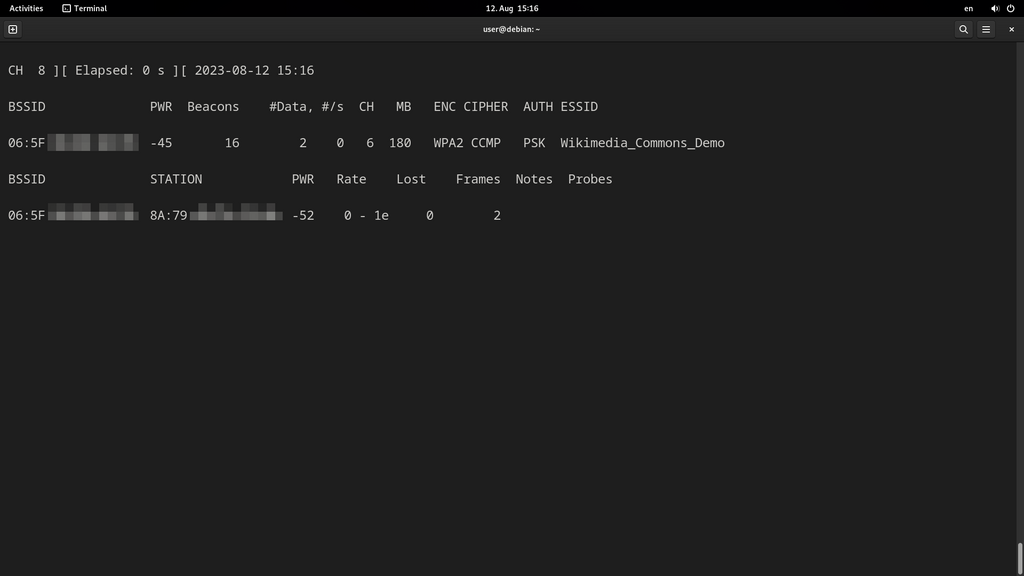
To start a general scan, you simply point airodump-ng at your monitor interface.
# Start scanning on the monitor interface
sudo airodump-ng wlan0mon
The tool will automatically start channel hopping across the 2.4GHz band, and you can specify the 5GHz band if your card supports it. The output shows a list of detected access points (BSSIDs) and, below that, a list of any clients associated with those networks. This gives us a map of the local wireless landscape.
Finding Hidden Targets
Some networks are configured with a 'hidden SSID'. This means the access point doesn't broadcast the network's name in its beacon frames. However, this is a weak form of security. While the beacon might not contain the SSID, the name is still transmitted in other management frames, like probe responses and association requests.
When a legitimate client that knows the hidden SSID wants to connect, it sends out a probe request that contains the network name. airodump-ng will capture this unencrypted request and instantly reveal the 'hidden' name. Alternatively, we can actively speed this up by forcing a client to disconnect and reconnect, which we'll cover later.
A hidden SSID is like having an unlisted phone number. It prevents casual discovery but offers no real protection against a determined attacker.
The final step in this reconnaissance phase is often a packet injection test. This confirms that our setup can not only listen but also transmit custom packets, a crucial capability for more advanced attacks. The aireplay-ng tool can perform this test.
# Test packet injection capabilities
sudo aireplay-ng --test wlan0mon
A successful injection test means your wireless card and its driver are correctly configured for penetration testing. You have now mapped the local attack surface and are ready to move on to assessing specific network vulnerabilities.
Let's check your understanding of these initial steps.
What is the key difference between a wireless card's 'managed mode' and 'monitor mode'?
Which tool from the Aircrack-ng suite is specifically designed to enable monitor mode on a wireless interface?
With the ability to monitor traffic and identify networks, you've completed the first critical phase of any wireless security audit.