Advanced Website Traffic Growth
Advanced Technical Audits
The Deep Technical SEO Audit
You've handled the on-page basics, but now it's time to look under the bonnet. A professional technical SEO audit goes beyond keywords and meta tags. It's about ensuring the very foundation of your website is solid, fast, and perfectly legible to search engines. This is where you find the hidden issues that throttle growth.
Using tools like Screaming Frog, Ahrefs, and Google Search Console, we can perform deep crawls to diagnose the health of a site. This process uncovers critical bottlenecks that, once fixed, can significantly boost organic performance.
You should invest in technical SEO first if issues block crawling, indexing, or site performance.
Mastering Core Web Vitals
User experience is a direct ranking factor. Google quantifies this through its Core Web Vitals, a set of three specific metrics that measure a page's loading performance, interactivity, and visual stability. Getting these right is no longer optional; it's essential for competitive rankings.
These metrics are Largest Contentful Paint (LCP), Interaction to Next Paint (INP), and Cumulative Layout Shift (CLS). Each one gives you a clear target for improving the real-world experience visitors have on your site.
| Metric | What It Measures | Good Score |
|---|---|---|
| LCP | How long it takes for the largest element (image or text block) to load. | Under 2.5 seconds |
| INP | How quickly the page responds to user interactions (clicks, taps). | Under 200 milliseconds |
| CLS | How much the page layout shifts unexpectedly during loading. | Under 0.1 |
To improve your scores:
- For LCP: Compress images, defer non-critical CSS, and use a Content Delivery Network (CDN) to serve assets faster.
- For INP: Break up long JavaScript tasks. Optimise how your site handles clicks and keyboard inputs to provide instant feedback.
- For CLS: Always specify dimensions (width and height attributes) for images and video elements. Reserve space for ads or embeds so they don't push content down as they load.
Winning with Advanced Schema
Schema markup is a form of structured data that acts like a cheat sheet for search engines. By adding it to your HTML, you explicitly tell Google what your content is about. This clarity helps you earn rich results in the search engine results pages (SERPs), making your listings more eye-catching and informative.
<script type="application/ld+json">
{
  "@context": "https://schema.org",
  "@type": "Organization",
  "name": "Your Company Name",
  "url": "https://www.yourwebsite.com",
  "logo": "https://www.yourwebsite.com/logo.png",
  "sameAs": [
    "https://www.facebook.com/yourprofile",
    "https://www.twitter.com/yourprofile"
  ]
}
</script>
The code above is a JSON-LD example for an Organisation. It clearly defines the company's name, URL, and social media profiles for Google. Beyond this, implementing FAQPage schema on pages with questions and answers can generate helpful dropdowns directly in search results. For e-commerce, Product schema can display prices, availability, and review ratings, giving shoppers key information at a glance.
Directing the Crawlers
Search engines don't have unlimited resources. They allocate a finite
crawl budget
noun
The number of pages Googlebot will crawl on a site within a certain timeframe.
For large websites with thousands or millions of pages, managing this budget is critical. You want Google to spend its time crawling your most important content, not wasting it on low-value pages like internal search results, filtered views, or admin logins.
This is where the robots.txt file comes in. It provides directives to crawlers, telling them which parts of your site to ignore.
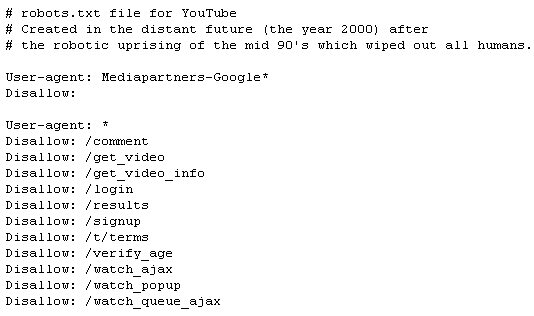
By using the Disallow directive, you can block access to parameter-heavy URLs or non-essential directories, preserving your crawl budget for the pages that actually drive traffic and revenue. A well-tuned robots.txt ensures that your most valuable content gets discovered and indexed promptly.
Fixing Leaks and Dead Ends
Even with a well-managed crawl budget, technical issues can silently undermine your SEO. Two common culprits are canonical loops and orphan pages.
A canonical loop occurs when Page A tells Google it's a copy of Page B, but Page B tells Google it's a copy of Page A. This confuses search engines, and they may end up indexing neither page correctly. A redirect chain is a series of redirects from one page to another. While one redirect is fine, chains of two or more waste crawl budget and can dilute link equity.
Orphan pages are pages that have no internal links pointing to them. Because crawlers navigate a site by following links, orphan pages are often invisible to both search engines and users. A site crawl can identify these pages, which should then be linked from relevant parent or category pages to integrate them into your site architecture.
An ideal site structure is often described as 'flat'. This doesn't mean having thousands of pages in your main navigation. It means ensuring that any page on your site can be reached within a few clicks (ideally 3-4) from the homepage. A logical, shallow structure helps distribute link equity effectively and makes it easier for crawlers to discover all your content.
Now that you can spot these advanced issues, it's time to put your knowledge to the test.
A webpage's content unexpectedly shifts downwards as an advertisement loads. Which Core Web Vital metric would be negatively impacted by this?
What is the primary purpose of implementing schema markup on a website?
By mastering these technical elements, you move from simply doing SEO to architecting a website for peak search performance. It's a continuous process of auditing, refining, and optimising that separates the pros from the amateurs.