Advanced SSH Mastery and Network Security
Key Based Authentication
Beyond Passwords
Password-based authentication has a fundamental weakness: it relies on a secret that must be sent over the network. While SSH encrypts this exchange, the password itself can still be guessed through brute-force attacks or phished from the user. A far more robust method is cryptographic key-based authentication.
This approach uses a key pair: a private key that you keep secret on your local machine, and a public key that you place on the server. When you try to connect, the server uses your public key to issue a cryptographic puzzle, or challenge, that only your private key can solve. This challenge-response mechanism allows you to prove your identity without ever sending your private key across the network. The secret never leaves your computer.
The core principle is proving possession of a secret, not transmitting the secret itself.
Generating Your Keys
The first step is to generate a key pair on your client machine using the ssh-keygen command. You have several cryptographic algorithms to choose from, but the modern standard is Ed25519 due to its excellent security and performance.
# Generate an Ed25519 key pair
# -t specifies the type (algorithm)
# -C adds a comment, usually your email
ssh-keygen -t ed25519 -C "your_email@example.com"
This command will prompt you to choose a file to save the key in (the default ~/.ssh/id_ed25519 is usually fine) and to set a passphrase. We'll discuss passphrases in more detail later.
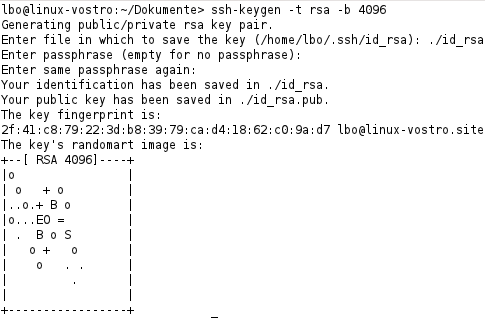
For compatibility with older systems, or if required by organizational policy, you might need to generate an RSA key. For RSA, a key size of at least 2048 bits is recommended, with 4096 being a common choice for stronger security.
# Generate a 4096-bit RSA key pair
# -b specifies the number of bits
ssh-keygen -t rsa -b 4096 -C "your_email@example.com"
So which should you choose? For most modern systems, Ed25519 is the clear winner. ECDSA is another elliptic curve algorithm you might see, but Ed25519 is generally preferred for its simpler and safer implementation.
| Feature | Ed25519 | RSA 4096 |
|---|---|---|
| Security | Excellent, comparable to RSA ~3072 bits | Very strong, but larger key is needed |
| Performance | Very fast for signing and verification | Slower, especially for signing |
| Key Size | Small (68 characters for public key) | Large (700+ characters for public key) |
| Compatibility | Requires OpenSSH 6.5+ (released 2014) | Supported nearly everywhere |
Distributing Your Public Key
Once you have a key pair, you need to copy your public key to the server you want to access. The private key must always remain on your local machine and be kept secret.
The server stores authorized public keys in a specific file within the user's home directory: ~/.ssh/authorized_keys. Each line in this file corresponds to one authorized key.
The easiest and most reliable way to install your public key on a server is with the ssh-copy-id utility. This tool handles creating the ~/.ssh directory and the authorized_keys file with the correct permissions, and it appends your key.
# This command will prompt for your password on the remote server
# just this one time to copy the key.
ssh-copy-id user@remote_host
If you don't have ssh-copy-id, you can do it manually. This command reads your public key file, connects to the server via SSH, and appends the key to the authorized_keys file.
cat ~/.ssh/id_ed25519.pub | ssh user@remote_host "mkdir -p ~/.ssh && chmod 700 ~/.ssh && cat >> ~/.ssh/authorized_keys && chmod 600 ~/.ssh/authorized_keys"
The authorized_keys file has a simple format: each line contains optional settings, the key type (e.g., ssh-ed25519), the base64-encoded key itself, and the comment you added during generation.
Protecting Your Private Key
Your private key is your identity. If it's compromised, an attacker can impersonate you on any system that trusts the corresponding public key. To add another layer of security, you should always protect your private key with a strong passphrase.
A passphrase encrypts the private key file on your disk. Even if someone steals the file, they can't use it without knowing the passphrase. This is critical for protecting against theft of your laptop or a breach of your local machine.
Think of it this way: the key pair proves you have the key, while the passphrase proves you are you when you're about to use the key.
If you ever need to change your passphrase, you can do so without regenerating the entire key pair.
# The -p flag prompts you to change the passphrase
# -f specifies the private key file
ssh-keygen -p -f ~/.ssh/id_ed25519
By moving from passwords to passphrase-protected SSH keys, you significantly harden your systems against unauthorized access. It's a foundational practice for secure systems administration.