Advanced Smartlead Email Strategies
Advanced Smartlead Techniques
Beyond the Basics
You've already mastered the fundamentals. You know how to warm up mailboxes, configure DNS records, and use SPINTAX to vary your messaging. Now, it's time to elevate your strategy from simply sending emails to creating sophisticated outreach systems that generate real conversations and opportunities. This involves fine-tuning every aspect of your Smartlead campaigns, from the technical setup to the psychology of your messaging.
Mastering Deliverability
Getting into the primary inbox is more than just warming up an account. Advanced deliverability requires a proactive approach to managing your sending reputation. Smartlead provides tools to help you maintain a pristine sender score.
First, set up a custom tracking domain. Using Smartlead's default tracking domain links your sender reputation to every other user on the platform. A custom domain isolates your reputation, so your deliverability is only affected by your own actions. This is a non-negotiable step for serious email outreach.
Next, leverage Smartlead's IP rotation and management features if you're operating at a high volume. By rotating through a pool of dedicated IPs, you spread your sending volume and minimize the risk of any single IP getting flagged. Think of it like diversifying an investment portfolio; you don't want all your risk in one place. Regularly monitor the health of your mailboxes within the Smartlead dashboard to catch and address issues like high bounce rates or spam complaints before they escalate.
Isolating your sender reputation with a custom tracking domain is one of the most impactful changes you can make to improve deliverability.
Smart Automation Workflows
Basic email sequences are linear. They send Email A, then Email B, then Email C, regardless of how the prospect interacts. Advanced campaigns are dynamic. They adapt based on the lead's behavior. Smartlead's conditional logic allows you to build these intelligent workflows.
For example, you can create a rule that says IF a lead clicks a specific link in your email (like one to a case study about the manufacturing industry), THEN move them to a new sequence tailored specifically to manufacturing pain points. This ensures your follow-up messages are always relevant.
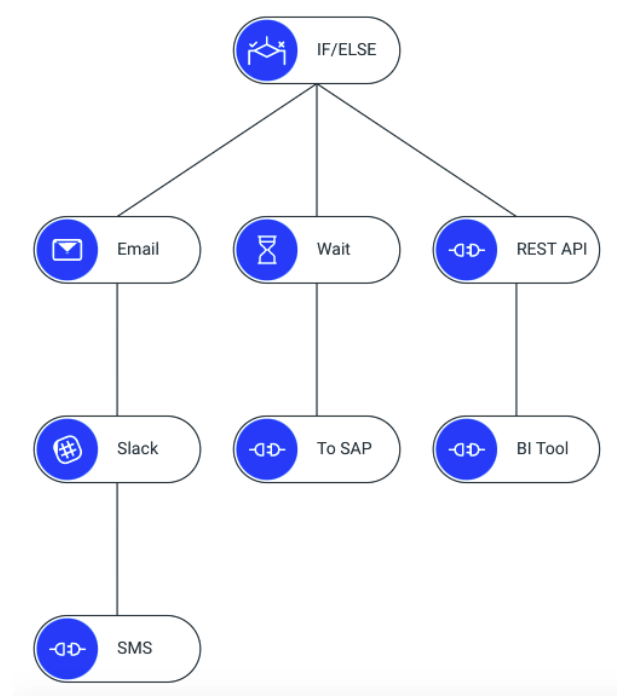
This approach turns your outreach into a conversation that responds to the prospect's interests. You can also set up rules based on replies. If a lead replies with 'not interested,' they can be automatically unsubscribed. If they reply with 'follow up next quarter,' the system can automatically snooze the conversation and restart it in 90 days. This level of automation saves you time and prevents valuable leads from falling through the cracks.
Personalization at Scale
Generic emails get ignored. True personalization goes beyond just using a prospect's name. Smartlead supports advanced conditional logic, often using a syntax similar to Liquid, which allows you to insert entire sentences or paragraphs based on the data you have for a lead.
For instance, if you have a column in your lead list called Industry, you can write a template that shows a different opening line for each industry type. This makes your message hyper-relevant without requiring you to write thousands of unique emails.
Refining subject lines, focusing on value, and using clear CTAs will boost engagement and increase the number of replies, turning cold emails into warm conversations.
Here’s how you could structure a message that adapts based on industry and company size.
Subject: Idea for {{companyName}}

Hi {{firstName}},

{% if industry == 'SaaS' %}
Noticed you're making waves in the competitive SaaS space. Scaling user acquisition is always a top priority.
{% elsif industry == 'Manufacturing' %}
Saw that {{companyName}} is a key player in the manufacturing sector. Optimizing supply chains is crucial right now.
{% else %}
Came across your work at {{companyName}} and was impressed.
{% endif %}

{% if company_size > 200 %}
For larger teams like yours, coordinating projects can be a challenge.
{% endif %}

Our solution helps companies like yours to [Your Value Proposition].

Would you be open to a brief chat next week?

Best,

{{senderName}}
This single template can generate thousands of unique variations, each feeling like it was written specifically for the recipient. The key is having clean, well-structured data in your lead list.
Analyzing and Refining
Smartlead's analytics dashboard is more than a vanity board of open and click rates. Use it to run structured A/B tests to systematically improve your results. Don't just test random ideas. Test specific hypotheses.
Hypothesis: A subject line that mentions the prospect's industry will get a higher open rate than a generic one.
To test this, create two versions of your email in a campaign. Version A has a generic subject line like "Quick Question," while Version B has a dynamic one like "Idea for the {{industry}} space." Smartlead will automatically split your list and show you the results.
| Variation | Subject Line | Sent | Open Rate | Reply Rate |
|---|---|---|---|---|
| A | Quick Question | 500 | 45% | 2.1% |
| B | Idea for the {{industry}} space | 500 | 62% | 4.5% |
In this example, Version B is the clear winner. Now, you can make that your new control and test another variable, like the call-to-action. This process of continuous, data-driven iteration is what separates amateur email marketers from professionals who consistently generate opportunities.
Ready to test your knowledge?
What is the primary reason for setting up a custom tracking domain in an email outreach platform like Smartlead?
In an advanced campaign, a prospect clicks a link to a case study about the healthcare industry. What is the most effective automated action to take using conditional logic?
By applying these advanced techniques, you can transform Smartlead from a simple sending tool into a powerful engine for growth. Focus on deliverability, build intelligent automations, personalize your messages deeply, and let the data guide your refinements.