Advanced SEO Strategy Integration
Technical Site Audits
Mastering Your Crawl Budget
Search engines don't have unlimited time or resources. They allocate a specific amount of processing power to crawl each website, a concept known as This budget is finite. For a small site with a few dozen pages, it’s hardly a concern. But for large e-commerce sites or publishers with thousands of URLs, managing this budget is critical.
Every wasted crawl on a low-value page—like a filtered search result or a printer-friendly version—is a missed opportunity to index or update a more important one. Your goal is to guide search engine bots to your most valuable content and away from the digital clutter. The primary tool for this is the robots.txt file.
A well-configured robots.txt acts as a doorman for web crawlers. You can use it to block access to entire sections of your site or prevent bots from crawling URLs with specific parameters that create duplicate content. For example, you can block all parameter-based URLs that are often used for tracking or sorting.
# robots.txt example for an e-commerce site
User-agent: *

# Block crawlers from faceted navigation and sort parameters
Disallow: /*?sort=
Disallow: /*?price-range=
Disallow: /*?color=

# Block access to internal search result pages
Disallow: /search/

# Allow crawlers to access the XML sitemap
Sitemap: https://www.example.com/sitemap.xml
Diagnosing Health with Status Codes
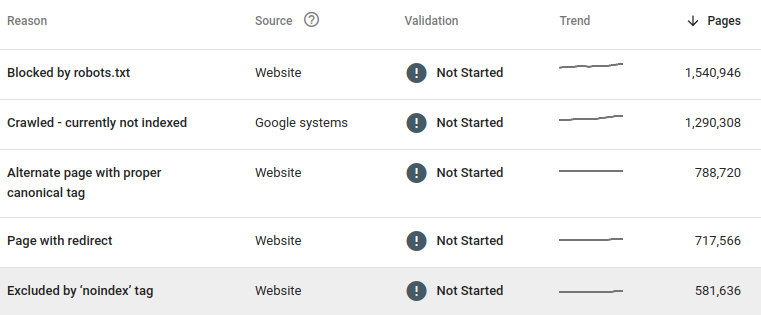
A technical audit goes beyond spotting simple 404 'Not Found' errors. You need to analyse the full spectrum of HTTP status codes to understand how efficiently crawlers and users navigate your site. One of the most common culprits of wasted crawl budget and diluted link equity are redirect chains.
A redirect chain occurs when a URL redirects to another URL, which in turn redirects to a third, and so on. Each 'hop' in the chain wastes a fraction of your crawl budget and can diminish the ranking signals passed to the final destination page.
Similarly, look out for 5xx server errors. While occasional timeouts can happen, a consistent pattern of 5xx errors on certain page types points to underlying infrastructure or code issues that need immediate attention. If Googlebot repeatedly encounters server errors, it may reduce your site's crawl rate.
Core Web Vitals and Mobile Audits
With Google's mobile-first indexing, the performance of your mobile site is paramount. This goes beyond just having a responsive design. Google evaluates the user experience using a set of metrics called which are crucial for ranking.
These vitals measure three aspects of user experience:
- Largest Contentful Paint (LCP): How long it takes for the largest element on the screen to load. Slow LCP is often caused by large, unoptimised images or render-blocking resources.
- Interaction to Next Paint (INP): How quickly your page responds to user interactions, like clicks or taps. High INP is usually due to heavy JavaScript execution that ties up the browser.
- Cumulative Layout Shift (CLS): How much the content unexpectedly moves around as the page loads. This is commonly caused by images, ads, or embeds loading without reserved space.
A technical audit must involve testing your site on a simulated mobile device with a slower network connection. This reveals bottlenecks that might not be apparent on a powerful desktop computer. Your goal is to ensure the mobile experience is not just functional, but fast and smooth.
Optimising for Core Web Vitals isn't just about SEO. It directly improves user satisfaction and can lead to better conversion rates.
Solving Cannibalisation
Content cannibalisation occurs when multiple pages on your site compete for the same keyword. This often happens unintentionally with e-commerce filters or tracking parameters. For instance, these three URLs might show the same content but are seen as separate pages by Google:
example.com/t-shirts/blue-shirtexample.com/t-shirts/blue-shirt?sessionid=123example.com/t-shirts/blue-shirt?source=newsletter
This splits your link equity and confuses search engines about which page to rank. The solution is to use a canonical tag (rel="canonical") to tell search engines which version is the definitive one.
<head>
  <!-- This tag goes on all three example URLs -->
  <link rel="canonical" href="https://example.com/t-shirts/blue-shirt" />
</head>
Tools like are indispensable for finding these issues at scale. You can crawl your entire site and easily filter for URLs that have canonical tags pointing elsewhere, or identify pages that lack a canonical tag entirely. This allows you to spot and fix widespread canonicalisation problems that would be impossible to find manually.
A thorough technical audit is the foundation of any successful SEO strategy. By systematically diagnosing and fixing issues related to crawlability, performance, and indexing, you ensure that your great content has the best possible chance to be seen.
For a large e-commerce site with thousands of product variations, what is the primary concern related to "crawl budget"?
A URL that redirects to a second URL, which in turn redirects to a third, is known as a redirect chain. This practice is problematic for SEO.