Advanced Networking Deep Dive
Network Layer Protocols
The Internet's Postal Service
Think of the Network Layer as the global postal system for the internet. Its main job is to move data from any point A to any point B, even if they are on completely different networks on opposite sides of the world. The core set of rules for this delivery service is the Internet Protocol, or IP.
The Network Layer is like the postal system of the internet—it makes sure each data “letter” gets from your computer to exactly the right computer, even if it has to hop through several routers (post offices).
Just like a letter needs a specific street address to be delivered, every device connected to a network needs a unique identifier. This is its IP address. It’s a numerical label that tells the network exactly where to send information.
Internet Protocol
noun
The principal communications protocol in the Internet protocol suite for relaying datagrams across network boundaries. Its routing function enables internetworking, and essentially establishes the Internet.
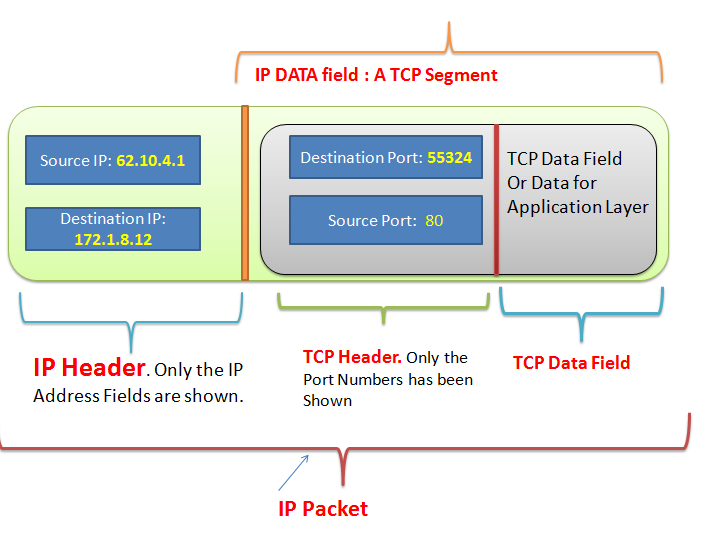
When you send an email or visit a website, your data is broken down into small pieces called packets. The IP wraps each packet in a sort of digital envelope. This envelope, called an IP header, contains crucial information, including the IP address of the sender (you) and the receiver (the website's server). Without these addresses, the packets would be lost.
Slicing the Network Pie
Imagine a large company with thousands of employees in one giant office building. If all mail was just addressed to the building, sorting it would be a nightmare. It's much more efficient to give each department its own suite number.
Subnetting does the same thing for computer networks. It's the process of dividing one large network into smaller, more manageable sub-networks, or subnets. This practice isn't just for tidiness. It helps reduce network traffic, improve performance, and bolster security by containing traffic within a specific area.
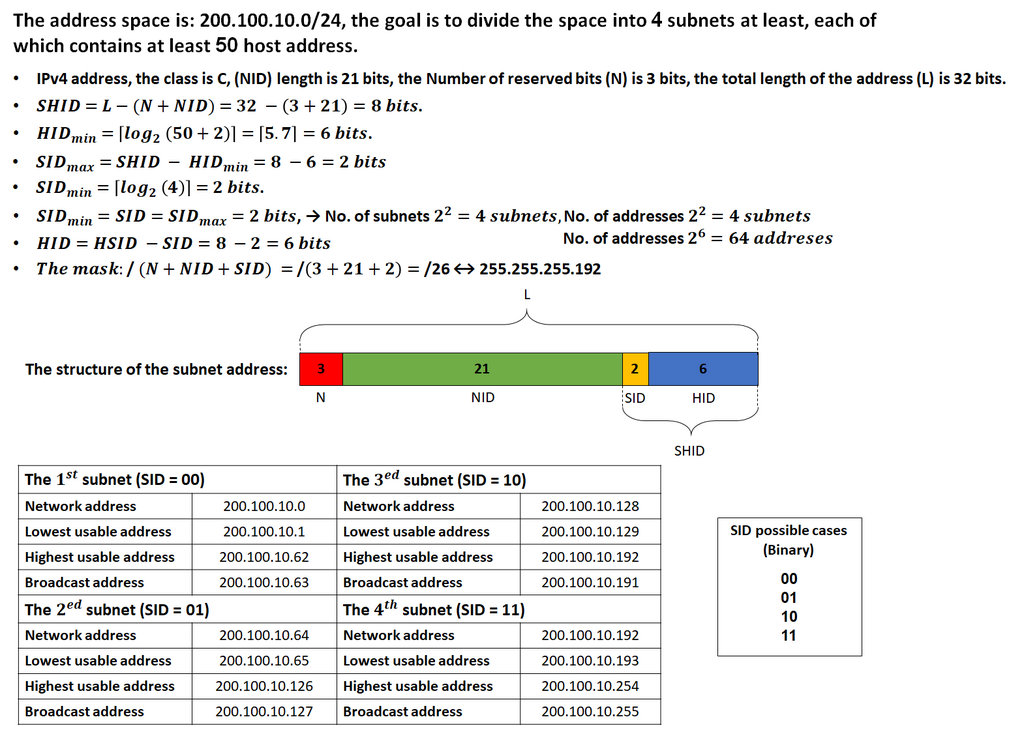
Each subnet acts like its own mini-network. Devices within a subnet can communicate with each other quickly and directly. When a device needs to communicate with another device outside its subnet, it sends the packet to a special gateway that knows how to forward it to the wider world.
The Journey of a Packet
So how does a packet get from your computer to a server halfway across the globe? It doesn't travel on a direct, private road. Instead, it makes a series of hops between specialized devices called routers.
A router is like a traffic cop at a busy intersection. Its job is to look at the destination IP address on each incoming packet and decide the best path to send it on next. It consults a map, called a routing table, to make this decision in a fraction of a second.
This journey isn't instantaneous. The time it takes for a packet to travel from the source to the destination is called latency. It’s the digital equivalent of shipping delay. Latency is affected by the physical distance the data must travel, the number of routers it has to pass through (hops), and the amount of traffic on each network segment. High latency can make video calls choppy or online games feel sluggish because there's a noticeable delay between your action and the response.
Think of latency as the time it takes for a question to travel to someone and for their answer to get back to you. The longer the distance or the more complex the path, the longer you wait for the response.
Routing is the dynamic process of finding and using these paths. Routers are constantly talking to each other, updating their routing tables with information about network traffic, outages, and shortcuts. This allows them to intelligently reroute packets around congested or broken parts of the internet, ensuring your data has the best possible chance of arriving quickly and correctly.
What is the primary function of the Network Layer in internet communication?
In the context of networking, what is a 'packet'?