Advanced Jira Subtask Management
Hierarchy and Trade-offs
Structuring Your Work
A large task on an agile board can feel like a mountain. You know you need to climb it, but the path isn't clear. The first step is always to break it down. But how you break down that work in Jira has major consequences for your team's clarity, workflow, and reporting. It's not just about making smaller pieces; it's about choosing the right tool for the job.
Breaking down big tasks into manageable subtasks makes for easier tracking, and reduces the intimidation that often comes with complex work elements.
In Jira, you have three primary tools for this: checklists, subtasks, and linked issues. Each serves a different purpose. A checklist is a simple to-do list within an issue. A subtask is a full-fledged child issue nested under a parent. A linked issue connects two separate issues, establishing a relationship like "blocks" or "is related to."
Choosing the right structure is a strategic decision that separates a clean, efficient project from a chaotic one.
Subtask vs. Checklist
The most common decision is whether a small piece of work warrants a full subtask or just a checklist item. The answer depends on the required level of detail and accountability.
Checklists are best for simple verification steps that don't need their own workflow or assignee. Think of them as a private to-do list for the person assigned to the parent issue. They're perfect for ensuring small, necessary steps aren't forgotten, like "Confirm API key is stored securely" or "Proofread documentation." They don't clutter the board and keep the focus on the main task.
Subtasks, on the other hand, are distinct units of work. A subtask is the right choice when a piece of work needs to be assigned to a specific person (who might be different from the parent issue's assignee), tracked through its own workflow (e.g., To Do, In Progress, In Review), or have time logged against it. They are, in essence, smaller tickets that roll up into a larger parent story or task.
When done right, subtasks don’t cause chaos on a Jira board – they actually play a crucial role in creating a clear path to the finish line.
The key is to define a granular for your team. If a developer needs to build the front-end component and another needs to create the back-end API endpoint for a single user story, those are two distinct units of work. They should be subtasks. This allows each developer to manage their own progress and makes the overall status of the parent story transparent to everyone.
However, this power comes with a risk: . Creating too many subtasks for minuscule steps clutters the board, complicates reports, and creates unnecessary administrative overhead. If a subtask can't live on its own with a clear owner and purpose, it might be better as a checklist item.
| Feature | Checklist | Subtask |
|---|---|---|
| Assignee | No (belongs to parent assignee) | Yes (can have a different assignee) |
| Workflow | No (simple checkbox) | Yes (e.g., To Do, In Progress, Done) |
| Time Tracking | No | Yes |
| Board Visibility | No (only visible inside the issue) | Yes (can appear on the board) |
| Use Case | Simple verification steps | Definable piece of work needing tracking |
Subtasks vs. Linked Issues
The distinction between a subtask and a linked issue is about hierarchy versus relationship. A subtask is a part of its parent. It cannot exist without it. The parent issue is only complete when all its subtasks are complete. This creates a tight, parent-child structural integrity.
Linked issues, however, are peers. They are separate, independent issues that have a relationship. The most common link types are:
- Blocks / Is Blocked By: This is for dependencies. Task A cannot start until Task B is finished.
- Relates to: This connects issues that are related but don't have a strict dependency.
- Duplicates / Is Duplicated By: This cleans up the backlog by linking redundant reports of the same issue.
Use subtasks when you are breaking one task into smaller pieces. Use linked issues when you are showing the relationship between two separate, independent tasks, especially when they might be in different projects or managed by different teams.
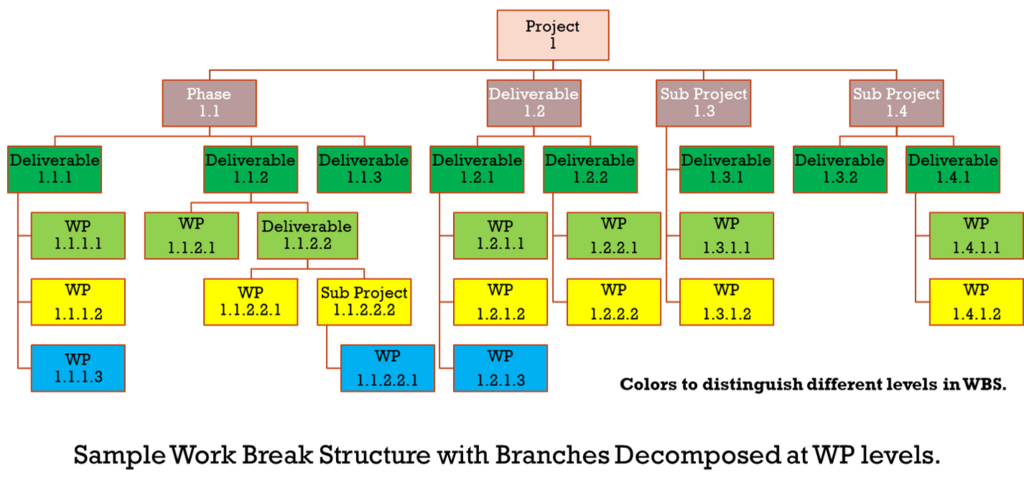
Maintaining this structural integrity is crucial. The state of the parent issue should always reflect the reality of its children. Many teams configure their Jira workflows to prevent a parent issue from being moved to "Done" if any of its subtasks are still open. This enforces a clear at the parent level and ensures nothing slips through the cracks.
By thoughtfully choosing between checklists, subtasks, and linked issues, you create a project structure that provides clarity, not clutter. It empowers your team to see both the big picture and the immediate next step, paving a clear path to the finish line.
Your team is building a new feature that requires both a front-end change and a back-end API change. These two pieces of work can be done by different developers and need to be tracked separately. How should you structure this work in Jira?
A __________ is a simple, private to-do list within a Jira issue, best used for small verification steps that don't need a separate owner or workflow.