Advanced Data Entry Techniques
Advanced Data Entry Techniques
Building a Smarter Entry System
Moving beyond simply typing data into a form, advanced techniques focus on creating systems that prevent errors before they happen. Instead of just correcting mistakes, we can design workflows that make them less likely in the first place. These methods improve both the speed and, more importantly, the accuracy of your data.
One of the oldest and most effective methods for ensuring accuracy is double data entry. It’s a simple concept: two different people enter the same set of data from the same source document. A computer program then compares the two entries. Any differences are flagged for a supervisor to review and correct. This method significantly reduces the chance of a typo slipping through, as it's highly unlikely that two people would make the exact same mistake.
Preventing Errors at the Source
A powerful way to maintain data integrity is to control how information is entered. Instead of allowing free-form text entry for everything, we can use structured input fields. These guide the user to provide data in a consistent, clean format.
For example, using a drop-down menu for a list of states ensures that no one can misspell "California" or enter "Cali." Checkboxes are perfect for simple yes/no questions, eliminating variations like "Y," "Yes," or "true." These small design choices make a huge difference in data quality by removing ambiguity.
Real-time validation takes this a step further. As you enter data, the system instantly checks if it meets certain criteria. If you type an email address without an "@" symbol, a red box might immediately appear, alerting you to the error. This instant feedback loop allows for immediate correction, rather than discovering a batch of errors long after the data has been entered.
Automating the Process
For high-volume tasks, manual entry isn't always practical. Automation technologies can handle repetitive work with speed and precision, freeing up humans to focus on more complex tasks.
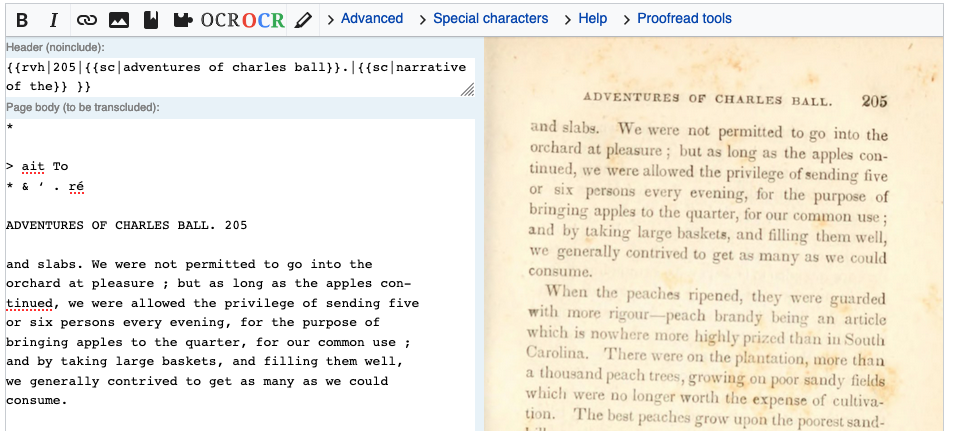
OCR
noun
Stands for Optical Character Recognition. It's a technology that converts different types of documents, such as scanned paper documents, PDF files or images captured by a digital camera, into editable and searchable data.
Imagine you have a stack of 1,000 paper invoices. Instead of typing out each line item, you could scan them. OCR software would then "read" the images and extract the text, populating a spreadsheet automatically. While it's not perfect—it can struggle with messy handwriting or poor-quality images—it dramatically accelerates the process of digitizing physical documents.
Robotic Process Automation, or RPA, takes automation to the next level. RPA involves configuring software "bots" to perform the same actions a human would on a computer. An RPA bot can be taught to open an application, log in, navigate menus, copy data from one system, and paste it into another. It's ideal for structured, rule-based, repetitive tasks that don't require human judgment.
Increased Efficiency: Automation tools perform repetitive tasks with consistent precision, reducing the likelihood of errors and the need for manual labor.
These advanced methods, from smart design to full automation, transform data entry from a tedious chore into a highly efficient and accurate process.
What is the primary goal of advanced data entry techniques like using drop-down menus and checkboxes?
Which technology is best suited for automating the task of copying data from a spreadsheet and pasting it into a separate web application's login form?