Advanced Color Grading Workflows for Cinematography
Advanced Color Management
Consistent Color on Any Screen
In a professional production, video footage passes through many hands and appears on many screens. From the camera on set, to the editor's suite, to the visual effects artist's workstation, and finally to the colorist's calibrated monitor. How do you ensure the colors look the same at every stage?
The answer is a Color Management System (CMS). Think of a CMS as a set of rules and translations for color. It acts like a universal translator, ensuring that a specific color value looks the same regardless of the device it's viewed on. It keeps everyone on the same page, preventing a shot that looked perfect in the editing bay from appearing washed out or overly saturated on a different display.
A CMS uses profiles for each device (camera, monitor, projector) to understand its specific color capabilities and limitations. It then intelligently converts colors between these profiles to maintain the director's creative intent.
Using Look-Up Tables
A Look-Up Table, or LUT, is a core component of modern color workflows. At its simplest, a LUT is a preset that transforms color values. It takes an input color and maps it to a specific output color according to a predefined table. LUTs fall into two main categories.
By utilizing LUTs in your color grading process, you can achieve a consistent look across your footage, save time, and establish a signature style for your video projects.
Technical LUTs are for conversion. Cameras often shoot in a "flat" or logarithmic (Log) format to capture the maximum amount of dynamic range. This footage looks gray and washed out. A technical LUT converts this Log footage into a standard viewing color space, like Rec. 709 (the standard for HD television), so it looks normal on a monitor.
Creative LUTs, also called "look" LUTs, are for style. These apply a specific aesthetic to the footage, like the teal-and-orange look popular in action films or a warm, nostalgic vibe for a period piece. They are applied after the initial technical conversion to shape the mood and tone.
Standardizing Corrections
While LUTs are great for applying complex looks, sometimes you just need to share simple, primary color adjustments. This is where the American Society of Cinematographers Color Decision List (ASC CDL) comes in. It's a standardized format for communicating basic color correction information between different software and devices.
The ASC CDL breaks down color adjustments into three simple mathematical operations: Slope, Offset, and Power. These controls correspond roughly to gain/contrast, lift/brightness, and gamma/mid-tones, respectively. It also includes a saturation control.
Because it's just a small set of numbers, a CDL can be easily embedded in a file or sent in an email. This allows a director on set to make a basic color decision with the cinematographer, and that exact same basic grade can be applied automatically in the editing suite and later serve as a starting point for the final colorist.
Managing Color Spaces
A color space defines the specific range of colors—the gamut—that can be represented in an image or on a device. Think of it like a box of crayons. The sRGB color space, common for websites and consumer monitors, is like a small 8-crayon box. A wider gamut space like DCI-P3, used for digital cinema, might be a 64-crayon box. A very wide space like Rec. 2020, used for UHD television, is the giant 120-crayon box with every shade imaginable.
Properly managing these spaces is crucial. If you edit footage captured in a wide gamut on a standard monitor without color management, the colors will look incorrect and compressed. Your CMS is responsible for handling these translations, using a working color space that is large enough to contain all the colors from the source footage, and then correctly transforming it to the smaller color space of the final delivery format (e.g., sRGB for the web or Rec. 709 for broadcast).
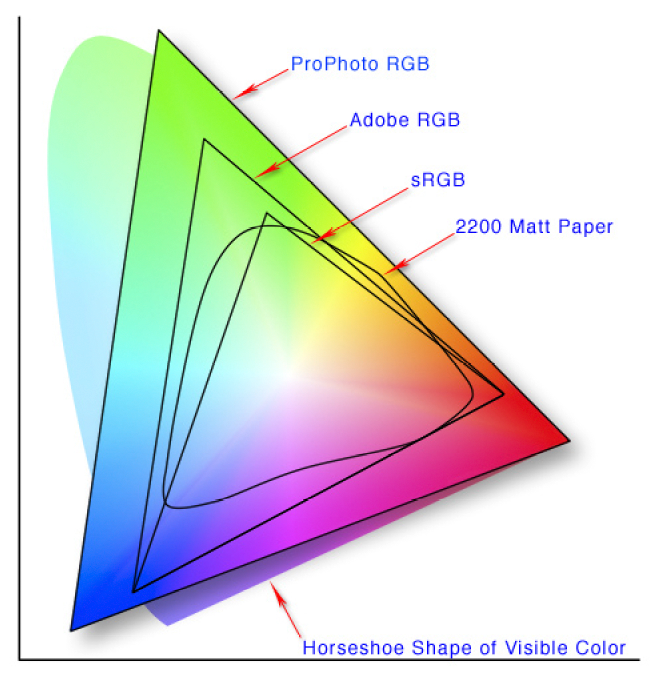
The goal is to preserve the original creative intent, ensuring that the vibrant red of a costume looks the way it's supposed to, whether viewed in a movie theater or on a smartphone.
Ready to test your knowledge on advanced color management?
What is the primary function of a Color Management System (CMS) in a video production workflow?
An editor receives footage shot in a flat, logarithmic (Log) profile. To make it viewable with normal contrast and saturation on a standard Rec. 709 monitor, what should they apply first?
By mastering these tools—CMS, LUTs, ASC CDL, and color space management—you can maintain creative control and technical accuracy throughout the entire post-production pipeline.