Advanced C# Programming
Asynchronous Programming
Keeping Your App Responsive
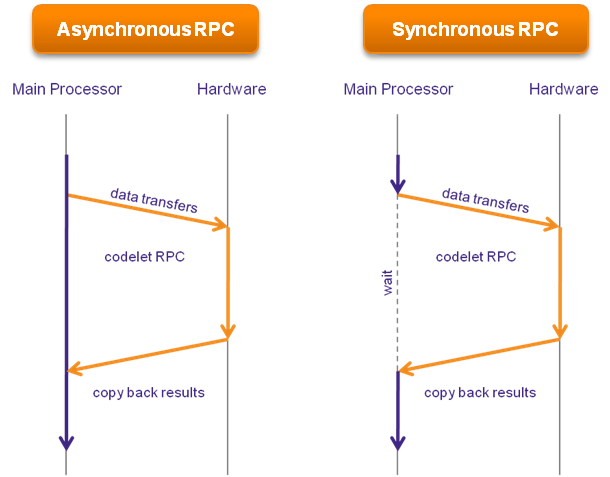
Imagine you're making breakfast. You put toast in the toaster and decide to wait for it to pop before you do anything else. You just stand there, staring at the toaster. The coffee isn't brewing, the eggs aren't cracked. Nothing happens until the toast is done. This is synchronous, or blocking, programming. One task must finish completely before the next one starts.
Now, imagine you put the toast in and then start the coffee maker. While both are running, you get the eggs and pan ready. You're working on other things while waiting for the long-running tasks (toasting, brewing) to finish. This is asynchronous programming. It allows an application to start a potentially long-running task—like downloading a file from the internet or querying a database—and continue doing other work in the meantime.
In C#, asynchronous programming keeps your application's user interface (UI) from freezing. While waiting for a network request, the user can still click buttons and interact with the app.
The async and await Keywords
C# makes asynchronous programming straightforward with two keywords: async and await.
| Keyword | Purpose |
|---|---|
async | A modifier you add to a method signature. It tells the compiler that this method might contain an await expression. It doesn't change how the method is called, but it enables the magic of await inside it. |
await | An operator that is applied to a task. It tells the program to pause the execution of the current method until the awaited task is complete. Crucially, it returns control to the caller, freeing up the thread to do other work. |
Let's look at an example. Here’s a method that simulates downloading a file synchronously. If this were a UI application, the entire app would freeze for 3 seconds.
public string DownloadFile()
{
    Console.WriteLine("Starting file download...");
    // Simulate a 3-second network delay
    Thread.Sleep(3000);
    string fileContent = "This is the file content.";
    Console.WriteLine("File download complete.");
    return fileContent;
}
Now, let's make it asynchronous using async and await. Notice the changes: the method is marked async, it returns a Task<string>, and we await an asynchronous delay instead of using Thread.Sleep().
public async Task<string> DownloadFileAsync()
{
    Console.WriteLine("Starting file download...");
    // Asynchronously wait for 3 seconds without blocking
    await Task.Delay(3000);
    string fileContent = "This is the file content.";
    Console.WriteLine("File download complete.");
    return fileContent;
}
When the await Task.Delay(3000); line is hit, the method pauses and control is returned to whatever called DownloadFileAsync. The thread is now free. After 3 seconds, the method resumes where it left off, and the rest of the code executes.
The Task Parallel Library
The await keyword operates on something called a Task. A Task is an object from the Task Parallel Library (TPL) that represents an asynchronous operation. It's a promise that work is being done and will eventually complete.
There are two main types of tasks:
Task: Represents an operation that does not return a value.Task<TResult>: Represents an operation that returns a value of typeTResult. In our example,DownloadFileAsyncreturned aTask<string>, promising astringresult upon completion.
Most modern I/O operations in .NET (like reading files, making web requests, or database queries) have asynchronous versions that return a Task. You'll often see them with an Async suffix, like HttpClient.GetStringAsync() or StreamReader.ReadToEndAsync().
Handling Errors and Best Practices
What happens if an asynchronous operation fails? The exception handling is surprisingly simple. An exception thrown inside an awaited Task is re-thrown at the point where it is awaited. This means you can wrap your await calls in a standard try-catch block.
public async Task ProcessDataAsync()
{
    try
    {
        var data = await FetchDataFromApiAsync();
        Console.WriteLine("Data fetched successfully!");
    }
    catch (HttpRequestException ex)
    {
        Console.WriteLine($"Error fetching data: {ex.Message}");
    }
}
To write robust asynchronous code, keep a few best practices in mind.
Use "async all the way up." If you call an asynchronous method, the method you're in should also be
asyncso you canawaitthe result. Chainingasynccalls up through your application's call stack is the standard pattern.
Avoid
async void. Anasyncmethod should returnTaskorTask<TResult>.async voidmethods cannot be awaited, which makes it very difficult for the calling code to know when they've completed or to handle exceptions that occur within them. The only legitimate use forasync voidis for event handlers, like a button click method in a UI.
Following these patterns helps you build applications that are fast, responsive, and reliable, handling long-running operations without sacrificing the user experience.
Based on the "breakfast analogy," which statement best describes synchronous programming?
What is the primary role of the await keyword in an async method?