Active Directory Replication Essentials
Active Directory Basics
The Network's Directory
Imagine a large company with thousands of employees, computers, and printers. How do you keep track of everything? How do you ensure that only the right people can access sensitive files? That's where Active Directory (AD) comes in. It's a directory service created by Microsoft for Windows domain networks.
Active Directory (AD) is the default security management system for Windows domain networks.
Think of it as a massive, digital address book for the entire network. It stores information about all network objects—users, groups, computers, printers, and more—in a structured, accessible database. Its main job is to manage these resources and control who can access what.
The Logical Structure
Active Directory organizes resources in a logical hierarchy. This structure helps administrators manage the network efficiently, no matter how large or complex it gets. The fundamental building blocks are domains, trees, and forests.
Domain
noun
A core administrative boundary in an Active Directory network. It groups together users, computers, and other objects that are subject to a common set of rules and policies.
A domain is the starting point. For example, a company might have a domain called ourcompany.com. All the users and computers within that company would belong to this domain.
When you have multiple domains that share a common namespace, like sales.ourcompany.com and research.ourcompany.com, they can be linked together to form a tree.
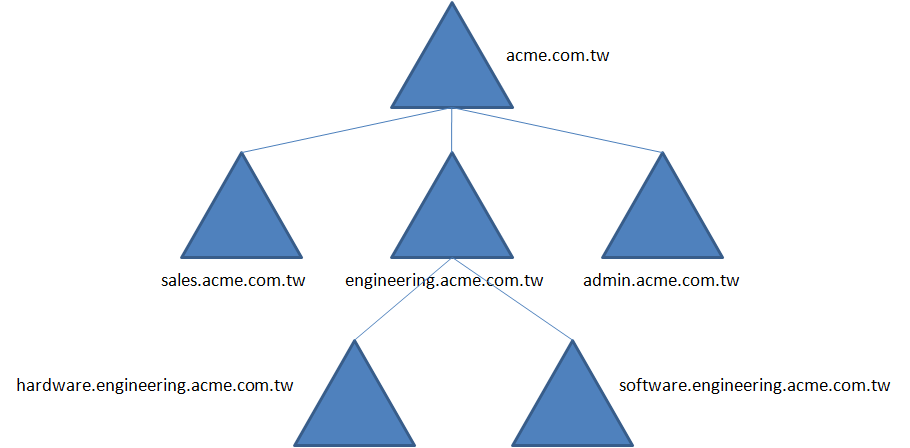
But what if two separate companies, each with its own AD tree, merge? Or what if a single corporation wants to maintain separate namespaces for different divisions? In that case, you can link multiple trees together to create a forest. A forest is the highest-level container in Active Directory. All domains within a forest trust each other, allowing users in one domain to access resources in another, if given permission.
Inside a domain, you can further organize objects using Organizational Units (OUs). OUs are containers used to group users, computers, and other OUs. They make it much easier to apply specific policies or delegate administrative tasks. For example, you could create an OU for the Marketing department to manage all its users and computers separately from the Engineering department.
A well-organized OU structure is like having well-labeled folders in a filing cabinet. It simplifies administration and helps you find what you need quickly.
The Domain Controller
So, where is all this information stored? The entire Active Directory database lives on servers called Domain Controllers (DCs). A domain controller is a server that responds to security authentication requests, like logging in, and it enforces security policies for the domain.
| Key Responsibilities of a Domain Controller | Description |
|---|---|
| Authentication | Verifies user identities when they log in to the network. |
| Authorization | Confirms a user's permissions to access resources. |
| Policy Enforcement | Applies security policies, like password complexity rules. |
| Database Storage | Holds a copy of the Active Directory database for its domain. |
Every domain must have at least one domain controller, but for reliability, most networks have two or more. If one DC goes offline, the others can continue to handle authentication requests, ensuring the network stays up and running. These DCs regularly communicate with each other to keep their copies of the directory database synchronized.
Let's review these core concepts before moving on.
Now, test your knowledge of these fundamental building blocks.
What is the primary function of Active Directory?
A company has two separate business units, legal.corp.com and finance.corp.com. Both are part of the corp.com namespace. What Active Directory structure do these domains form?
Understanding these components—domains, trees, forests, OUs, and domain controllers—is the first step to mastering how Active Directory works. They form the foundation upon which all other AD services and features are built.