A/B Testing in Big Tech
Introduction to A/B Testing
What is A/B Testing?
A/B testing is a straightforward way to compare two versions of something to see which one performs better. It’s like a science experiment for your website, app, or marketing email. You show one version (version A, the control) to one group of users, and a second version (version B, the variation) to another group. Then you measure which version was more effective at achieving a specific goal.
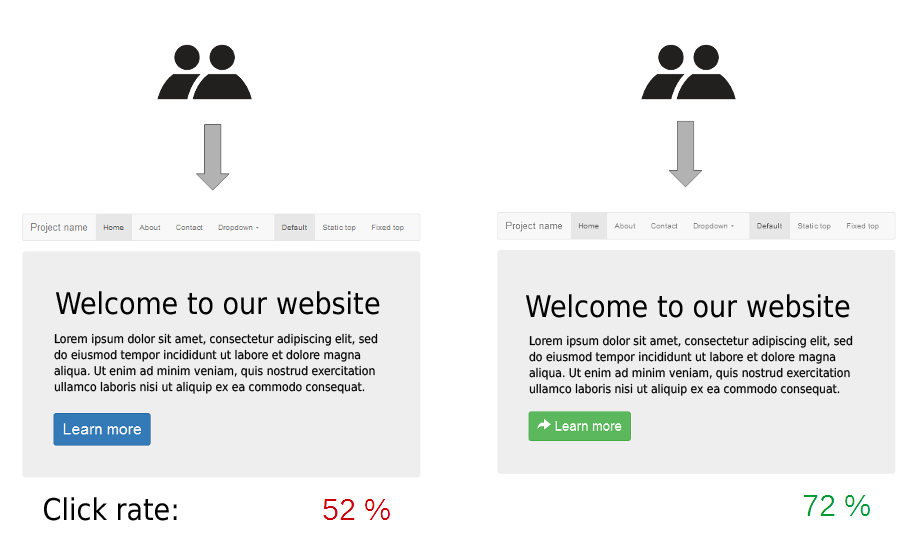
Imagine you run an online store and want more people to click the "Buy Now" button. You suspect the button's color might make a difference. Your current button is blue (Version A), but you have a hunch that a green one (Version B) might work better.
Instead of just guessing, you can run an A/B test. You randomly show half of your website visitors the blue button and the other half the green one. After a while, you compare the data. If the green button received significantly more clicks, you have evidence that it's the better choice.
The core purpose of A/B testing is to make decisions based on data, not just on intuition or opinions.
The Testing Process
A well-structured A/B test follows a clear process. This ensures that the results are reliable and you can be confident in the decisions you make based on them. It generally breaks down into three main stages.
1. Formulate a Hypothesis
Every test starts with a hypothesis. This is an educated guess about a change you could make and the impact you expect it to have. A good hypothesis is specific and measurable.
It often follows a simple structure: "If we change [independent variable], then [dependent variable] will increase/decrease because [rationale]."
For our button color example, a clear hypothesis would be:
*"If we change the 'Buy Now' button color from blue to green, then the click-through rate will increase because green is more commonly associated with 'go' and positive action."
When running A/B tests, it's important to focus on one specific change at a time.
Testing one change at a time, like the button color, helps you know exactly what caused the change in user behavior. If you changed the color, the text, and the button's position all at once, you wouldn't know which change made the difference.
2. Randomize and Run the Test
Once you have your hypothesis, you need to show the two versions to users. The key here is randomization. Users should be randomly assigned to see either Version A or Version B. This prevents bias from creeping into your results and ensures that both groups are, on average, alike.
For example, you wouldn't want to show Version A only to mobile users and Version B only to desktop users, because their behavior might naturally be different. A random split ensures a fair comparison.
You then let the test run long enough to collect enough data to make a reliable decision. How long depends on how much traffic your site gets. You need a large enough sample size to be confident that the results aren't just a fluke.
3. Analyze the Results
After the test concludes, it's time to look at the numbers. Which version won? Did the green button get more clicks than the blue one?
More importantly, is the difference statistically significant? This is a way of saying you're confident the result is real and not just due to random chance. If your variation is a clear winner, the next step is to implement the change for all users. If it performed worse or about the same, you've still learned something valuable and can stick with the original version.
Sometimes a test is inconclusive, and that’s okay too. Every test, regardless of the outcome, provides an insight into user behavior. This knowledge is crucial for making smarter product decisions and continuously improving the user experience.
What is the primary purpose of A/B testing?
Why is it crucial to randomly assign users to either Version A or Version B?
This process of hypothesizing, testing, and analyzing is what makes A/B testing a powerful tool in product development. It replaces guesswork with a systematic approach to improvement.