TypeScript Visual Architecture and Advanced Patterns
Compiler Lifecycle Mechanics
The Compiler's Journey
When you run the TypeScript compiler, tsc, you kick off a sophisticated, multi-stage pipeline. Your code, which starts as a simple string of text, is transformed step-by-step into a structured, validated program before finally being converted into JavaScript that can run in a browser or on a server.
This process isn't magic. It's a series of distinct phases, each with a specific job: Parsing, Binding, Checking, and Emitting. Understanding this flow provides a powerful mental model for how TypeScript catches errors and how your editor provides real-time feedback.
From Text to Tree
The first step is parsing. The parser takes your raw TypeScript code and breaks it down into a meaningful structure. It doesn't understand types or logic yet; its only goal is to verify that the syntax is correct and to build a tree-like representation of the code's structure.
This structure is called an (AST). Every element of your code—a variable declaration, a function call, an if statement—becomes a node in this tree. The tree captures the grammatical relationships between all the pieces of your program, turning a flat string of text into a hierarchical model that the compiler can analyze.
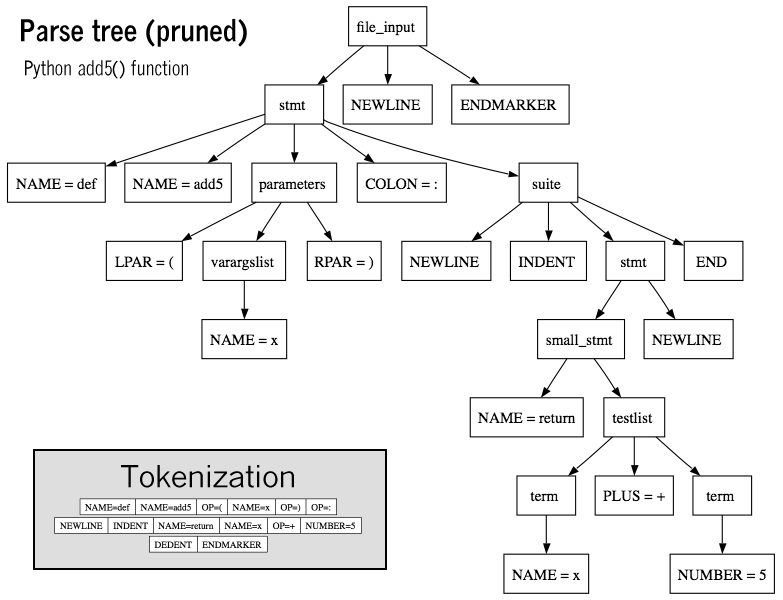
This tree is the foundation for everything that follows. Once the AST is built, the compiler can move on to the next stage: connecting the dots.
Linking Declarations
With the AST in hand, the gets to work. Its job is to walk the tree and create a mapping between identifiers (like variable and function names) and their original declarations. It builds what's known as a Symbol Table.
Think of a Symbol as an object that contains all the information about a declared entity: its name, where it was declared, and what modifiers it has (like export or const). The Binder establishes these connections, so when the compiler later sees a variable being used, it knows exactly which declaration it refers to. This is crucial for understanding scope—knowing that a variable x inside a function is different from a variable x outside of it.
Once the Binder has linked all the identifiers to their declarations, the real heavy lifting can begin. This is the domain of the Checker.
The Heart of Type Checking
The Checker is the core of TypeScript's value proposition. It traverses the AST, using the Symbol Table created by the Binder, to perform type inference and validation. This is where your code's logic is actually understood and checked for correctness against TypeScript's rules.
When you assign a string to a variable expected to be a number, the Checker is what catches it. It looks at an expression, infers its type, and compares it to the type of the location where it's being used. If they don't match, it generates a diagnostic—the error message you see in your terminal or IDE.
The constant feedback loop you experience while coding—the red squiggles, the hover-over type information—is powered directly by the Checker.
function greet(name: string) {
  console.log(`Hello, ${name.toUpperCase()}!`);
}

greet(42); // Type error!
In this example, the Checker sees the call to greet. It looks up the greet symbol to find its declaration and sees the name parameter is annotated as string. Then, it checks the argument, 42, and infers its type as number. Since number is not assignable to string, it flags an error.
Generating the Output
After the Checker has validated the entire program and found no errors, the final stage is the Emitter. Its task is to take the validated AST and generate the final output files.
This usually includes two main artifacts:
- JavaScript Files (
.js): The Emitter transforms the TypeScript-specific syntax (like type annotations and interfaces) into standard JavaScript code. It removes the types, transpiles features like enums, and produces code that can be executed by a JavaScript runtime. - Declaration Files (
.d.ts): If configured, the Emitter also generates which contain only the type information for your code. These files allow other TypeScript projects to use your library and get full type-checking and autocompletion without needing your original source code.
From a simple text file to executable JavaScript, the compiler's pipeline is a well-defined process of structuring, understanding, validating, and finally, transforming your code.