SQL Subquery Selection
SQL Basics
What is SQL?
SQL, which stands for Structured Query Language, is the language used to communicate with databases. Think of a database as a massive, highly organized library, and SQL is the specific language you must use to ask the librarian (the database management system) to find, add, or update books for you.
SQL (Structured Query Language) is a standard programming language used for managing and manipulating relational databases.
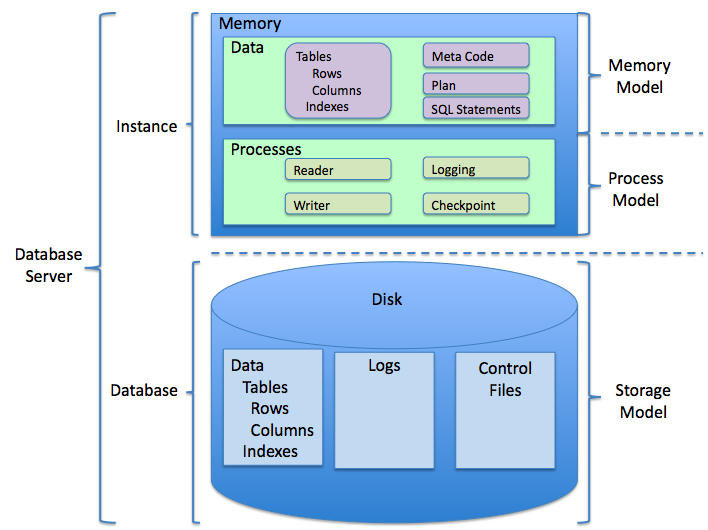
Specifically, SQL works with relational databases. These databases store information in tables, which are a lot like spreadsheets. Each table has rows and columns. For example, you might have a Customers table where each row is a different customer and the columns are Name, Email, and City.
Asking for Data with SELECT
The most common task in SQL is retrieving data. For this, we use the SELECT statement. It tells the database exactly which columns of information you want and which table to get them from.
The basic structure looks like this: SELECT column_name FROM table_name;.
SELECT Name, City
FROM Customers;
This query asks for the Name and City columns from the Customers table. The semicolon at the end marks the end of the statement, which is a good practice.
If you want to see all the columns in a table without listing them one by one, you can use an asterisk * as a shortcut.
SELECT *
FROM Customers;
This command fetches every piece of information for all customers in the table.
Filtering with WHERE
You rarely need every single row from a table. Usually, you're looking for something specific. The WHERE clause lets you filter the data and pull only the rows that match a certain condition.
Let's say we only want to see customers who live in London. We add a WHERE clause to our SELECT statement.
SELECT Name, Email
FROM Customers
WHERE City = 'London';
Notice that text values like 'London' must be enclosed in single quotes.
The WHERE clause also works with numbers. You can use operators like = (equal to), > (greater than), < (less than), and <> (not equal to). Imagine we have a Products table and want to find all products that cost more than $50.
SELECT ProductName, Price
FROM Products
WHERE Price > 50;
Sorting with ORDER BY
By default, a database returns data in whatever order it finds convenient, which often isn't very useful. The ORDER BY clause allows you to sort your results.
You can sort in ascending order (A to Z, 1 to 100) using ASC or in descending order (Z to A, 100 to 1) using DESC. Ascending is the default, so you can leave ASC off if you want.
-- Sort customers alphabetically by name
SELECT Name, City
FROM Customers
ORDER BY Name ASC;
Now let's find our most expensive products and list them from highest price to lowest.
-- Sort products by price, from most to least expensive
SELECT ProductName, Price
FROM Products
ORDER BY Price DESC;
These three components—SELECT, WHERE, and ORDER BY—are the building blocks of most SQL queries. You can even combine them all into a single, more powerful query. For example, we could find all customers in London and sort them by name.
SELECT Name, Email
FROM Customers
WHERE City = 'London'
ORDER BY Name;
This query first filters the Customers table to find only the rows where City is 'London', and then it sorts those results alphabetically by Name before showing them to you.
Time to check your understanding of these fundamental commands.
What is the primary function of the SQL SELECT statement?
To retrieve all columns from a table named Products without listing each column individually, which query would you use?