SQL Proficiency Masterclass
Introduction to SQL
What Is SQL?
SQL, which stands for Structured Query Language, is the language used to communicate with a specific type of database called a relational database. Think of it like a translator. If a database holds a massive library of organized information, SQL is the language you use to ask the librarian to find, add, or update a book.
SQL, or Structured Query Language, is a programming language that allows users to interact with and manipulate databases.
Databases store everything from user profiles on a social media site to inventory levels for an online store. SQL allows developers and data analysts to write commands, called queries, to interact with that data. You can ask the database to retrieve specific pieces of information, add new entries, change existing ones, or remove old data.
Organizing Data the Relational Way
SQL works with relational databases. These databases organize information into a collection of tables, much like spreadsheets in an Excel file. Each table is designed to hold information about a specific type of thing, like 'Customers' or 'Products'.
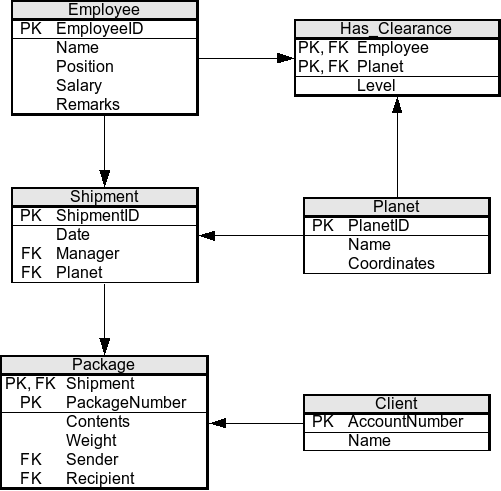
Within each table, the data is structured into columns and rows.
-
Columns represent the different attributes or characteristics of the data. For a 'Customers' table, columns might include 'CustomerID', 'FirstName', 'LastName', and 'EmailAddress'. Each column has a specific data type, like text, number, or date.
-
Rows represent individual records. Each row in the 'Customers' table would contain the information for a single customer, filling in the details for each column.
| CustomerID | FirstName | LastName | EmailAddress |
|---|---|---|---|
| 101 | Maria | Anders | maria.a@email.com |
| 102 | Ana | Trujillo | ana.t@email.com |
| 103 | Antonio | Moreno | antonio.m@email.com |
The “relational” part comes from the ability to link, or relate, data from different tables. For example, you could have another table for 'Orders' and link each order to a specific customer using the 'CustomerID'. This structure avoids duplicating information and keeps the data organized and efficient.
A Glimpse at SQL Commands
SQL syntax is designed to be readable, often resembling plain English. The commands are straightforward and describe the action you want to perform. While there are many commands, they generally fall into a few main categories. The most common one is for querying data, which starts with the SELECT keyword.
Imagine you wanted to find the email addresses of all your customers. The SQL query would look something like this:
SELECT EmailAddress
FROM Customers;
This command tells the database to select the 'EmailAddress' column from the 'Customers' table. Simple, right? Other basic commands include INSERT to add new rows, UPDATE to modify existing rows, and DELETE to remove them. You'll learn the details of these later, but the key takeaway is that SQL provides a clear and powerful way to manage data.
What is the primary purpose of SQL?
In a relational database, data is organized into a collection of what?
That's the basic idea behind SQL and relational databases. It's a system for storing data in an organized way and a language for interacting with it.