SQL Fundamentals to Advanced Mastery
Relational Databases
The Structure of Relational Databases
A relational database organizes data into a collection of tables. Think of each table as a spreadsheet, with information neatly arranged. Each table focuses on a single subject, like 'Customers,' 'Products,' or 'Orders.'
Within each table, data is structured into columns and rows. Columns define the categories of information, such as 'FirstName' or 'ProductPrice.' Each column is set to hold a specific type of data, like text, numbers, or dates. Rows, also known as records, represent a single entry in the table. For instance, one row in a 'Customers' table would contain all the information about one specific customer.
Relational databases store information in structured tables with rows and columns, allowing for complex relationships between data.
This simple structure is the foundation of how relational databases work. By breaking information down into discrete, subject-specific tables, we can manage data efficiently and avoid confusion. The real power, however, comes from linking these tables together.
Connecting the Dots with Keys
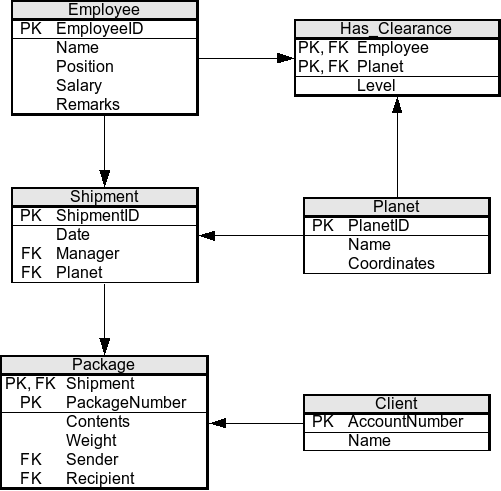
Tables in a relational database don't exist in isolation. They are connected through a system of keys. Keys are special columns that create and enforce relationships between tables, ensuring the data remains consistent.
The first type is the primary key. This is a column (or a set of columns) that contains a unique identifier for each row in a table. A CustomerID in a 'Customers' table is a perfect example. No two customers can have the same CustomerID, so it serves as a reliable way to pinpoint a specific record.
The second type is the foreign key. A foreign key is a column in one table that refers to the primary key of another table. This is how we build relationships. For example, an 'Orders' table would likely have a CustomerID column. This CustomerID is a foreign key because it links each order back to the unique customer who placed it in the 'Customers' table.
Using this primary key-foreign key structure, we can ask complex questions. For example, we could easily retrieve all orders placed by Ben Carter by finding his CustomerID in the 'Customers' table and then looking for all matching entries in the 'Orders' table. This system keeps data organized and prevents errors.
Keeping Data Tidy with Normalization
How do we decide what goes into each table? The guiding principle is data normalization. This is the process of organizing columns and tables to minimize data redundancy. In simple terms, you want to avoid storing the same piece of information in multiple places.
Redundant data wastes space and creates maintenance problems. If a customer's address appears in every order they've ever placed, changing that address means updating dozens, or even thousands, of rows. If you miss one, the data becomes inconsistent.
Consider this un-normalized table of project assignments:
| EmployeeID | EmployeeName | EmployeeDept | ProjectID | ProjectName |
|---|---|---|---|---|
| 101 | Alice | Engineering | 9 | Project X |
| 101 | Alice | Engineering | 12 | Project Y |
| 102 | Bob | Marketing | 9 | Project X |
Notice the repetition? Alice's name and department are listed twice. If she changes departments, we have to update multiple rows. Normalization solves this by splitting the data into separate tables, one for employees and another for project assignments.
Employees Table
| EmployeeID | EmployeeName | EmployeeDept |
|---|---|---|
| 101 | Alice | Engineering |
| 102 | Bob | Marketing |
Assignments Table
| EmployeeID | ProjectID |
|---|---|
| 101 | 9 |
| 101 | 12 |
| 102 | 9 |
Now, an employee's information is stored only once. If Alice moves to a new department, we only need to make a single update in the 'Employees' table. The link between employees and projects is maintained using the EmployeeID as a foreign key in the 'Assignments' table.
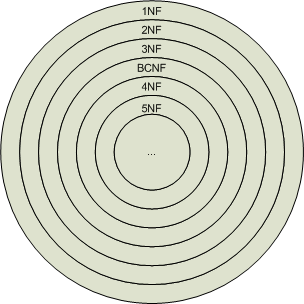
Normalization involves a set of formal rules called normal forms (1NF, 2NF, 3NF, etc.). While the details of each form are beyond our current scope, the core idea is simple: each table should describe a single entity, and data that doesn't describe that entity belongs in a different table.
Understanding tables, keys, and normalization is the first step to mastering relational databases. Before we move on, let's review these core concepts.
Ready to test your knowledge?
What is the primary organizational structure used in a relational database?
What is the main purpose of a primary key in a database table?
With these foundational concepts in place, you're now ready to learn the language used to interact with relational databases: SQL.