SQL Fundamentals for Database Management
Introduction to Databases
What Is a Database?
At its core, a database is simply an organized collection of data. Think of it like a digital filing cabinet. Instead of storing paper in folders, a database stores information electronically in a way that makes it easy to find, manage, and update.
Nearly every app you use relies on a database. When you check your social media feed, the app pulls your friends' latest posts from a database. When you buy something online, your order information is saved into a database. They are the invisible backbone of the modern digital world, ensuring data is stored safely and can be accessed quickly.
Organizing Data with Relations
The most common type of database is a relational database. The name comes from the way it organizes data: in tables that can be related to one another. This structure is intuitive because it mirrors how we often organize information in real life, like in a spreadsheet.
A relational database is built from three main components:
- Tables: A table holds information about a single subject, like 'Customers' or 'Products'.
- Columns: Each table is divided into columns, which define a specific piece of information. For a 'Customers' table, you might have columns for 'FirstName', 'LastName', and 'Email'. Columns are also called fields or attributes.
- Rows: A row is a single record in a table. It contains the actual data for one item. For example, one row in the 'Customers' table would represent one specific customer.
| CustomerID | FirstName | LastName | |
|---|---|---|---|
| 1 | Maria | Garcia | m.garcia@email.com |
| 2 | Chen | Wei | chen.wei@email.com |
| 3 | Sam | Jones | sam.j@email.com |
In the table above, 'Customers' is the subject of the table. 'CustomerID', 'FirstName', 'LastName', and 'Email' are the columns. Each line of customer information is a row, or a record.
The Database Manager
You don't interact with a database directly. Instead, you use a special piece of software called a Relational Database Management System, or RDBMS. An RDBMS is the program that lets you create, update, and manage the database.
The RDBMS acts as a gatekeeper. It enforces rules to keep the data consistent and secure, handles requests from users and applications, and manages how the data is physically stored.
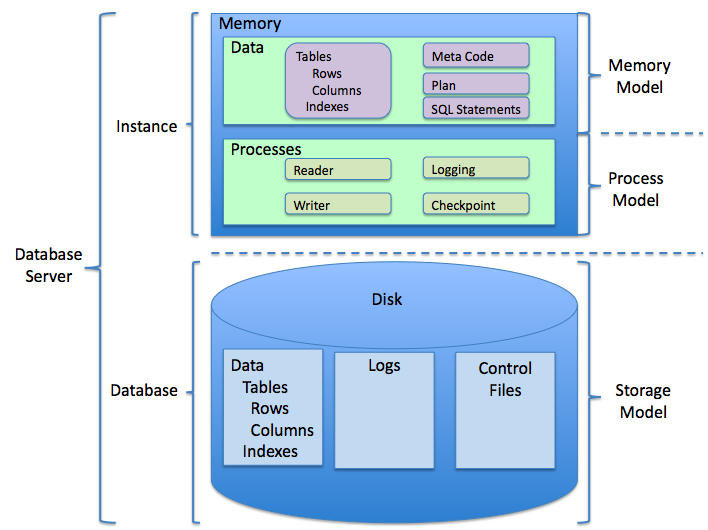
There are many different RDBMS platforms, each with its own strengths. While they all manage relational databases, they have key differences in performance, cost, and features. Some of the most popular platforms include:
| Platform | Key Feature | Common Use Case |
|---|---|---|
| MySQL | Open-source and very popular | Web applications (e.g., WordPress, Facebook) |
| PostgreSQL | Open-source and feature-rich | Complex applications needing data integrity |
| Oracle | Powerful and commercial | Large enterprise systems, data warehousing |
| SQL Server | Commercial, by Microsoft | Enterprise applications, especially in Windows environments |
Choosing the right RDBMS depends on the project's specific needs, like the amount of data, the required performance, and the budget.
Time to check your understanding.
What is the primary function of a database?
In a relational database, information about a single subject (like 'Customers' or 'Products') is stored in a...
This structured approach to data storage is fundamental. By organizing data into tables, databases give us a powerful and efficient way to handle vast amounts of information for nearly any purpose.