SQL Fundamentals and Coding
Introduction to Databases
What is a Database?
At its core, a database is just an organized collection of data. Think of it like a digital filing cabinet. Instead of folders and paper, you have a system designed to store, manage, and retrieve information efficiently. Whether it's tracking customer orders for an online store, managing patient records in a hospital, or keeping a list of your favorite songs, databases make information easy to access and work with.
The main purpose of a database is to keep data organized and accessible so that it can be used effectively.
Most modern websites and applications rely on databases running behind the scenes. They are the engines that power everything from social media feeds to online banking. Without them, we'd be swimming in a chaotic sea of unstructured information.
Relational Databases
The most common type of database is the relational database. The name comes from the way it organizes data: in tables that can be related to one another. A program that lets us create and manage these is called a Relational Database Management System, or RDBMS.
Imagine you have a set of spreadsheets. One lists all your customers. Another lists all their orders. A relational database allows you to link these two spreadsheets together. This structure is powerful because it lets you see the relationships in your data, like which customer placed which order.
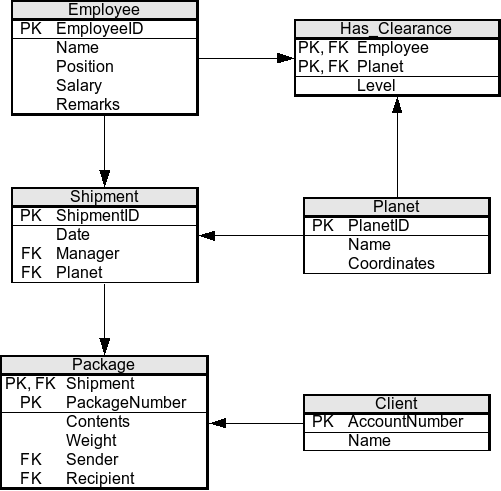
The basic structure consists of three key parts:
- Tables: A table organizes data about a single topic, like 'Customers' or 'Products'. It's like an individual spreadsheet.
- Rows: Each row in a table represents a single record or item. For instance, in a 'Customers' table, each row would hold the information for one specific customer.
- Columns: Columns define the attributes for each record. In our 'Customers' table, you might have columns for 'FirstName', 'LastName', and 'EmailAddress'.
The Building Blocks
Let's look closer at what makes up a database table. Every column is designed to hold a specific category of information, and it's defined by a data type.
A data type is a rule that specifies what kind of data can be stored in a column. This ensures that the information is consistent and reliable.
For example, a column for a person's age should only accept numbers, not text. A column for a name should accept text, and a column for a birthday should only store dates. Using the correct data type prevents errors and helps the database run more efficiently. Here are a few common examples:
| Data Type | Description | Example |
|---|---|---|
INTEGER | Whole numbers | 25 |
VARCHAR | Variable-length text (strings) | 'Jane Doe' |
BOOLEAN | True or false values | TRUE |
DATE | A calendar date | '2024-09-15' |
Now, how do we uniquely identify each row in a table? And how do we link tables together? This is where keys come in.
Primary Key
noun
A column (or set of columns) that uniquely identifies each row in a table. Its value must be unique for each record and cannot be empty.
Think of a primary key like a student ID number. Each student has a unique ID, which ensures you can always find the correct person's records. No two students can have the same ID.
To connect tables, we use a foreign key.
Foreign Key
noun
A column (or set of columns) in one table that refers to the primary key in another table. It's used to link the two tables together.
This link is what puts the "relation" in relational databases. The foreign key in one table points to the primary key in another, creating a connection that lets us combine their information.
Designing Good Databases
How do you decide which columns go in which tables? The goal is to design a database that is efficient and free of problems. The process for this is called normalization.
Normalization is the process of organizing data in a database to reduce redundancy and improve data integrity.
Redundancy means storing the same piece of information in multiple places. For example, if you stored a customer's name and address with every single order they placed, you'd have a lot of repeated data. If that customer moved, you'd have to update their address in many different places, which is a recipe for errors.
Normalization involves breaking down large tables into smaller, more manageable ones and linking them with keys. A well-normalized database ensures that each piece of data is stored in only one place. This saves space, prevents inconsistencies, and makes the database much easier to maintain.
With these fundamentals in place, you now understand the landscape where data lives. Next, you'll learn the language used to talk to it.