SQL for Data Analytics
Introduction to Databases
What's a Database?
Think of a massive library. Books are everywhere, but you can find the one you want because they're organized by a system. A database is like that library, but for digital information. It's a structured system for storing, managing, and retrieving data efficiently.
At its core, a database is just an organized collection of data, making it easy to access and use.
Without databases, finding a specific customer's order from a million sales would be like searching for a needle in a continent-sized haystack. They power everything from your social media feed to your online banking, ensuring information is safe, organized, and available when needed.
Two Main Flavors
Databases come in two main categories: relational and non-relational.
Relational databases organize data into tables, much like a spreadsheet. Each table has rows and columns, and different tables can be linked together. This is the most traditional and common type of database, and it's what we'll focus on for learning SQL.
Non-relational databases (often called NoSQL) are more flexible. They might store data in documents, as key-value pairs, or in a graph structure. They're great for handling large amounts of unstructured data, but they work very differently from relational databases.
Inside a Relational Database
A relational database management system (RDBMS) is the software used to create, manage, and interact with relational databases. Think of it as the librarian who knows how the entire library is organized.
The core building blocks of an RDBMS are tables, columns, and rows.
Table
noun
A collection of related data organized in a grid of columns and rows. You might have a table for Customers, another for Products, and a third for Orders.
Column
noun
A vertical field in a table that contains a specific type of information for every record. In a Customers table, you might have columns for CustomerID, FirstName, and Email.
Row
noun
A single record, or entry, in a table. A row in the Customers table represents one specific customer, containing their ID, first name, email, and so on.
Here's what a simple Users table might look like:
| UserID | FirstName | LastName | |
|---|---|---|---|
| 1 | Maria | Rodriguez | m.rod@email.com |
| 2 | Chen | Wei | chen.wei@email.com |
| 3 | Fatima | Khan | f.khan@email.com |
Keeping Data Connected
The real power of relational databases comes from creating relationships between tables. You don't want to cram every piece of information into one giant table. Instead, you create separate, logical tables and link them together.
This is done using keys.
Primary Key
noun
A column (or set of columns) that uniquely identifies each row in a table. No two rows can have the same primary key, and it cannot be empty (NULL). In our Users table, UserID is the primary key.
A primary key is like a Social Security Number for a row. It's a guaranteed unique identifier.
Foreign Key
noun
A column in one table that is a primary key in another table. It's used to create a link between the two tables. For example, an Orders table might have a UserID column to link each order back to the user who placed it.
Imagine we have another table called Orders. Instead of repeating user details in it, we just include the UserID.
| OrderID | UserID (Foreign Key) | OrderDate | TotalAmount |
|---|---|---|---|
| 101 | 2 | 2023-10-26 | $45.50 |
| 102 | 1 | 2023-10-26 | $19.99 |
| 103 | 2 | 2023-10-27 | $105.00 |
Here, OrderID is the primary key for the Orders table. UserID is a foreign key that points to the primary key of the Users table. This link, or relationship, lets us easily find all orders placed by Chen Wei (UserID 2) without duplicating his name and email in the Orders table.
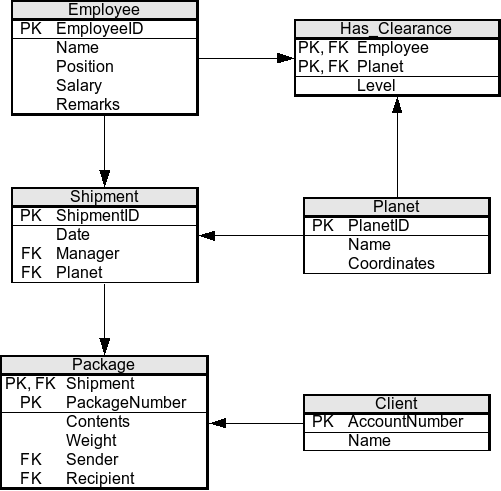
This structure keeps data organized, reduces redundancy, and maintains data integrity. Understanding this foundation of tables, columns, rows, and keys is the first step to mastering SQL.
Ready to check your understanding?
What is the primary purpose of a database?
In a relational database, what is the term for a column that uniquely identifies each row in a table?
Now that you have the basic concepts down, you're ready to start learning the language used to talk to these databases: SQL.