SQL Essentials
Introduction to Databases
The Digital Filing Cabinet
At its heart, a database is just an organized collection of information. Think of it like a massive, super-efficient digital filing cabinet. Instead of paper files, you have data, and instead of alphabetical folders, you have a logical structure that makes finding, updating, and managing that data incredibly fast and easy.
Why not just use a spreadsheet or a text file? For small tasks, those can work. But as the amount of data grows, they become slow, error-prone, and difficult to manage. Imagine trying to run an online store with thousands of customers and products using a single giant spreadsheet. It would be a nightmare.
Databases are built to handle huge amounts of information securely and reliably. They ensure data integrity, meaning the information stays accurate and consistent. They also allow many users to access and modify the data at the same time without creating chaos.
The Relational Model
There are several ways to organize a database, but the most common by far is the relational model. The software used to manage these databases is called a Relational Database Management System, or RDBMS.
An RDBMS organizes data into tables, which you can think of as simple spreadsheets. Each table stores information about a specific type of thing, like customers, products, or orders.
Let's break down the three key components of the relational model.
Table
noun
A collection of related data held in a structured format within a database, consisting of columns and rows.
A table is a container for your data. If you were building a database for a library, you might have a table for Books, another for Members, and a third for Loans.
Field
noun
A column in a table that contains a specific piece of information for each record. All items in a single field are of the same type.
Fields, or columns, define the attributes of the items in a table. For our Books table, the fields might be Title, Author, Genre, and ISBN.
Record
noun
A single entry or row in a table, representing a complete set of information for one item.
Records, or rows, are the individual entries in the table. Each row in our Books table would be a single, unique book.
| BookID | Title | Author | Genre |
|---|---|---|---|
| 1 | The Hobbit | J.R.R. Tolkien | Fantasy |
| 2 | Dune | Frank Herbert | Science Fiction |
| 3 | 1984 | George Orwell | Dystopian |
In the table above:
- The entire thing is the
Bookstable. BookID,Title,Author, andGenreare the fields (columns).- The row for "The Hobbit" is one record.
Powering Modern Applications
Databases are the invisible backbone of almost every application you use. When you log into a social media app, it checks your credentials against a Users table in a database. When you shop online, the products you see are pulled from a Products table, and your order is saved as a new record in an Orders table.
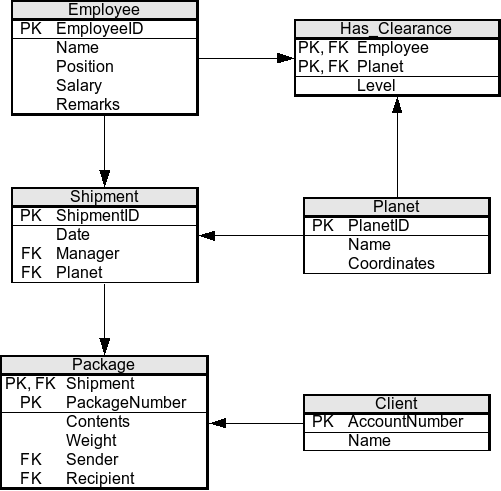
They provide the structure needed to store data in a way that's not only organized but also meaningful. The "relational" part of the name comes from the ability to link, or relate, data from different tables. For example, you can link a customer to all the orders they've placed. This ability to form relationships between data is what makes RDBMS so powerful.
What is the primary purpose of a database?
In a relational database for a library, the individual entries for each unique book are called ______.
Understanding these basic concepts is the first step. Next, you'll learn about the language used to communicate with these databases: SQL.