SQL Database Fundamentals
Relational Database Design
Entities, Attributes, and Relationships
Good database design starts with a clear model of the real world. We don't just dump data into a spreadsheet. Instead, we identify the distinct things we need to track. These are our entities. An entity is a person, place, object, event, or concept. Think of them as the nouns of your database. For a university, entities might be Student, Course, and Professor.
Entity
noun
A real-world object or concept, such as a person, place, or thing, whose data can be stored in a database.
Each entity has characteristics or properties called attributes. These are the details we want to store. For the Student entity, attributes could be StudentID, FirstName, LastName, and Major. Attributes are like the adjectives that describe our nouns.
Entities don't exist in isolation; they connect to each other through relationships. A Student enrolls in a Course. A Professor teaches a Course. These relationships are the verbs that link our entities, forming a logical structure.
Defining Cardinality
Relationships have rules. We define these rules using cardinality, which specifies the number of instances of one entity that can be related to instances of another. It answers questions like "how many?" There are three main types:
- One-to-One (1:1): Each instance in Entity A relates to exactly one instance in Entity B, and vice versa. For example, one
Driveris assigned oneCompanyCar. - One-to-Many (1:N): One instance in Entity A can relate to many instances in Entity B, but each instance in B relates to only one in A. A
Professorcan teach manyCourses, but eachCoursesection has only oneProfessor. - Many-to-Many (N:M): An instance in Entity A can relate to many instances in Entity B, and vice versa. A
Studentcan enroll in manyCourses, and aCoursecan have manyStudents.
Many-to-many relationships are tricky to implement directly in a database. We resolve them by creating an associative table (also called a junction or linking table), like Enrollment in the diagram above. This table breaks the N:M relationship into two 1:N relationships.
Normalization for Efficiency
Once we have our entities and relationships, we need to organize the data to prevent problems. Normalization is a process for structuring tables to minimize data redundancy and improve data integrity. Redundancy wastes space and leads to update anomalies, where changing data in one place requires changes in many others, risking inconsistency.
For an effective database structure, apply normalized database design principles.
We'll focus on the first three normal forms, which are sufficient for most applications.
First Normal Form (1NF): Each column must hold a single, atomic value, and each row must be unique. No repeating groups or multivalued columns.
Imagine a table tracking project assignments. In an unnormalized state, it might look like this:
| ProjectID | ProjectName | Employees |
|---|---|---|
| 101 | Apollo | John Smith, Jane Doe |
| 102 | Gemini | Jane Doe, Peter Jones, Susan Williams |
The Employees column violates 1NF because it contains multiple values. To fix this, we create separate rows for each employee on a project.
| ProjectID | ProjectName | EmployeeName |
|---|---|---|
| 101 | Apollo | John Smith |
| 101 | Apollo | Jane Doe |
| 102 | Gemini | Jane Doe |
| 102 | Gemini | Peter Jones |
| 102 | Gemini | Susan Williams |
Now the table is in 1NF, but ProjectName is repeated. This leads us to the next step.
Second Normal Form (2NF): The table must be in 1NF, and all non-key attributes must be fully dependent on the entire primary key. This rule applies when a table has a composite primary key (a key made of multiple columns).
In our 1NF table, the primary key would be a combination of (ProjectID, EmployeeName). However, ProjectName depends only on ProjectID, not the full key. This is a partial dependency. To reach 2NF, we split the table into two:
Projects Table
| ProjectID | ProjectName |
|---|---|
| 101 | Apollo |
| 102 | Gemini |
Assignments Table
| ProjectID | EmployeeName |
|---|---|
| 101 | John Smith |
| 101 | Jane Doe |
| 102 | Jane Doe |
| 102 | Peter Jones |
| 102 | Susan Williams |
Third Normal Form (3NF): The table must be in 2NF, and there should be no transitive dependencies, where a non-key attribute depends on another non-key attribute.
Let's add EmployeeDept and DeptHead to our data. If DeptHead depends on EmployeeDept, which in turn depends on the employee, we have a transitive dependency.
| EmployeeID | EmployeeName | EmployeeDept | DeptHead |
|---|---|---|---|
| 1 | John Smith | Engineering | M. Johnson |
| 2 | Jane Doe | Marketing | S. Brown |
| 3 | Peter Jones | Marketing | S. Brown |
Here, DeptHead depends on EmployeeDept, not directly on EmployeeID. If the head of Marketing changes, we have to update multiple rows. To achieve 3NF, we split this into two tables:
Employees Table
| EmployeeID | EmployeeName | DeptName |
|---|---|---|
| 1 | John Smith | Engineering |
| 2 | Jane Doe | Marketing |
| 3 | Peter Jones | Marketing |
Departments Table
| DeptName | DeptHead |
|---|---|
| Engineering | M. Johnson |
| Marketing | S. Brown |
By following these rules, we create a clean, efficient structure that is easy to maintain.
Keys and Schema Design
Keys are the mechanism that enforces uniqueness and connects our normalized tables.
A primary key (PK) is a column (or set of columns) that uniquely identifies each row in a table. It cannot contain NULL values, and its values must be unique. StudentID in a Students table is a classic example.
A foreign key (FK) is a column in one table that is a primary key in another table. It creates the link between the two. In our 3NF example, DeptName in the Employees table is a foreign key that references the DeptName primary key in the Departments table. This link enforces referential integrity, ensuring that a department listed for an employee actually exists in the Departments table.
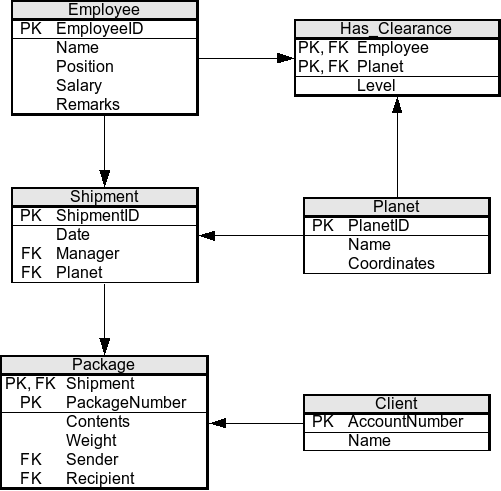
Bringing it all together, a database schema is the blueprint of the entire database. It defines the tables, the fields in each table, and the relationships between them. Good schema design is both an art and a science, balancing normalization with real-world performance needs.
Here are a few best practices:
- Use consistent naming conventions. For example, always use singular nouns for table names (
Student, notStudents) and camelCase or snake_case for column names. - Choose appropriate data types. Don't store a date in a text field or use a large integer type for a number that will never exceed 100. This saves space and improves performance.
- Start with normalization. Aim for 3NF as a baseline. You can selectively denormalize later for performance reasons, but only after identifying a specific bottleneck. Denormalization means intentionally violating a normal form to improve read performance by reducing the number of joins needed.
Ready to test your understanding of these design principles?
In designing a database for a library, which of the following would be best classified as an entity?
A country has one official capital city, and a capital city can only belong to one country. What type of cardinality describes this relationship?
A well-designed relational database is the foundation for building scalable and reliable applications. By carefully defining entities, normalizing tables, and using keys to enforce relationships, you create a structure that is efficient, maintainable, and robust.