React JS and Java for Web Development
Introduction to Web Development
The Anatomy of a Web Page
Every web page you visit is built with two core technologies: HTML and CSS. Think of them like the structure and style of a house.
HTML (HyperText Markup Language) is the skeleton. It gives the page its structure, defining elements like headings, paragraphs, images, and links. It's the blueprint that says, "This is a door, this is a window, and these are the walls."
CSS (Cascading Style Sheets) is the interior and exterior design. It takes that raw structure and makes it look good. CSS controls the colors, fonts, spacing, and layout. It's the paint on the walls, the style of the furniture, and the landscaping outside.
These are the building blocks of web development.
Structuring with HTML
HTML isn't a programming language. It's a markup language, which means it uses tags to describe the content. Tags are keywords surrounded by angle brackets, like <p>. They usually come in pairs: an opening tag (<p>) and a closing tag (</p>). Everything between them is considered part of that element.
A basic HTML document has a standard structure that tells the browser what kind of document it is and where the main content lives. The <html> tag wraps everything. Inside, the <head> contains metadata (like the page title), and the <body> holds all the visible content.
<!DOCTYPE html>
<html>
  <head>
    <title>My First Web Page</title>
  </head>
  <body>
    <h1>This is a heading</h1>
    <p>This is a paragraph of text.</p>
  </body>
</html>
In this example, <h1> defines the most important heading, and <p> defines a paragraph. When a browser reads this code, it renders the content according to the tags' default styles.

Styling with CSS
CSS lets you apply styles to your HTML elements. It works using a simple rule-based system. A CSS rule consists of a selector and a declaration block.
- Selector: This points to the HTML element you want to style. It could be a tag name like
p, a class, or an ID. - Declaration: This is a block of one or more style rules, enclosed in curly braces
{}. Each rule has a property (likecolororfont-size) and a value (likeblueor16px), separated by a colon.
/* This is a CSS comment */
p {
  color: navy;
  font-size: 18px;
}
This rule tells the browser to find all paragraph (<p>) elements and make their text color navy and their font size 18 pixels. You can include CSS directly in your HTML file using a <style> tag inside the <head> section. Let's add some style to our page.
<!DOCTYPE html>
<html>
  <head>
    <title>My Styled Page</title>
    <style>
      body {
        font-family: sans-serif;
        background-color: #f0f0f0;
      }
      h1 {
        color: #333333;
        text-align: center;
      }
      p {
        color: #555555;
      }
    </style>
  </head>
  <body>
    <h1>This is a styled heading</h1>
    <p>This paragraph has some style now, too.</p>
  </body>
</html>
With just a few lines of CSS, the same HTML structure now looks completely different. This separation of structure (HTML) and presentation (CSS) is a fundamental principle of modern web development. It makes websites easier to build, update, and maintain.
Understanding the Box Model
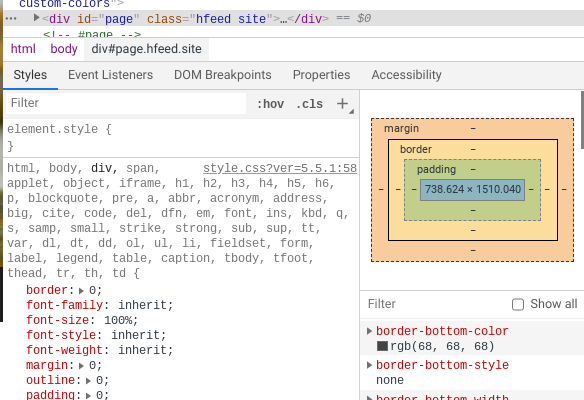
Every element on a web page can be thought of as a rectangular box. CSS uses a concept called the box model to determine the size and spacing of these elements. It consists of four parts, working from the inside out:
Content: The text, image, or other media in the element. Padding: The transparent space around the content, inside the border. Border: A line that goes around the padding and content. Margin: The transparent space outside the border, separating the element from other elements.
By adjusting these four properties, you have precise control over how elements are sized and positioned on the page. Mastering the box model is a key step toward building complex, well-structured layouts.
With a solid grasp of HTML for structure and CSS for styling, you can build any static web page. These are the essential first steps on the path to becoming a web developer.
Ready to check your understanding?
What is the primary role of HTML in web development?
Using the analogy of building a house, what does CSS represent?
You've now learned the foundational building blocks of the web. Next, you'll see how to make pages interactive.