Python Programming Fundamentals
Python Basics
Setting Up Your Workspace
Before you can write Python, you need a place for your code to run. Computers don't understand programming languages directly. They need a special program called an interpreter to translate your Python code into instructions the machine can execute.
You can install the Python interpreter directly from the official website, python.org. This download includes a simple editor called IDLE, which is great for starting out.
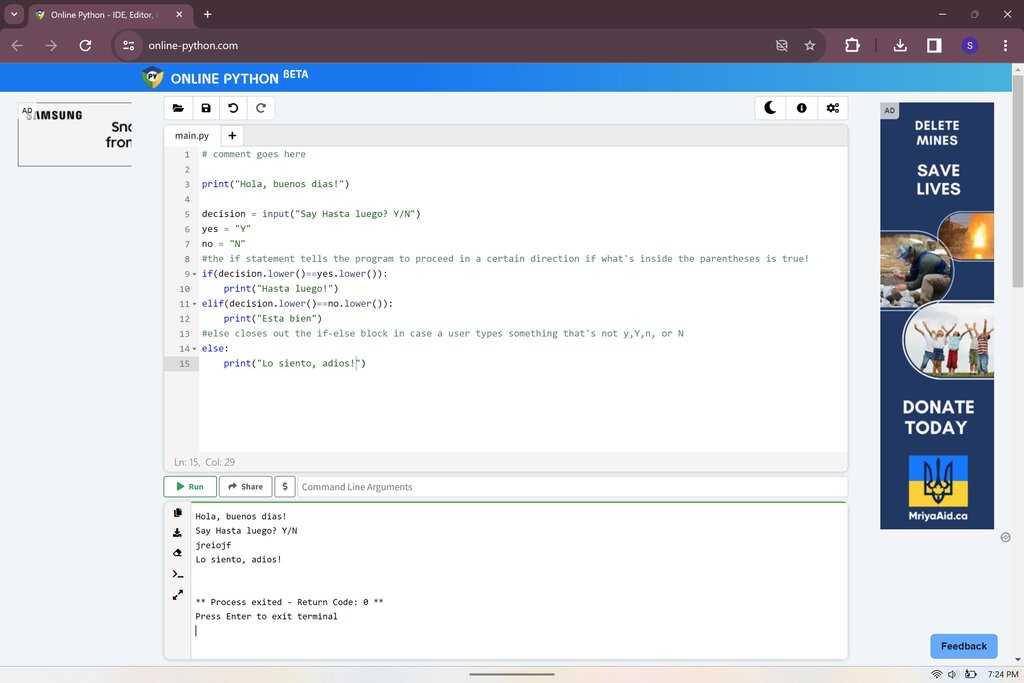
For an even easier start, you can use an online Python interpreter. These are websites that let you write and run code directly in your browser without installing anything. They're perfect for trying things out and learning the basics.
Your First Lines of Code
Let's start by telling the computer to say something. In Python, the command to display text on the screen is print().
print("Hello, Python!")
When you run this code, the interpreter reads the print command and displays the text you put inside the parentheses and quotation marks. This is called an output operation, because you're sending information out of the program.
Getting User Input
Just as we can send information out, we can also bring information in. The input() function pauses the program and waits for the user to type something and press Enter.
# Get the user's name and store it
user_name = input("What is your name? ")

# Greet the user by name
print("Hello, " + user_name + "!")
Here's what this code does:
- The
input()function first prints the prompt "What is your name? " to the screen. - It then waits for you to type. Whatever you enter is captured as a piece of text.
- The
=sign assigns that text to a variable calleduser_name. - Finally, the
print()function combines "Hello, ", the name you entered, and "!" into a single message and displays it.
Syntax, Indentation, and Comments
Every language has rules of grammar, and programming languages are no different. These rules are called syntax. In Python, the syntax is designed to be clean and readable.
One of Python's most important syntax rules is indentation. While other languages might use curly braces {} or keywords to group lines of code into blocks, Python uses whitespace. Lines of code that are part of the same block must be indented by the same amount.
You'll see this in action later when we learn about control structures. For now, just remember that the spacing at the beginning of a line is meaningful.
Finally, it's good practice to leave notes in your code for yourself or other programmers. These notes are called comments. The Python interpreter ignores them completely. A comment starts with a hash symbol (#) and continues to the end of the line.
Use comments to explain why your code does something, not just what it does. Good code often explains itself, but the reasoning behind it might not be as obvious.
# This is a comment. It's for human eyes only.

# The next line will display a message.
print("Comments are very helpful!") # This is an inline comment.
You've now seen how to set up your environment, display output, get input, and organize your code with indentation and comments. These are the fundamental building blocks for every Python program you'll write.
What is the primary function of a Python interpreter?
Which line of Python code will correctly display the message "Let's code!" on the screen?