Python Pandas for Data Analysis
Introduction to Pandas
Your Toolkit for Data
Most real-world data isn't a simple list of numbers. It's more like a spreadsheet, with rows and columns, each holding different types of information. You might have names, dates, numbers, and text all mixed together. Working with this kind of structured data is what data science is all about, and in Python, the primary tool for this job is Pandas.
Pandas is a powerful, fast, and open-source library built on NumPy.
Think of Pandas as a super-powered version of a spreadsheet program, like Excel or Google Sheets, but built to live inside your Python code. It's designed to make reading, cleaning, transforming, and analyzing data fast and intuitive. If you're going to work with data in Python, you're going to be using Pandas.
Getting Started
Before you can use Pandas, you need to install it. If you have a standard Python setup, you can install it using pip, Python's package installer. Just open your terminal or command prompt and type the following command:
pip install pandas
Once the installation is complete, you can start using it in your Python scripts. The standard way to import Pandas is to give it a shorter alias, pd, to make your code cleaner and easier to type. It's a convention you'll see everywhere.
# Import the pandas library and give it the alias 'pd'
import pandas as pd
With that one line, you've unlocked a massive library of tools for data manipulation.
The Building Blocks
Pandas is built around two core data structures: the Series and the DataFrame.
Everything in Pandas is based on these two objects. Understanding them is the key to mastering the library.
A Series is a one-dimensional array-like object. It's like a single column in a spreadsheet. It can hold any data type, like integers, strings, or floats. Each element in a Series has an associated label, called an index.
A DataFrame is the real workhorse of Pandas. It's a two-dimensional, size-mutable, and potentially heterogeneous tabular data structure. Think of it as the entire spreadsheet. It's a collection of Series objects that share the same index. You can have columns with different data types.
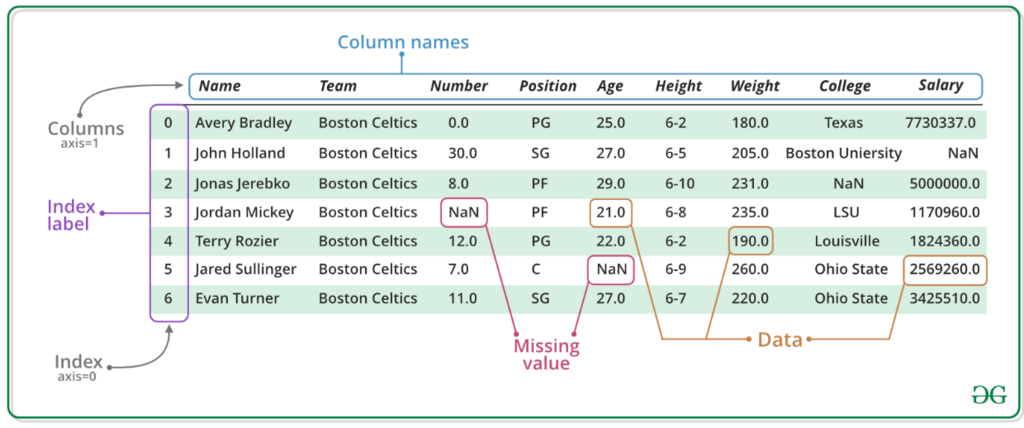
Let's see this in action. Here's how you can create a simple DataFrame from a Python dictionary.
import pandas as pd

# Data in a dictionary
data = {
    'Name': ['Alice', 'Bob', 'Charlie'],
    'Age': [25, 30, 35],
    'City': ['New York', 'Los Angeles', 'Chicago']
}

# Create a DataFrame from the dictionary
df = pd.DataFrame(data)

print(df)
Each key in the dictionary ('Name', 'Age', 'City') becomes a column header, and the lists of values become the data in those columns. Each column in this DataFrame is a Pandas Series.
Now, let's test your understanding of these fundamental concepts.
What is the primary purpose of the Pandas library in Python?
Which of the following is the conventional and most common way to import the Pandas library?
You've just taken the first step into a much larger world of data analysis. With a basic understanding of Series and DataFrames, you're ready to start exploring how to manipulate and analyze data.