Python Fundamentals for Practical Applications
Python Setup
Setting Up Your Workspace
Before you can write Python code, you need two key components: the Python interpreter, which understands and executes your code, and a code editor, where you'll write it. Let's get them set up.
Installing Python
First, you need to install Python on your computer. The official source for Python is python.org. Download the latest stable version for your operating system (Windows, macOS, or Linux).
During installation on Windows, a crucial step is to check the box that says "Add python.exe to PATH." This allows you to run Python from your command line or terminal from any directory, which is essential for a smooth development workflow.
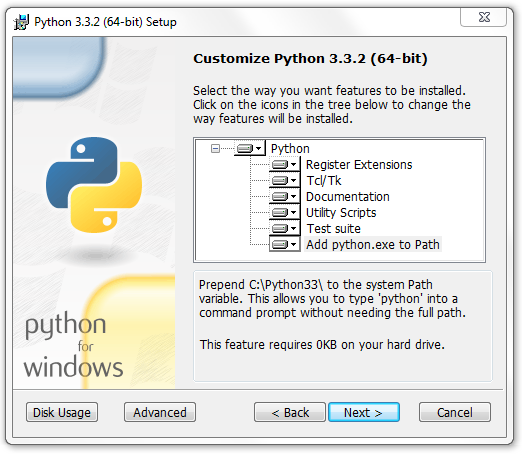
After the installation is complete, open your terminal (like PowerShell on Windows or Terminal on macOS/Linux) and run the following command to verify that Python was installed correctly. You should see the version number printed back to you.
# In your terminal or command prompt
python --version

# You might need to use python3 on macOS or Linux
python3 --version
Choosing Your Code Editor
You can write Python in a simple text editor, but most developers use an Integrated Development Environment (IDE) or a specialized code editor. These tools offer features like syntax highlighting, code completion, and debugging, which make writing code faster and less error-prone.
For beginners and professionals alike, Visual Studio Code (VS Code) is a fantastic, free option. It's lightweight, highly customizable, and has excellent support for Python through extensions. Other popular choices include PyCharm and Sublime Text.

Once you've installed VS Code, you'll need to add the official Python extension. Open the Extensions view by clicking the icon on the sidebar, search for "Python," and install the one published by Microsoft. This extension enables features like IntelliSense (code completion) and linting (code analysis).
Running Your First Script
With your environment ready, it's time to write and run a simple Python script. This is a rite of passage in programming.
First, create a new file in your IDE and name it hello.py. The .py extension is important, as it tells the system that this is a Python file.
Inside hello.py, type the following line of code. This uses Python's built-in print() function to display a string of text to the console.
print("Hello, World!")
Now, save the file. To run it, open the integrated terminal in your IDE (in VS Code, you can find this in the "Terminal" menu). The terminal will open in your project's directory. Type the following command and press Enter:
python hello.py
If everything is set up correctly, you'll see the text Hello, World! printed in the terminal. You've just written and executed your first Python program.
What are the two essential components you need to start writing and running Python code?
When installing Python on Windows, what is the most crucial step to ensure you can easily run Python from your command line?
That's all it takes to get a basic Python environment up and running. You're now ready to start building more complex programs.