Python for Data Science
Python Fundamentals
The Building Blocks of Code
Think of a programming language as any other language. It has vocabulary (words) and syntax (grammar rules). Python's syntax is known for being clean and readable, which makes it a great language for beginners. The rules are straightforward, so you can focus more on what you want to do and less on how to say it.
The most basic piece of vocabulary is a variable. A variable is just a name you give to a piece of information so you can use it later. It's like a labeled box where you store something. You can put different types of data into these boxes.
Here are the most common data types you'll encounter:
- Integers: Whole numbers, like 10, -5, or 0.
- Floats: Numbers with a decimal point, like 3.14 or -0.5.
- Strings: Text, wrapped in single or double quotes, like 'hello' or "world".
- Booleans: Represent truth values. They can only be
TrueorFalse.
# Storing an integer
student_count = 25

# Storing a float
price = 99.95

# Storing a string
student_name = "Alex"

# Storing a boolean
is_enrolled = True

# You can print them out to see their values
print(student_name)
print(price)
The computer reads and executes your code line by line, from top to bottom. Each line is an instruction. The # symbol indicates a comment—a note for humans that the computer ignores.
Making Decisions and Repeating Tasks
Writing code isn't just about giving a static list of instructions. Often, you need your program to make decisions or repeat actions. This is where control structures come in.
First up are conditionals. They let your code react differently based on whether a condition is true or false. You use the keywords if, elif (short for "else if"), and else to create these decision points. It's like checking the weather: if it's raining, you take an umbrella, else if it's sunny, you wear sunglasses, else you just walk outside.
temperature = 75

if temperature > 80:
    print("It's a hot day!")
elif temperature < 60:
    print("Better bring a jacket.")
else:
    print("The weather is perfect.")

# This will print: The weather is perfect.
Next are loops, which are used to repeat a block of code. A for loop is great for when you want to iterate over a sequence of items, like a list of names. A while loop is used to repeat code as long as a certain condition remains true.
# A for loop to print each name in a list
students = ["Maria", "David", "Chen"]
for student in students:
    print("Hello,", student)

# A while loop that counts down from 3
count = 3
while count > 0:
    print(count)
    count = count - 1 # Decrease count by 1 each time
print("Liftoff!")
Organizing Your Code
As your programs get more complex, you'll want ways to keep them organized and avoid repeating yourself. Functions are the primary way to do this. A function is a named, reusable block of code that performs a specific task. Think of it as a recipe: you define the steps once, and then you can "make the recipe" whenever you need to, just by calling its name.
# Define a function that greets someone
def greet(name):
    message = "Welcome, " + name + "!"
    return message

# Call the function with different inputs
print(greet("Sarah"))
print(greet("Ben"))
When you have many functions, you can group related ones into files called modules. A module is like a toolbox containing specific tools (functions). Python has a rich standard library of modules you can use. To access the tools in a module, you just import it.
# Import the 'math' module to use its functions
import math

# Now we can use tools from the math module
radius = 5
area = math.pi * (radius ** 2)

print(area) # Prints the area of the circle
Handling the Unexpected
No one is perfect, and neither is our code. Sometimes things go wrong. Python will tell you about errors, which generally fall into two categories. Syntax errors are like grammatical mistakes; you've broken a language rule, and the program won't even run. Exceptions are errors that happen while the program is running, like trying to divide a number by zero or accessing a file that doesn't exist.
A program that crashes is not very user-friendly. You can gracefully manage potential exceptions using a try...except block. You put the risky code in the try block, and the code to run if an error occurs goes in the except block.
try:
    # This code might cause an error
    result = 10 / 0
    print(result)
except ZeroDivisionError:
    # This code runs only if that specific error happens
    print("Oops! You can't divide by zero.")
This prevents the program from halting and allows you to handle the problem, perhaps by telling the user what went wrong.
Your Interactive Coding Playground
For data science, you won't just be writing scripts. You'll be exploring data, testing ideas, and visualizing results. The perfect tool for this is a Jupyter Notebook.
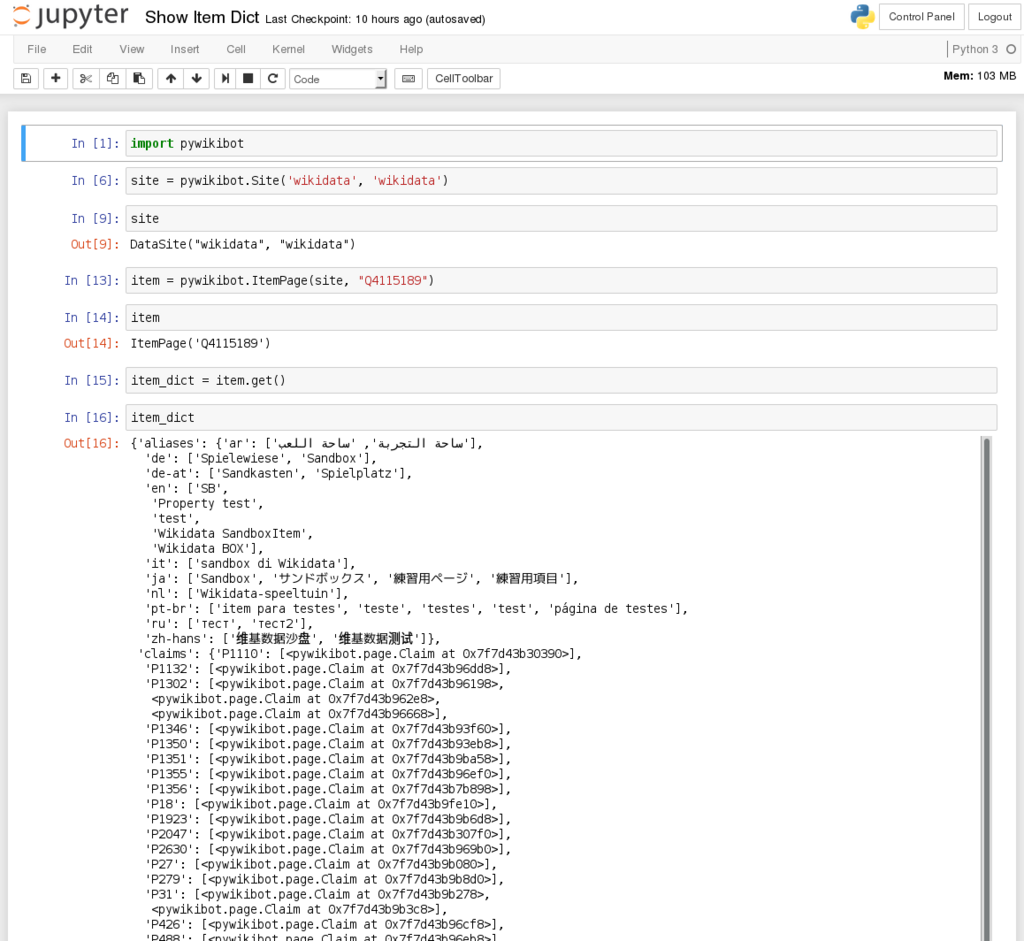
A notebook is an interactive document that lets you combine live code, explanatory text, equations, and visualizations. It's organized into cells. You can write and run one cell of code at a time, see the output right underneath it, and then move on to the next. This makes it incredibly effective for step-by-step analysis and for sharing your work with others in a way that tells a story.
To set up Jupyter Notebooks, you'll typically install a distribution like Anaconda, which bundles Python, Jupyter, and many essential data science libraries together. Once installed, you can launch a notebook from your terminal, and it will open in your web browser, ready for you to start coding.
Now let's test your understanding of these core concepts.
What is the primary role of a variable in Python?
You need to execute a specific piece of code for every single name in a list of names. Which control structure is the most appropriate for this task?
With these fundamentals—variables, control structures, functions, and error handling—you have the foundation needed to start tackling real data science problems.