Python for Beginners
Python Basics
Setting Up Your Workspace
Before you can write Python code, you need a place to write and run it. While you can install Python directly on your computer, the easiest way to start is by using an online tool. These websites provide an Integrated Development Environment, or IDE, right in your browser.
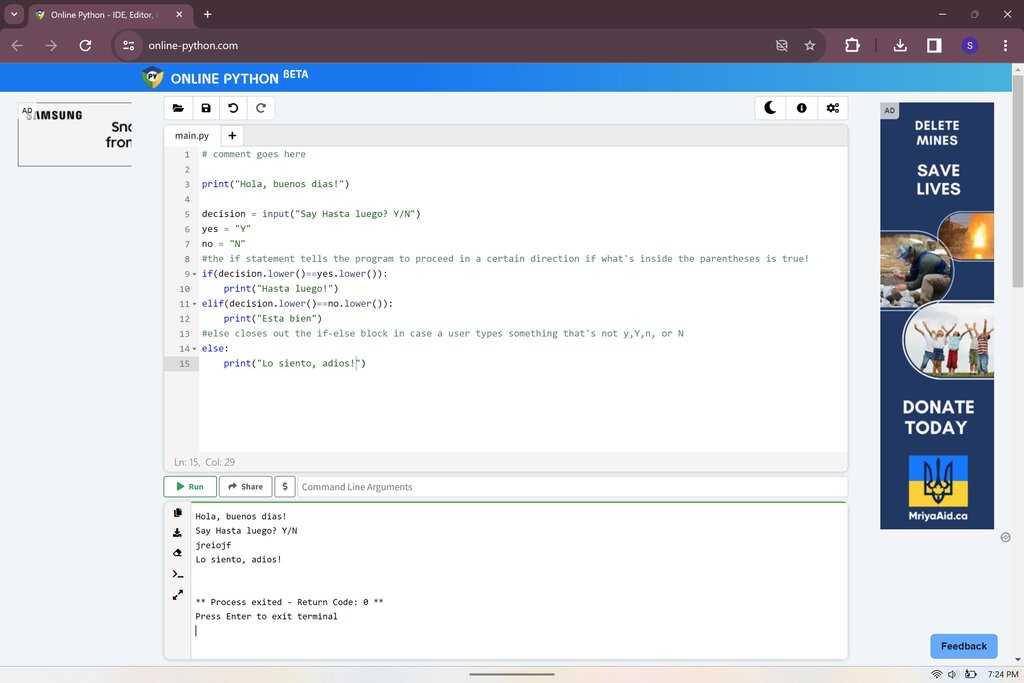
An IDE is like a specialized workshop for programmers. It combines a text editor for writing code, a console for seeing the output, and other helpful tools all in one place. Using an online IDE means you can start coding immediately without worrying about installation and configuration. For the examples that follow, you can use any online Python editor to follow along.
Your First Lines of Code
A long-standing tradition in programming is to start by making the computer say "Hello, World!". It's a simple way to check that your setup is working. In Python, this is incredibly straightforward.
print("Hello, World!")
Let's break that down. print() is a built-in Python command, called a function, that displays text on the screen. The text you want to display goes inside the parentheses, wrapped in quotation marks. The quotation marks tell Python that this is a piece of text, known as a string.
Python's rules for writing code are called its syntax. One of the most important rules in Python is about indentation, which refers to the spaces at the beginning of a line of code. Unlike many other languages where indentation is just for readability, in Python it is a strict rule. It's how Python understands the structure of your program. For simple, single-line commands, no indentation is needed.
In Python, indentation is not a suggestion. It is a requirement that is fundamental to the language's syntax.
Variables and Data Types
Programs need to store and manage information. We do this using variables. Think of a variable as a labeled box where you can keep a piece of information. You give the box a name, and you can change what's inside it later.
variable
noun
A symbolic name that is a reference or pointer to an object. Once an object is assigned to a variable, you can refer to the object by that name.
Creating a variable is simple. You use the equals sign (=), which is called the assignment operator. It assigns the value on the right to the variable name on the left.
greeting = "Welcome to Python!"
print(greeting)
Here, we created a variable named greeting and stored the text "Welcome to Python!" inside it. Then, we used the print() function to display the contents of the variable.
The type of information a variable holds is called its data type. Python automatically figures out the data type based on the value you assign. Let's look at a few basic types.
| Data Type | Description | Example |
|---|---|---|
| String | A sequence of text | "Hello" or 'Python' |
| Integer | A whole number | 10, -5, 0 |
| Float | A number with a decimal | 3.14, -0.5 |
You can see these types in action.
# String
book_title = "A Brief History of Time"

# Integer
year_published = 1988

# Float
price = 24.99
The lines starting with a # are comments. Python ignores these lines completely. Programmers use comments to leave notes for themselves or for others reading the code.
Interacting with the User
So far, we've only displayed predefined information. A program becomes much more interesting when it can interact with a user. Python's input() function allows you to pause the program and wait for the user to type something.
Let's ask for the user's name and then greet them.
name = input("What is your name? ")
print("Hello, " + name + "!")
When this code runs, it first displays the message "What is your name? ". It then waits. Whatever the user types is stored in the name variable as a string. The second line uses the + symbol to combine, or concatenate, several strings together to create a personalized greeting. This is a simple example of both an input and an output operation, forming the basis for interactive programs.
Now you're ready to test your knowledge on these fundamental concepts.
Which line of code will correctly display the text "Hello, Python!" on the screen?
What is the primary purpose of the = symbol in Python?