Python for AI and FastAPI Engineering
Pydantic and Type Safety
From Dictionaries to Data Contracts
When building applications with Large Language Models (LLMs), you're often dealing with data that can be unpredictable. An LLM might return a JSON object, but the keys could be missing, or the data types might be incorrect. Relying on simple Python dictionaries to handle this is like building a house on sand – it's fragile and prone to breaking unexpectedly.
This is where Pydantic comes in. It allows you to define a clear, enforceable 'data contract' for your information. Instead of hoping the data is correct, you can guarantee it.
Pydantic enforces data types at runtime, giving you robust error handling and auto-generated documentation.
Your First Pydantic Model
At its core, uses Python's built-in to create data models. You define the 'shape' of your data using a class that inherits from BaseModel. Let's say we want to represent a user's query to our system. Instead of a dictionary like {'text': '...', 'user_id': 123}, we can define a formal structure.
from pydantic import BaseModel

class UserQuery(BaseModel):
    text: str
    user_id: int

# Example of creating an instance from a dictionary
external_data = {
    'text': 'What are the main benefits of RAG?',
    'user_id': 123
}

query = UserQuery(**external_data)

print(query.text)
# Output: What are the main benefits of RAG?

print(query.model_dump_json())
# Output: {"text":"What are the main benefits of RAG?","user_id":123}
Here, UserQuery is our Pydantic model. It clearly states that text must be a string and user_id must be an integer. When we create an instance of UserQuery from a dictionary, Pydantic automatically validates the data. If the data doesn't match the schema (e.g., if user_id was missing or not a number), Pydantic would raise an error immediately, preventing bad data from going further into your system.
Handling Complex & Nested Data
Real-world data is rarely flat. In a RAG system, a query response might include the answer and a list of source documents used to generate it. Each source document, in turn, has its own structure. Pydantic handles this nesting with ease.
from typing import List, Optional
from pydantic import BaseModel, HttpUrl

class SourceDocument(BaseModel):
    id: int
    source_name: str
    source_url: Optional[HttpUrl] = None
    content: str

class RAGResponse(BaseModel):
    answer: str
    sources: List[SourceDocument]

# Example of a complex, nested JSON from an LLM
llm_output = {
    "answer": "RAG improves accuracy by providing relevant context.",
    "sources": [
        {
            "id": 1,
            "source_name": "DocA.pdf",
            "source_url": "https://example.com/doc_a",
            "content": "Retrieval-Augmented Generation (RAG) is a technique..."
        },
        {
            "id": 2,
            "source_name": "DocB.txt",
            "content": "The primary benefit of RAG is..."
        }
    ]
}

# Parsing the data into our Pydantic models
rag_data = RAGResponse(**llm_output)

print(rag_data.sources[0].source_name)
# Output: DocA.pdf
Notice how we can define a SourceDocument model and then use List[SourceDocument] within the RAGResponse model. Pydantic understands these relationships and validates the entire structure. We've also used Optional to indicate that source_url may not always be present, and HttpUrl to ensure that if it is present, it's a valid URL string.
Advanced Validation and Error Handling
Beyond just type checking, Pydantic allows you to add more specific constraints using the Field function. This is essential for ensuring the quality of data coming into your system.
For example, you might want to ensure a user's query isn't empty or that an ID is always a positive number. When validation fails, Pydantic raises a ValidationError, which your application can catch and handle gracefully.
from pydantic import BaseModel, Field, ValidationError

class UserInput(BaseModel):
    query: str = Field(..., min_length=3, max_length=500)
    user_id: int = Field(gt=0) # Must be greater than 0

# --- Example of valid data ---
data_good = {"query": "What is RAG?", "user_id": 101}
try:
    validated_data = UserInput(**data_good)
    print("Validation successful!")
except ValidationError as e:
    print(e)

# --- Example of invalid data ---
data_bad = {"query": "Hi", "user_id": -5}
try:
    validated_data = UserInput(**data_bad)
except ValidationError as e:
    print(e)
# This will print a detailed error message explaining that
# the query is too short and the user_id is not greater than 0.
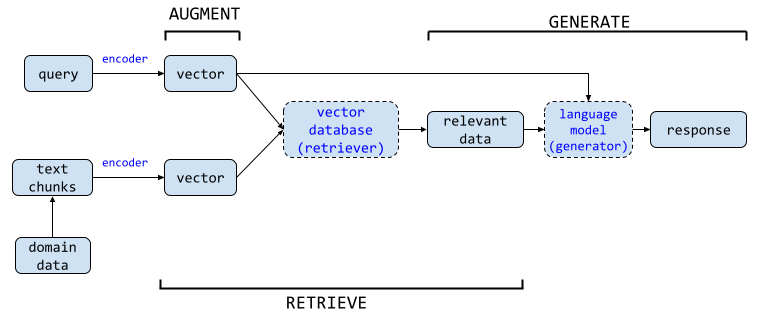
By catching the ValidationError, you can provide clear feedback to the user or system that sent the malformed data, rather than letting it cause unexpected errors deeper in your application. This is a cornerstone of building reliable AI-powered systems with FastAPI, which uses Pydantic models to automatically validate incoming request data.
FastAPI makes use of Pydantic models to provide simple validation and serialization of data.
Using Pydantic to define your data structures is a crucial step in moving from a simple prototype to a production-ready application. It enforces a contract between different parts of your system—be it the user, your API, or an external LLM—ensuring that the data flowing through it is always well-structured and valid.