Python Data Structures and Algorithms Fundamentals
Introduction to Data Structures
What Are Data Structures?
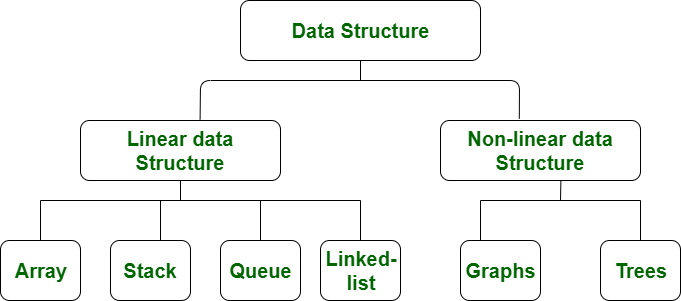
Think about your bookshelf. You could just throw books into a pile on the floor, but finding a specific one would be a nightmare. Instead, you probably organize them—by author, genre, or color. In programming, we do the same thing with information. A data structure is simply a way to organize and store data so it can be accessed and used efficiently.
Choosing the right data structure is like choosing the right tool for a job. You wouldn't use a hammer to turn a screw. Similarly, the way you structure your data affects how quickly your program can find, add, or remove information. Let's look at four fundamental data structures in Python: lists, tuples, sets, and dictionaries.
Lists: Ordered and Changeable
A list is one of the most common data structures. It's an ordered collection of items, and you can change it whenever you want. Think of it like a to-do list: you can add new tasks, check them off (remove them), or reorder them based on priority.
Lists are defined using square brackets
[], with items separated by commas.
Because lists are ordered, each item has a specific position, or index. In Python, indexing starts at 0. So, the first item is at index 0, the second is at index 1, and so on.
# A list of tasks for the day
tasks = ["Answer emails", "Write report", "Call team lead"]

# Access the first item (index 0)
print(tasks[0])  # Output: Answer emails

# Change an item
tasks[1] = "Finalize report"

# Add a new item to the end
tasks.append("Plan tomorrow's meeting")

# Remove an item
tasks.remove("Answer emails")

print(tasks)
# Output: ['Finalize report', 'Call team lead', "Plan tomorrow's meeting"]
Tuples: Ordered and Unchangeable
A tuple is like a list, but with one key difference: once you create it, you can't change it. This property is called immutability. Tuples are useful for data that should not be modified, like coordinates on a map or the days of the week.
Tuples are defined using parentheses
(), with items separated by commas.
Since tuples are unchangeable, you can't add, remove, or modify items after the tuple has been created. This makes your code safer by preventing accidental changes to important data.
# A tuple representing a point on a map (latitude, longitude)
location = (40.7128, -74.0060)

# Access items just like a list
print(location[0]) # Output: 40.7128

# Trying to change an item will cause an error
# location[0] = 41.0  # This would raise a TypeError
Sets and Dictionaries
While lists and tuples are about order, sets and dictionaries are about uniqueness and relationships.
Set
noun
An unordered collection of unique items. Duplicates are not allowed.
Imagine you have a list of attendees for an event, and you want to see how many unique people signed up, even if some signed up twice. A set is perfect for this. It automatically discards any duplicates.
Sets are defined using curly braces
{}. Because they are unordered, you cannot access items using an index.
# A list with duplicate names
attendees = ["Alice", "Bob", "Charlie", "Alice"]

# Convert the list to a set to get unique names
unique_attendees = set(attendees)

print(unique_attendees)  # Output: {'Bob', 'Charlie', 'Alice'}

# Add a new attendee
unique_attendees.add("David")

# Remove an attendee
unique_attendees.remove("Bob")

print(unique_attendees)  # Output: {'David', 'Charlie', 'Alice'}
Dictionary
noun
An unordered collection of key-value pairs. Each key must be unique.
A dictionary stores data in pairs: a unique key and its corresponding value. It's just like a real dictionary, where you look up a word (the key) to find its definition (the value). Dictionaries are incredibly useful for storing related pieces of information.
# A dictionary for a user profile
user_profile = {
    "username": "alex_c",
    "email": "alex@example.com",
    "age": 28
}

# Access a value by its key
print(user_profile["email"])  # Output: alex@example.com

# Add a new key-value pair
user_profile["location"] = "New York"

# Change an existing value
user_profile["age"] = 29

print(user_profile)
# Output: {'username': 'alex_c', 'email': 'alex@example.com', 'age': 29, 'location': 'New York'}
Each of these data structures has its own strengths. Learning when to use each one is a key part of writing clean and efficient code.
What is the primary purpose of a data structure in programming?
Which data structure is best suited for storing a collection of items that must remain unchanged after creation, like the coordinates for a fixed point on a map?