Python App Development for Appointments
Python Basics
Getting Started with Python
Before you can write any code, you need to have Python installed on your computer. Python is a versatile programming language used for everything from web development to data science. Its simple, readable syntax makes it a great choice for beginners.
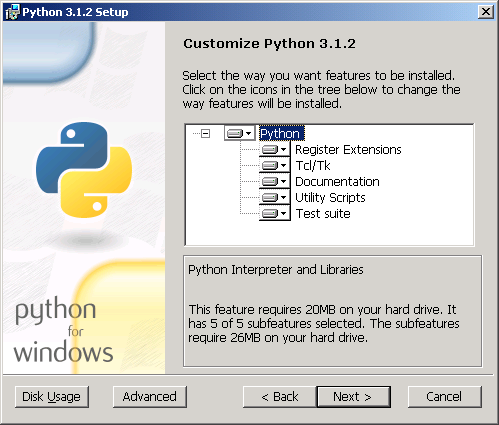
You can download the latest version from the official Python website, python.org. The installation is straightforward; just follow the instructions for your operating system. Make sure to check the box that says "Add Python to PATH" during installation on Windows. This makes it easier to run Python from your command line.
Once Python is installed, you can start writing code. A classic first step in programming is to make the computer display the phrase "Hello, World!". In Python, this is incredibly simple. You just need one line of code using the built-in print() function.
print("Hello, World!")
You can run this code by saving it in a file with a .py extension (like hello.py) and running it from your terminal, or by typing it directly into the Python interpreter.
Syntax and Indentation
Every programming language has its own set of rules, called syntax. Python's syntax is known for being clean and readable. One of its most distinctive features is how it uses indentation.
Unlike many other languages that use curly braces {} to group blocks of code, Python uses whitespace. When you start a new block of code, like after an if statement or a for loop, you must indent the lines that belong to that block. The standard is to use four spaces for each level of indentation.
In Python, indentation is not just for style. It's a fundamental part of the syntax that tells the interpreter how your code is structured.
If you get the indentation wrong, your program will produce an error. This might seem strict at first, but it forces you to write organized, easy-to-read code. Here’s a quick example:
# This is a comment. Python ignores lines starting with #

appointment_time = 14

if appointment_time < 12:
    print("Good morning!") # This line is indented, so it's part of the if block
else:
    print("Good afternoon!") # This line is indented, so it's part of the else block
Basic Data Types
Data is the information that programs work with. Python has several built-in data types to represent different kinds of information. For now, we'll focus on three of the most common ones: integers, floats, and strings.
Integers and floats are both used for numbers. Integers are whole numbers, while floats are numbers with a decimal point.
| Data Type | Description | Example |
|---|---|---|
| Integer | Whole numbers | 42, -10 |
| Float | Numbers with a decimal | 3.14, -0.5 |
| String | Textual data | "Hello" |
Strings are used to represent text. You create a string by enclosing text in either single quotes (') or double quotes ("). You can store data in variables, which act as named containers. Assigning a value to a variable is simple:
# Variable assignments
client_name = "Alex"
appointment_id = 101
service_cost = 55.50
Making Decisions and Repeating Actions
Programs rarely run straight through from top to bottom. They need to make decisions and perform repetitive tasks. This is where control structures come in.
Conditionals like if, elif (else if), and else allow your program to execute different code blocks based on whether a certain condition is true or false. This is how you give your program decision-making power.
is_confirmed = True

if is_confirmed:
    print("Your appointment is confirmed.")
else:
    print("Please confirm your appointment.")
Loops are used to repeat a block of code multiple times. The two main types of loops in Python are for loops and while loops.
A for loop is typically used when you want to iterate over a sequence of items, like a list of appointment times.
available_slots = [9, 10, 11, 14, 15]

for slot in available_slots:
    print(f"A slot is available at {slot}:00.")
A while loop continues to execute as long as its condition remains true. It's useful when you don't know in advance how many times you need to repeat the action.
reminders_to_send = 3

while reminders_to_send > 0:
    print(f"Sending reminder... {reminders_to_send} left.")
    reminders_to_send = reminders_to_send - 1 # Decrease the counter
Functions and Modules
As your programs get more complex, you'll want to organize your code into reusable blocks. Functions are named blocks of code that perform a specific task. You define a function using the def keyword, and you can "call" it whenever you need to execute that task.
# Define a function to greet a client
def greet_client(name):
    message = f"Welcome, {name}!"
    return message

# Call the function and print the result
print(greet_client("Jordan"))
print(greet_client("Casey"))
Python also has a vast standard library of pre-written code that you can use in your own programs. This code is organized into modules. To use a function or variable from a module, you first have to import it. For example, the math module contains many useful mathematical functions.
import math

# Use the sqrt function from the math module
number = 64
square_root = math.sqrt(number)
print(f"The square root of {number} is {square_root}.")
Mastering these basics provides the foundation you need to build more complex and powerful applications.
What is the primary way Python structures blocks of code, such as the body of a loop or conditional statement?
What is the data type of the value 14.5 in Python?