Python API Interaction
HTTP Basics
The Web's Conversation
Every time you visit a website, fill out a form, or watch a video online, you're kicking off a conversation. Your web browser (the client) sends a message to a powerful computer (the server) where the website lives. The server then sends a message back. This back-and-forth dialogue is the foundation of the web.
The language they use to speak is called Hypertext Transfer Protocol, or HTTP. Think of it as a set of grammar rules for the internet. It ensures that when your browser asks for a webpage, the server understands exactly what to send back.

This request-response cycle happens for every single thing you see on a page, from the text and images to the stylesheets that make it look good. Understanding this basic conversation is key to understanding how to work with APIs, which use the same principles to let applications talk to each other.
Anatomy of a Request
When your browser sends a request, it isn't just a simple
An HTTP request message has three parts: a request line, headers, and an optional body.
The request line is the most important part. It states the action you want to perform. It includes:
- Method: The verb, like
GETto retrieve data orPOSTto send data. - Path: The specific resource you want, like
/blog/my-first-post. - HTTP Version: The version of the protocol being used, usually
HTTP/1.1.
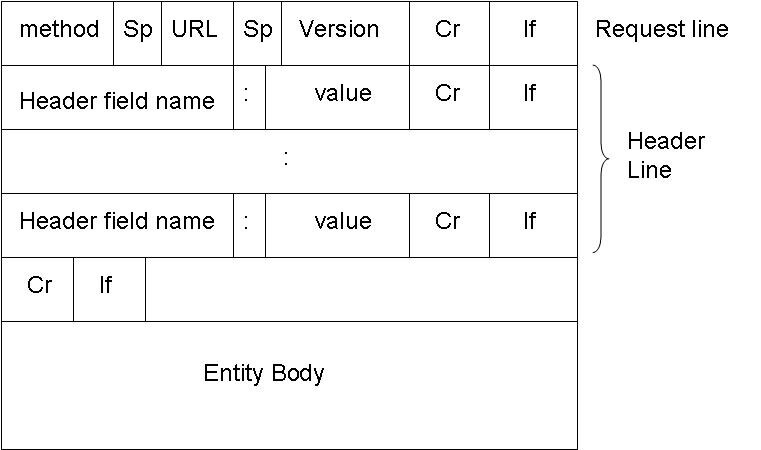
The HTTP method tells the server what kind of action the client wants to perform. While there are many methods, four are extremely common.
| Method | Action | Example Usage |
|---|---|---|
GET | Retrieve data | Loading a webpage or fetching a user's profile. |
POST | Submit new data | Creating a new blog post or signing up for an account. |
PUT | Update existing data | Editing the content of a blog post or changing your profile picture. |
DELETE | Remove data | Deleting a comment or removing a photo from an album. |
The Server's Reply
After the server processes the request, it sends back a response. Like the request, the response has a specific structure: a status line, headers, and a body.
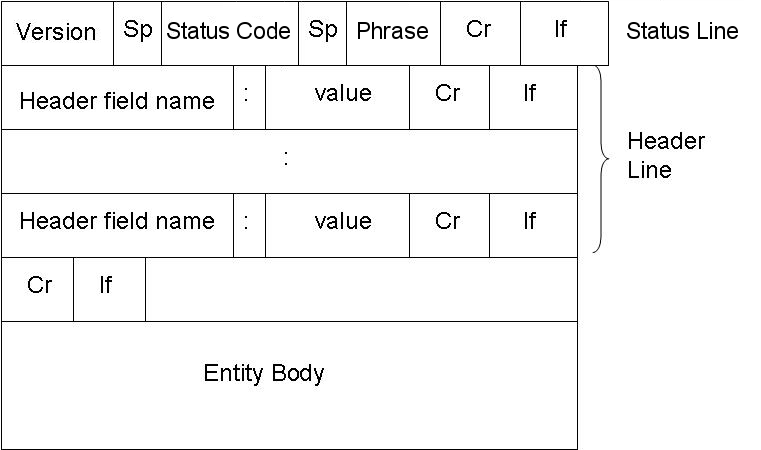
The status line gives a quick summary of what happened. It includes the HTTP version, a status code, and a short text description of the code.
The response body is where the actual content lives. If you requested a webpage, the body contains the HTML. If you asked an API for user data, it might contain JSON.
Status codes are like a quick report card on your request. Codes in the 200s mean success, 400s indicate a problem with your request, and 500s mean the server ran into an issue.
You don't need to memorize every code, but knowing the most common ones is helpful for figuring out what's happening.
| Status Code | Meaning | Description |
|---|---|---|
200 OK | Success | The request was successful and the server has the data. |
201 Created | Success | The request was successful and a new resource was created. |
400 Bad Request | Client Error | The server couldn't understand the request due to invalid syntax. |
404 Not Found | Client Error | The server can't find the requested resource. |
500 Internal Server Error | Server Error | Something went wrong on the server's end. |
Adding Context with Headers
Both requests and responses use headers to send extra information. Think of them as metadata or notes attached to the message. They work as key-value pairs, like Content-Type: application/json.
A request header might tell the server what kind of data the client can accept, or provide information about the browser being used. A response header can tell the client how long to cache the content or what kind of content is in the body.
GET /api/users/123 HTTP/1.1
Host: example.com
User-Agent: MyCoolBrowser/1.0
Accept: application/json
In this example, the Host header specifies the server's domain, User-Agent identifies the client making the request, and Accept tells the server the client would prefer to receive data in JSON format.
This entire structure of requests, responses, methods, codes, and headers forms the simple but powerful protocol that makes the web work. When you start interacting with APIs, you're just having a more structured HTTP conversation.