Professional Java Development Mastery
JVM Internal Architecture
The Virtual Machine
Coming from C++, you're used to a direct relationship between your code and the machine. You compile your source into machine code, an executable file tailored for a specific operating system and processor architecture. That executable runs directly on the hardware.
Java takes a different path. When you compile Java code, you don't get machine code. You get something called bytecode. This isn't the native language of a processor; it's the native language of an abstract computer: the Java Virtual Machine, or JVM. This approach is the foundation of Java's "Write Once, Run Anywhere" philosophy. The same bytecode can run on any device that has a JVM, whether it's a Windows server, a Mac laptop, or an Android phone.
Think of the JVM as a universal translator. Your Java code is compiled into a universal language (bytecode), and the JVM on each specific device translates that language into the local dialect (machine code) that the hardware understands.
Bringing Code to Life
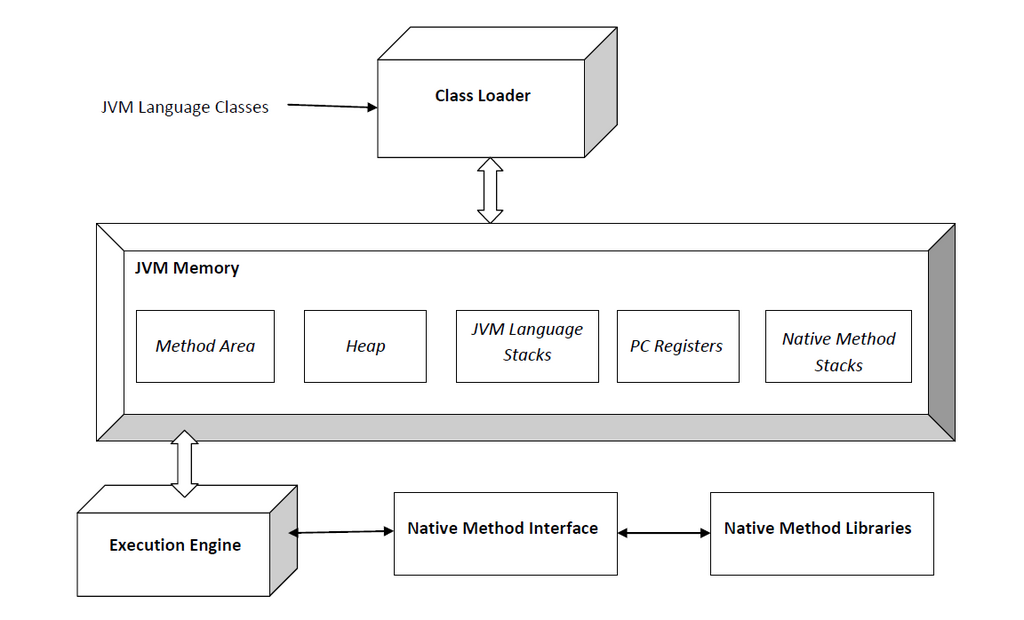
So how does the JVM turn bytecode into a running program? The process begins with the subsystem. Its job is to find the necessary bytecode, whether from your local disk or a network, and load it into the JVM's memory. It verifies the code to ensure it's safe and won't corrupt the machine, then allocates memory for it.
Once loaded, the JVM doesn't just interpret the bytecode line by line. That would be slow. Instead, it uses a . The JVM analyzes the code as it runs, identifying "hot spots"—pieces of code that are executed frequently. It then compiles these hot spots into native machine code on the fly. This gives you the best of both worlds: the portability of bytecode and, for critical parts of your application, the near-native performance of compiled C++.
A Managed Memory Space
In C++, memory management is your responsibility. You manually allocate memory with new or malloc() and must remember to deallocate it with delete or free(). Forgetting to do so leads to memory leaks. The JVM automates this process through a managed memory environment, which is split into a few key areas.
The memory is organized as follows:
-
Stack: Each thread of execution gets its own stack. The stack stores primitive variables (like
int,double) and references to objects. When a method is called, a new "frame" is pushed onto the stack to hold its local variables. When the method returns, its frame is popped off. This is very fast and strictly managed. -
Heap: This is where all objects live. When you use the
newkeyword to create an object, the JVM allocates memory for it on the heap. This memory is shared across all threads in your application. -
Metaspace: This area, which lives in native memory outside the heap, stores your application's metadata—the JVM's internal representation of your classes and methods.
Because objects on the heap are not automatically cleaned up when a method returns, they would pile up forever if left unchecked. This is where comes in. The GC is a process that periodically runs in the background, identifying and deleting objects on the heap that are no longer referenced by any part of the program.
This frees you from the burden of manual memory management, which is a major source of bugs in languages like C++. However, it doesn't mean you can ignore memory entirely. Understanding how GC works is crucial for writing high-performance, leak-free applications.
What is the direct output when you compile Java source code?
What is the primary purpose of the JIT (Just-In-Time) compiler within the JVM?
Understanding the JVM's architecture is the key to mastering Java. It's the engine that powers Java's platform independence, automatic memory management, and impressive performance. While it's a layer of abstraction that C++ developers might not be used to, it provides powerful features that are essential for building robust, scalable backend systems.