Practical Python Programming and Application
Pythonic Syntax Mastery
The Pythonic Way
Moving to Python from another programming language can feel like learning to speak a new dialect. The core concepts of loops, variables, and functions are familiar, but the way you express them is different. Python's design philosophy prioritizes readability and simplicity, often allowing you to write powerful programs with fewer lines of code. This is what developers mean when they talk about writing 'Pythonic' code.
Indentation Defines Everything
In many languages, you use curly braces {} or keywords like begin and end to define blocks of code. Python takes a different approach: it uses whitespace. The indentation of your code isn't just for style; it's a strict syntax rule that defines the scope of loops, functions, classes, and conditional statements.
Consistent indentation is mandatory. Four spaces per indentation level is the standard convention.
This rule is part of a larger set of guidelines called , Python's official style guide. Adhering to PEP 8 makes your code more readable and consistent with the broader Python community's practices.
# In Python, indentation groups statements.
weather = "sunny"

if weather == "sunny":
    print("Don't forget your sunglasses!") # This line is inside the if block
    print("Enjoy the day.")              # This line is also inside
else:
    print("You might need an umbrella.")   # This line is inside the else block

print("Have a good day regardless.") # This line is outside, it always runs
Types on the Fly
Python uses dynamic typing, which means you don't need to declare a variable's type. The interpreter figures it out at runtime. A variable is just a name pointing to an object, and that name can be pointed to a different type of object later.
# The same variable name can hold different types
my_variable = 42         # my_variable points to an integer object
print(type(my_variable))

my_variable = "Hello"    # Now it points to a string object
print(type(my_variable))
While this offers flexibility, it can sometimes make code harder to understand. To get the best of both worlds, modern Python supports . These are optional annotations that specify the expected type of a variable or function return value. They don't change how the code runs, but they provide valuable information for developers and tools like static analysis checkers.
# Using type hints for clarity
def greet(name: str) -> str:
    return "Hello, " + name

# This still works, as hints aren't enforced at runtime
# but analysis tools would flag it as an error.
greet(123)
Mutable vs. Immutable
Understanding the difference between mutable and immutable objects is critical in Python. It all comes down to whether an object's value can be changed after it's created.
| Type | Description | Examples |
|---|---|---|
| Immutable | Cannot be changed after creation. | int, float, str, tuple |
| Mutable | Can be changed in-place after creation. | list, dict, set |
When you try to "change" an immutable object, Python creates a new object in memory. When you change a mutable object, you are modifying the original object directly. This distinction becomes important when you pass objects to functions.
def modify_data(items: list):
    # This function modifies the list in-place
    items.append(4)
    print(f"Inside function: {items}")

my_numbers = [1, 2, 3]
print(f"Before function: {my_numbers}")

modify_data(my_numbers)

# The original list has been changed!
print(f"After function: {my_numbers}")
Expressive Control Flow
Python offers some unique tools that go beyond basic if/else and for/while loops, allowing for more concise and readable code.
The Walrus Operator (:=)
Introduced in Python 3.8, the allows you to assign a value to a variable as part of a larger expression. It's particularly useful for simplifying loops where you need to compute a value and then check it.
# Without the walrus operator
while True:
    line = input("Enter text (or 'quit'): ")
    if line == "quit":
        break
    print(f"You entered: {line}")

# With the walrus operator - more concise
while (line := input("Enter text (or 'quit'): ")) != "quit":
    print(f"You entered: {line}")
Match-Case Statements
Added in Python 3.10, match-case provides a powerful way to handle structural pattern matching, similar to switch statements in other languages but with more capabilities. It allows you to match values, types, and even the structure of complex objects.
def http_status(status):
    match status:
        case 200:
            return "OK"
        case 404:
            return "Not Found"
        case 500:
            return "Internal Server Error"
        case _:
            # The underscore is a wildcard, catches anything else
            return "Unknown status"

print(http_status(404)) # Output: Not Found
print(http_status(200)) # Output: OK
print(http_status(418)) # Output: Unknown status
Interactive Development
One of Python's most beloved features is its interactive shell, or . When you type python or python3 in your terminal with no script file, you enter this environment. It allows you to execute code line by line and immediately see the results, making it an excellent tool for testing small snippets of code, exploring libraries, and debugging.
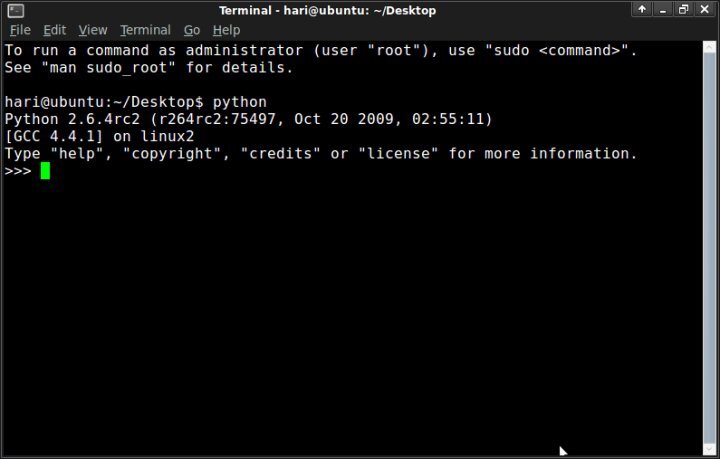
You can perform calculations, define functions, import modules, and inspect objects directly from the REPL. When you're ready to write a more permanent program, you save your code in a .py file and run it from the terminal using python your_script_name.py.
In Python, what is the primary role of indentation?
What is the main purpose of type hints in modern Python code?
Mastering these Python-specific syntax rules and conventions will make your code not only work, but also be clean, efficient, and understandable to other Python developers.