Operating System Fundamentals
Introduction to Operating Systems
What is an Operating System?
Think of a computer's hardware—the processor, memory, and storage—as a team of talented but uncoordinated specialists. They can do amazing things, but they don't speak the same language and can't work together on their own. The operating system (OS) is the project manager that steps in to direct everyone, ensuring tasks get done efficiently and without chaos.
Operating System
noun
System software that manages computer hardware and software resources, providing a platform for applications to run.
At its core, the OS acts as an intermediary. It's the bridge connecting you and your applications to the physical hardware. When you click save on a document, you aren't directly telling the hard drive what to do. You're telling the application, which then asks the operating system, which in turn commands the hardware to store the data.
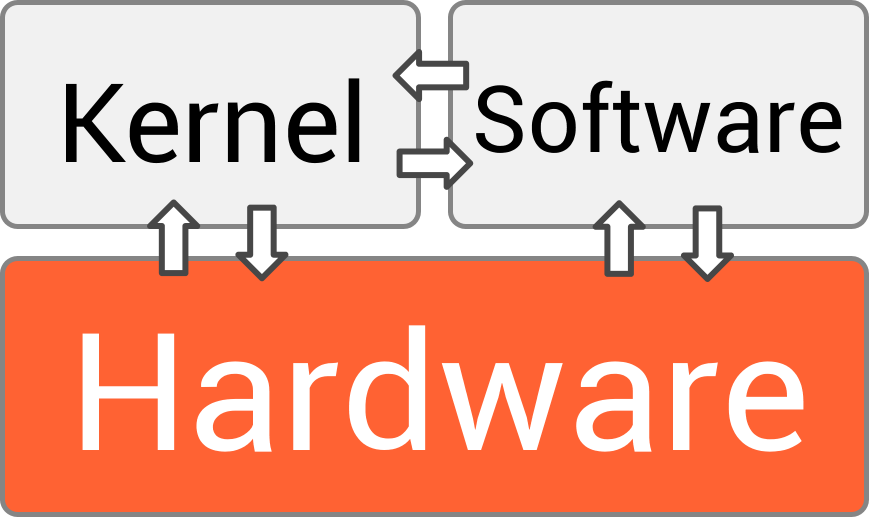
Without an operating system, a computer is just a collection of electronic parts. The OS brings it to life by providing a consistent way for software to access hardware resources.
A Quick Trip Through Time
The very first computers didn't have operating systems. Programmers had to interact directly with the hardware by flipping switches or feeding it punch cards with instructions. It was a slow, manual process, and the computer could only run one program at a time.
As computers grew more powerful, this became a bottleneck. The concept of an OS was born out of the need for efficiency. Early systems introduced batch processing, where similar jobs were grouped and run together without constant human intervention.
Things got more interesting with the development of time-sharing systems. These were the first operating systems that could juggle multiple programs and multiple users at once. They did this by rapidly switching the processor's attention between different tasks, creating the illusion that everything was running simultaneously. This laid the groundwork for the interactive, multitasking computers we use today.
The next major leap was the personal computer, which brought computing into homes and offices. This shift demanded more user-friendly interfaces, leading to the rise of the Graphical User Interface (GUI) pioneered by systems like the Apple Macintosh and later popularized by Microsoft Windows. Instead of typing commands, people could now point and click.

Today, operating systems are everywhere, from the smartphones in our pockets (like Android and iOS) to the massive servers that power the internet. The fundamental job, however, remains the same: manage resources and make the computer useful.
The OS at Work
So what does an OS actually do? It handles several critical tasks behind the scenes. Let's look at three of the most important ones.
Process Management: The Art of Juggling
When you run an application, it becomes a process that the OS needs to manage. If you have a web browser, a music player, and a text editor all open at once, the OS is in charge of allocating processor (CPU) time to each of them. Since a CPU can typically only do one thing at a time, the OS switches between these processes thousands of times per second. This switching, called multitasking, happens so fast that it seems like everything is running in parallel.
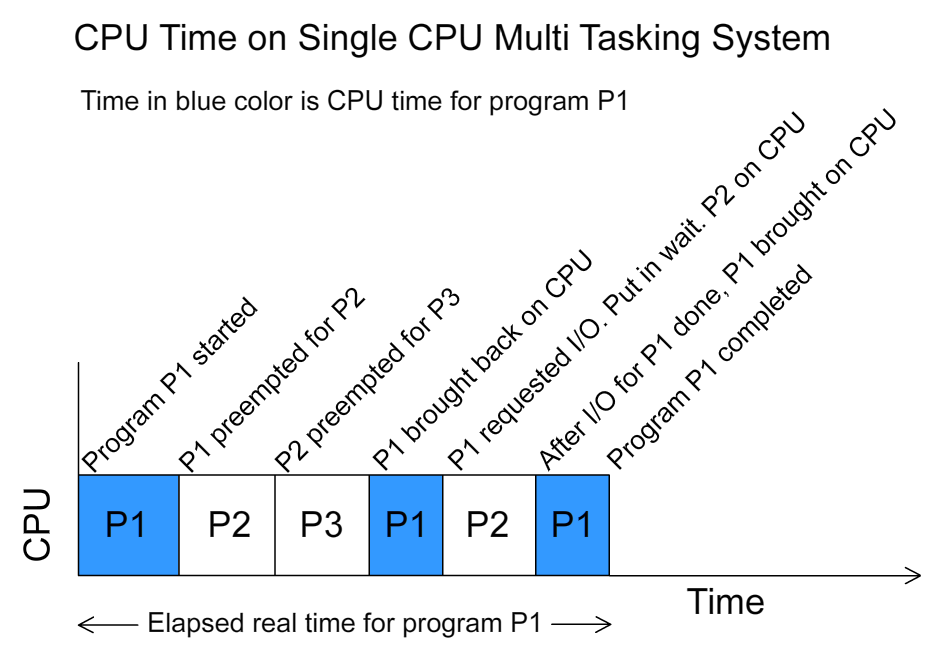
The OS decides which process gets to run, for how long, and in what order. It's a constant juggling act to keep the system responsive and ensure that no single application hogs all the resources.
Memory Management: A Place for Everything
Every running process needs a piece of the computer's main memory (RAM) to store its data and instructions. The operating system acts as a meticulous memory manager.
It allocates a specific portion of RAM to each process and ensures that no process can access the memory of another. This is crucial for stability and security; you wouldn't want a crashed web browser to take down your entire system or a malicious program to read your password from another application's memory. When you close an application, the OS reclaims its memory, making it available for other processes.
File Systems: The Digital Filing Cabinet
Without a file system, a storage drive would just be a vast, unorganized pool of data. It would be impossible to find anything.
The operating system imposes order by creating a file system, which organizes data into a hierarchy of files and directories (or folders). It keeps track of where each file is located on the drive, who has permission to access it, and other attributes like its size and creation date. When you save a file, the OS finds an empty spot on the drive, writes the data, and records its location. When you open a file, it retrieves that data for you. This is the foundation of how we store and retrieve information on a computer.
Ready to check your understanding? This quiz will cover the core functions and purpose of an operating system.
What is the primary role of an operating system?
How does an operating system create the illusion of running multiple programs at the same time on a single CPU core?
These three functions—process, memory, and file management—are the bedrock of any modern operating system. They work together seamlessly to create the smooth, reliable computing experience we often take for granted.