Networking Fundamentals for Technical Interviews
Networking Models
Models for Network Chat
When two computers talk to each other across a network, it's not a simple, single event. It's a complex process with many steps. To manage this complexity, engineers created networking models. These models act like a blueprint, breaking down the massive task of network communication into smaller, manageable jobs.
Think of a networking model as a set of rules for a conversation. Each rule handles a different part of the process, ensuring the message gets from sender to receiver correctly.
The two most important models to know are the OSI model and the TCP/IP model. They provide a shared language for talking about how networks work, which is incredibly useful for building and troubleshooting them.
The OSI Model: A Seven-Step Plan
The Open Systems Interconnection (OSI) model is a conceptual framework that standardizes network communication into seven distinct layers. Imagine it like an assembly line for data. As your email or a webpage request moves down the layers on your computer, it gets packaged up. When it arrives at the other computer, it moves up the layers, getting unpackaged at each step until it's readable again.
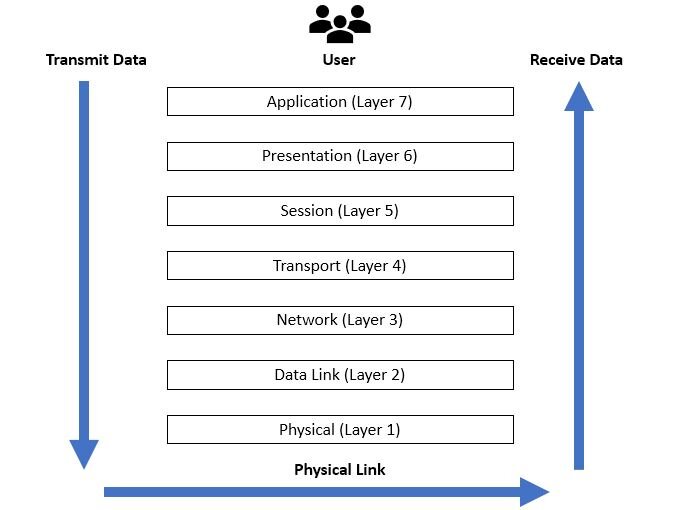
Each layer has a specific job and only talks to the layers directly above and below it. This separation makes it easier to understand the system and fix problems. If there's an issue with the physical cable, you know to check Layer 1, not the application at Layer 7.
| Layer | Name | Function |
|---|---|---|
| 7 | Application | Provides network services directly to user applications, like a web browser or email client. |
| 6 | Presentation | Translates, encrypts, and compresses data so the application layer can understand it. |
| 5 | Session | Manages conversations (sessions) between computers. Establishes, maintains, and terminates connections. |
| 4 | Transport | Provides reliable data transfer between hosts. It chops data into segments and ensures they all arrive correctly. |
| 3 | Network | Handles routing and logical addressing (like IP addresses). It figures out the best path for data to take across the network. |
| 2 | Data Link | Manages communication between devices on the same physical network. It deals with physical addresses (MAC addresses) and error checking. |
| 1 | Physical | Transmits raw bits of data over a physical medium, like cables or radio waves. This is the hardware layer. |
The TCP/IP Model: The Internet's Blueprint
While the OSI model is a great theoretical guide, the TCP/IP model is the practical framework that the internet is actually built on. It's more streamlined, combining several of the OSI layers into four broader categories.
The TCP/IP model is the foundational network protocol architecture for the internet.
The TCP/IP model maps directly to the specific protocols, like TCP (Transmission Control Protocol) and IP (Internet Protocol), that run the internet. It's less of a theoretical concept and more of a description of how things actually work.
| Layer | Name | Function |
|---|---|---|
| 4 | Application | Combines the OSI Application, Presentation, and Session layers. Handles user-facing protocols (HTTP for web, SMTP for email). |
| 3 | Transport | Corresponds to the OSI Transport layer. Manages end-to-end communication using protocols like TCP and UDP. |
| 2 | Internet | Corresponds to the OSI Network layer. Responsible for logical addressing (IP addresses) and routing packets across the network. |
| 1 | Link | Combines the OSI Data Link and Physical layers. Handles the hardware and physical transmission of data. |
Comparing the Two Models
The main difference is the level of detail. The OSI model's seven layers offer a more granular breakdown, which is great for learning and troubleshooting. The TCP/IP model's four layers are more practical, reflecting the actual implementation of internet protocols.
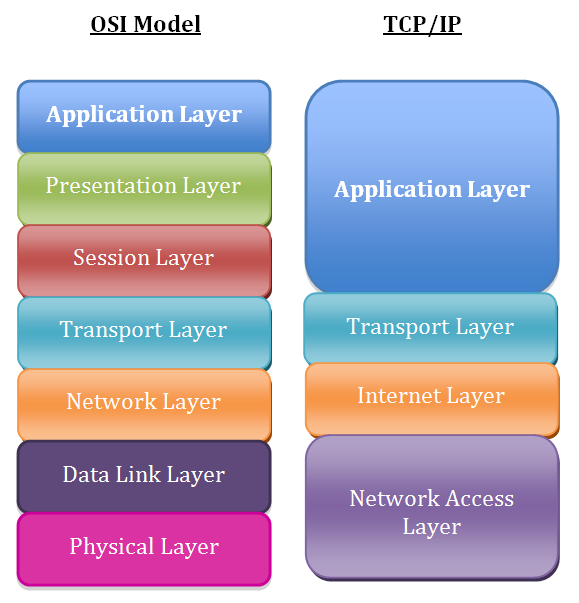
Key takeaway: The OSI model is the what and why (theory), while the TCP/IP model is the how (practice).
Both models show data moving through a stack of layers. Understanding these layers helps you visualize how a simple click in your browser becomes a stream of bits traveling through cables and routers to a server thousands of miles away, and how the response finds its way back to your screen.
Time to check your understanding.
What is the primary reason for using networking models like OSI and TCP/IP?
Which networking model is a conceptual framework with seven distinct layers, often used for teaching and troubleshooting?
Understanding these models provides a solid foundation for diving deeper into how the internet works.