Modern React Development Essentials
Declarative UI Patterns
A New Way of Thinking
When you first learn JavaScript, you learn to directly manipulate the Document Object Model (DOM). You write code that says: find this element, create a new element, change this element's text, and append it over there. This is the imperative approach. It's like giving a taxi driver turn-by-turn directions to get to your destination.
Imperative: "Go straight for two blocks, turn left at the light, drive 500 feet, and stop at the third house on the right."
React introduces a different, declarative approach. Instead of telling the browser how to change the UI, you simply declare what the UI should look like for any given state. You tell the taxi driver your destination and trust them to figure out the best route. React becomes the driver, handling all the DOM manipulations for you.
Declarative: "Take me to 123 Main Street."
Let's see this in action. Here’s how you might create a simple button that updates a message when clicked, using an imperative, vanilla JavaScript approach.
// Imperative (Vanilla JS)

// 1. Find the container and create elements
const app = document.getElementById('app');
const button = document.createElement('button');
const message = document.createElement('p');

// 2. Set initial properties
let isToggled = false;
button.textContent = 'Toggle';
message.textContent = 'Status: Off';

// 3. Define the step-by-step update logic
button.addEventListener('click', () => {
  isToggled = !isToggled;
  // Manually change the text based on the new state
  message.textContent = `Status: ${isToggled ? 'On' : 'Off'}`;
});

// 4. Append children to the DOM
app.appendChild(message);
app.appendChild(button);
Notice all the manual steps. We have to find elements, create them, set their content, listen for events, and then manually update the content inside the event listener. Now, here's the declarative React equivalent.
// Declarative (React)
import { useState } from 'react';

function ToggleSwitch() {
  const [isToggled, setToggled] = useState(false);

  // We describe WHAT the UI should look like
  return (
    <div>
      <p>Status: {isToggled ? 'On' : 'Off'}</p>
      <button onClick={() => setToggled(!isToggled)}>
        Toggle
      </button>
    </div>
  );
}
In the React version, we don't tell the DOM how to change. We just describe the final output. The p tag's content depends on the isToggled state. When the button is clicked, we update that state, and React handles the messy work of updating the DOM to match. This reduces the chances for bugs and makes the UI's behavior much more predictable.
UI as a Function of State
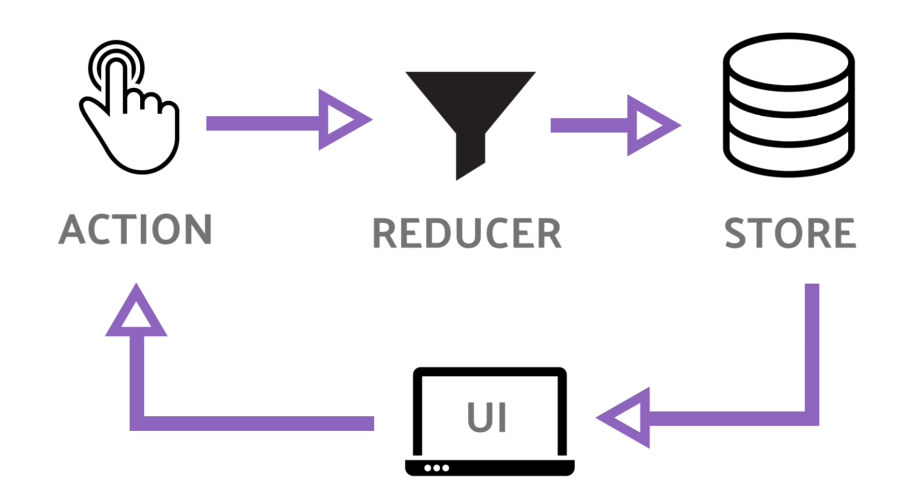
The core mental model for React is simple yet powerful: your entire UI is just a function of your application's state. Think of it as a formula.
When your state changes—say, a user types into a search bar—React simply re-runs the function. It then compares the new UI description with the old one and efficiently updates only the parts of the actual DOM that have changed. This data flows in one direction, from the state down to the UI, which is a concept called an approach that makes logic easier to follow and debug.
Building with Components
To manage complexity, React encourages you to break your UI down into independent, reusable pieces called components. A component is like a LEGO brick. It's a self-contained unit that manages its own state and logic, but it can be combined with other components to build something much larger and more complex. A webpage might be broken down into Navbar, Sidebar, Article, and Footer components. The Article component could itself be made of Headline, AuthorInfo, and Comment components.
But how do we describe what these components should render? We don't write HTML directly inside our JavaScript files. Instead, React uses a syntax extension that looks and feels like HTML but is far more powerful.
JSX allows you to write HTML-like structures right in your JavaScript code. You can embed JavaScript expressions directly inside it using curly braces {}. This combines the logic and the view into a single, cohesive unit: the component.
const name = 'Ada Lovelace';
// JSX lets us embed the 'name' variable directly.
const element = <h1>Hello, {name}</h1>;
Time to check your understanding of these core concepts.
Which of the following best describes the declarative approach to UI development that React uses?
What is the primary role of JSX in React?
This shift from imperative to declarative thinking is the most important step in learning React. By describing what you want and letting React handle the how, you build applications that are easier to reason about, debug, and maintain.