Modern Python Mastery for Developers
Complex Data Structures
Wrangling Nested Data
In the real world, data is rarely flat. When you get data from a web API, it often arrives as JSON a structure full of nested dictionaries and lists. Imagine you're working with user data.
user_profile = {
    "userId": 101,
    "username": "alex_w",
    "details": {
        "email": "alex.w@example.com",
        "account_type": "premium"
    },
    "posts": [
        {"postId": 55, "title": "My first post"},
        {"postId": 56, "title": "A weekend trip"}
    ]
}
Accessing this data involves chaining keys and indices. To get the user's email, you'd navigate through the details dictionary. To get the title of their second post, you'd access the posts list and then the specific dictionary inside it.
# Get the email
email = user_profile["details"]["email"]

# Get the title of the second post
post_title = user_profile["posts"][1]["title"]

print(email)       # Output: alex.w@example.com
print(post_title)  # Output: A weekend trip
Smarter Collections
Python's built-in collections module provides specialized container datatypes that solve common problems elegantly. Two of the most useful are defaultdict and Counter.
A defaultdict saves you from writing extra code to check if a key already exists. When you try to access a key that isn't there, it automatically creates a default value for it. This is perfect for grouping items.
from collections import defaultdict

departments = [("sales", "Alice"), ("dev", "Bob"), ("sales", "Charlie")]

# Without defaultdict
employees_by_dept = {}
for dept, name in departments:
    if dept not in employees_by_dept:
        employees_by_dept[dept] = []
    employees_by_dept[dept].append(name)

# With defaultdict
employees_by_dept_dd = defaultdict(list)
for dept, name in departments:
    employees_by_dept_dd[dept].append(name)

# Both produce: {'sales': ['Alice', 'Charlie'], 'dev': ['Bob']}
Notice how the defaultdict version is cleaner. We didn't need the if statement because defaultdict(list) tells Python, "If a key is missing, create an empty list for it."
Next, Counter is a dictionary subclass for counting hashable objects. It's a high-performance way to tally items in a list or string.
from collections import Counter

colors = ["red", "blue", "red", "green", "blue", "blue"]

color_counts = Counter(colors)

print(color_counts)
# Output: Counter({'blue': 3, 'red': 2, 'green': 1})

print(color_counts["blue"]) # Output: 3
print(color_counts.most_common(1)) # Output: [('blue', 3)]
A Counter object acts like a dictionary but provides extra methods like most_common(), which is very convenient.
The Power of Sets
A set is an unordered collection of unique items. Their main superpower is highly optimized membership testing. Checking if an item is in a set is significantly faster than checking if it's in a list, especially for large collections.
This performance boost comes from how sets are implemented using a hash table. While a list has to check each item one by one, a set can almost instantly compute where the item should be and check that one spot. In computer science terms, sets offer an average time complexity of O(1) (constant time) for lookups, while lists are O(n) (linear time).
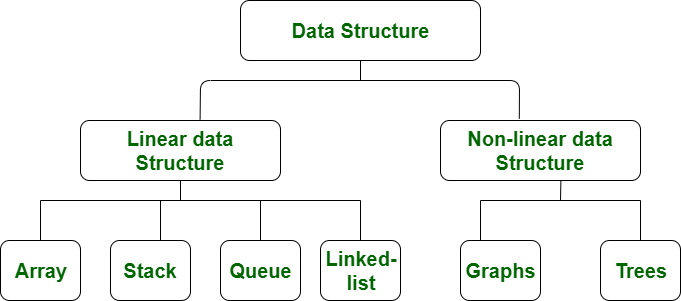
Sets also support powerful mathematical operations. You can find the union (all unique items from both sets), intersection (items present in both sets), and difference (items in one set but not the other) with simple operators.
devs = {"Alice", "Bob", "Charlie", "David"}
qa = {"Charlie", "Eve", "Frank"}

# Union: Who works in either department?
all_staff = devs | qa
# {'Alice', 'Bob', 'Charlie', 'David', 'Eve', 'Frank'}

# Intersection: Who works in both departments?
on_both_teams = devs & qa
# {'Charlie'}

# Difference: Which developers are not in QA?
just_devs = devs - qa
# {'Alice', 'Bob', 'David'}
Dictionary Views and Copies
When you call .keys(), .values(), or .items() on a dictionary, you don't get a list. You get a special "view" object. A view is a dynamic window into the dictionary's entries, which means it will reflect any changes you make to the original dictionary.
In Python 3.9 and later, you can merge dictionaries using the pipe | operator, which is a cleaner alternative to the .update() method.
dict1 = {"a": 1, "b": 2}
dict2 = {"b": 3, "c": 4}

# The pipe operator creates a new dictionary
merged = dict1 | dict2
# {'a': 1, 'b': 3, 'c': 4}

# The |= operator updates in place
dict1 |= dict2
# dict1 is now {'a': 1, 'b': 3, 'c': 4}
Finally, be careful when copying nested data structures. A standard copy, or a shallow copy, creates a new object but fills it with references to the items inside the original. If you change a nested object in the copy, it also changes in the original. To create a fully independent copy, you need a deepcopy from the copy module.
import copy

original_list = [1, [2, 3]]

# Shallow copy
shallow = copy.copy(original_list)
shallow[1].append(4)

# Deep copy
deep = copy.deepcopy(original_list)
deep[1].append(5)

print(f"Original: {original_list}")
# Output: Original: [1, [2, 3, 4, 5]] -- Whoops!

print(f"Shallow: {shallow}")
# Output: Shallow: [1, [2, 3, 4, 5]]

print(f"Deep: {deep}")
# Output: Deep: [1, [2, 3, 4, 5, 5]]
# The deep copy did not affect the original (which we have already mutated once)
Using deepcopy is more memory-intensive, but it prevents bugs where changes in one part of your program unexpectedly affect another.