Mastering Python Programming
Python Basics
Getting Python Ready
Before you can write code, you need a place to run it. Python code is run by a program called an interpreter, which reads your code line by line and tells the computer what to do. You have two main options for this.
You can install Python directly on your computer. This is great for bigger projects, but for just starting out, an online environment is much simpler. All you need is a web browser. Websites like Replit or Google Colab provide a complete setup where you can write and run Python code instantly.
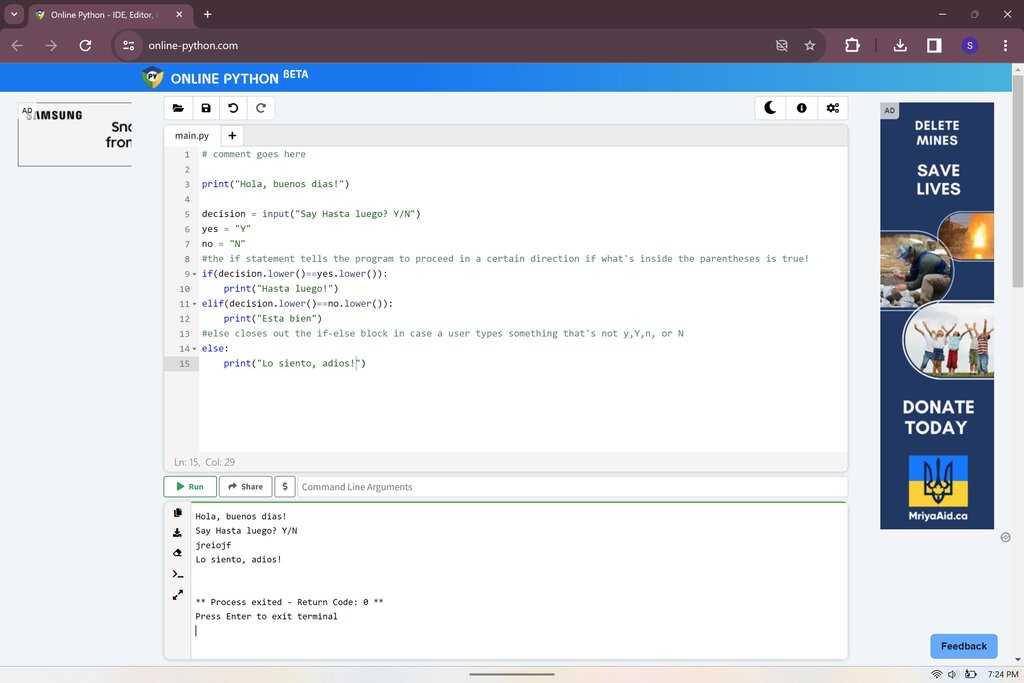
These online tools are often called Integrated Development Environments, or IDEs. An IDE is like a workshop for coders, bundling a text editor for writing code with a console to display the results, all in one place. It makes the process of writing, testing, and fixing code much smoother.
Writing Your First Code
A computer program is just a sequence of instructions. Let's start with the most basic one: telling the computer to display a message. In Python, we do this with the print() function.
A function is a reusable block of code that performs a specific task. Python has many built-in functions, like
print(), to handle common jobs.
The traditional first program for any new language is one that prints "Hello, World!". Here’s how you do it in Python.
print("Hello, World!")
When you run this code, the text Hello, World! appears on the screen. The print() function displays whatever you put inside its parentheses. The text inside the quotation marks is called a string, which is just a sequence of characters. Every programming language has rules about how to write instructions. These rules are called syntax. Python is famous for having a simple and readable syntax, which makes it a great language for beginners.
Storing Information
Programs need to work with data, and we often need a way to store that data for later use. We do this with variables. Think of a variable as a labeled box where you can keep a piece of information. You give the box a name, and you can change what's inside it.
# Assign the string "Python is fun" to a variable named 'greeting'
greeting = "Python is fun"

# Print the value stored in the 'greeting' variable
print(greeting)
Here, greeting is the variable name, and we've stored the text "Python is fun" inside it. When we print the variable, the program looks up what's inside that box and displays it. The text starting with a # is a comment. Python ignores comments, but they are useful for explaining what your code does to other people, or to your future self.
Variables can hold different kinds of information, not just text. These different kinds are called data types.
| Data Type | Description | Example |
|---|---|---|
String (str) | A sequence of characters. | "Hello" or 'Python' |
Integer (int) | A whole number. | 10, -5, 0 |
Float (float) | A number with a decimal point. | 3.14, -0.5 |
Boolean (bool) | A value that is either True or False. | True, False |
Python is smart enough to figure out the data type on its own when you assign a value to a variable.
name = "Alice"       # This is a string
age = 30            # This is an integer
height = 5.5        # This is a float
is_student = True   # This is a boolean
Interacting with the User
So far, our programs have just displayed information. A program becomes much more interesting when it can interact with a user. Python's input() function lets us get information from the user.
# Prompt the user to enter their name
name = input("What is your name? ")

# Say hello to the user
print("Hello, " + name + "!")
When this code runs, it first displays the message "What is your name? " and then waits. After you type your name and press Enter, the program stores your input in the name variable. Then, it uses the + symbol to join the string "Hello, " with the name you provided and a final "!", and prints the complete greeting.
One important detail: the
input()function always gives you back a string, even if the user types in a number. If you need to treat the input as a number to do math, you'll need to convert it first using functions likeint()orfloat().
age_string = input("How old are you? ")
age_number = int(age_string)
year_of_birth = 2024 - age_number

# We have to convert year_of_birth back to a string to print it with other strings
print("You were born in " + str(year_of_birth) + ".")
This example takes the user's age as a string, converts it to an integer, performs a calculation, and then converts the result back into a string to display it in a sentence.
What is the primary function of a Python interpreter?
Which line of Python code will correctly display the message Ready, set, go! on the screen?
You've just taken your first steps with Python. You know how to set up your coding environment, print messages, use variables to store different types of data, and interact with a user. These are the fundamental building blocks for all the powerful programs you'll create in the future.