Mastering GitHub Copilot for Coding
Introduction to GitHub Copilot
Your AI Coding Partner
Think of the last time you were writing code and got stuck, even for a moment. Maybe you forgot the exact syntax for a loop or the parameters for a specific library function. It happens to everyone. Now, imagine having an expert programmer sitting next to you, ready to offer suggestions in real time. That's the idea behind GitHub Copilot.
Developed by GitHub and OpenAI, Copilot is an AI-powered tool that acts like a super-intelligent autocomplete. It's trained on a massive amount of public code from GitHub repositories, allowing it to understand context and patterns across dozens of programming languages. As you type, it suggests not just single words or lines, but entire blocks of code, from simple functions to complex algorithms.
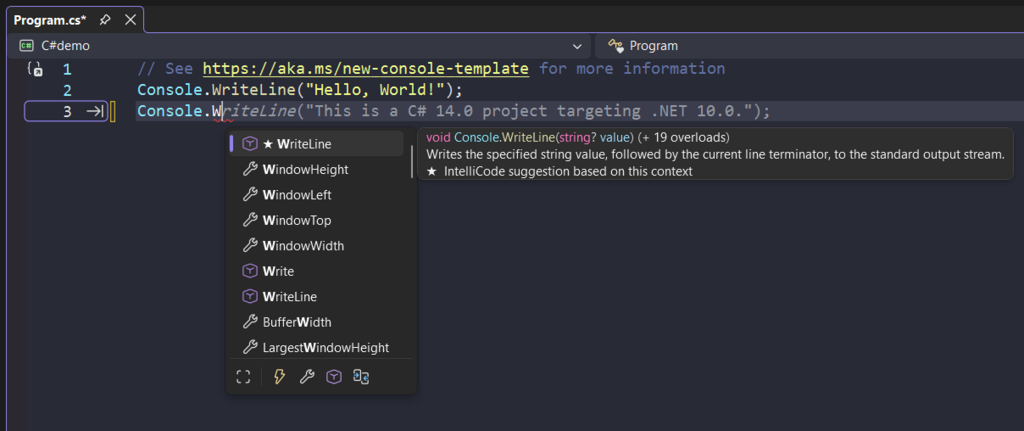
GitHub Copilot’s AI integration provides real-time code completion, helping developers quickly move through repetitive coding tasks.
This isn't just about saving keystrokes. By handling routine and repetitive code, Copilot frees you up to concentrate on the more creative and complex aspects of problem-solving. It helps reduce the mental load of remembering boilerplate syntax, letting you stay focused on the logic of your application.
How It Works
GitHub Copilot integrates directly into your code editor, such as Visual Studio Code, Neovim, or a JetBrains IDE. It analyzes the code you've already written in your current file, as well as any other open files in your project, to understand the context of what you're trying to build.
One of its most powerful features is its ability to turn natural language into code. You can write a comment describing the function you need, and Copilot will generate the code to match. For instance, you could write a comment like // function to fetch user data from an API and parse the JSON and Copilot will offer a complete implementation.
// A developer writes a comment describing the desired function.
// parse a date in the format YYYY-MM-DD

// Copilot suggests the complete function based on the comment.
function parseDate(dateString) {
  const parts = dateString.split('-');
  if (parts.length === 3) {
    const year = parseInt(parts[0], 10);
    const month = parseInt(parts[1], 10) - 1; // Month is 0-indexed
    const day = parseInt(parts[2], 10);
    return new Date(year, month, day);
  }
  return null;
}
This collaborative approach helps you code faster and learn new patterns. It’s particularly useful when you're working with an unfamiliar library or language. Because it's trained on a vast dataset, Copilot has seen countless examples and can often provide a solid starting point.
Languages and Frameworks
While GitHub Copilot is especially proficient in popular languages like Python, JavaScript, TypeScript, Ruby, and Go, it works with dozens of others. Its knowledge isn't limited to the core languages, either. It also understands a wide array of frameworks and APIs.
Whether you're building a web application with React, analyzing data with pandas, or creating a mobile app with Swift, Copilot can provide relevant and helpful suggestions.
This versatility makes it a valuable tool for developers across different specializations. Instead of constantly switching to a browser to look up documentation, you can get suggestions directly in your editor, helping you maintain your flow and stay productive.
What is the primary function of GitHub Copilot?
How does GitHub Copilot understand the context of the code you're trying to write?
Ultimately, GitHub Copilot is a tool designed to augment a developer's skills, not replace them. It accelerates development by handling the routine parts of coding, allowing you to focus on building better software.