Mastering Active Directory Fundamentals
Introduction to Active Directory
What Is Active Directory?
Active Directory, or AD, is Microsoft's directory service for Windows networks. Think of it as a highly organized address book for every resource on a network, from users and computers to printers and files. Its main job is to bring order to chaos by centralizing the management of all these resources.
Instead of managing each computer individually, AD allows administrators to manage everything from one central place. This is the core principle of Active Directory: centralized control.
The Core Jobs of AD
Active Directory handles two critical security tasks: authentication and authorization. Though they sound similar, they perform very different functions.
Authentication
noun
The process of verifying that a user is who they claim to be. It's like showing your ID to a security guard.
When you log in to a work computer by entering a username and password, Active Directory is what checks your credentials. It authenticates your identity, confirming that you are a legitimate user on the network.
Authorization
noun
The process of determining what an authenticated user is allowed to do. This is the permission to access specific resources.
Once you're authenticated, AD then determines your level of access. Can you open the company's financial records? Are you allowed to install new software? That’s authorization. It grants or denies permissions based on your role.
Think of it this way: Authentication is proving you're an employee. Authorization is what your keycard actually opens.
The Structure of Active Directory
To manage all these resources effectively, Active Directory uses a hierarchical structure. This organization is built from three main components: domains, trees, and forests.
These components provide a logical, scalable way to organize network resources, much like a filing cabinet system.
Domains are the basic building blocks. A domain is a group of objects, like users and computers, that share the same AD database. For example, a company might have a single domain called mycompany.com.
Trees are collections of one or more domains grouped together in a hierarchical parent-child structure. For instance, sales.mycompany.com could be a child domain of the parent domain mycompany.com. They share a common namespace.
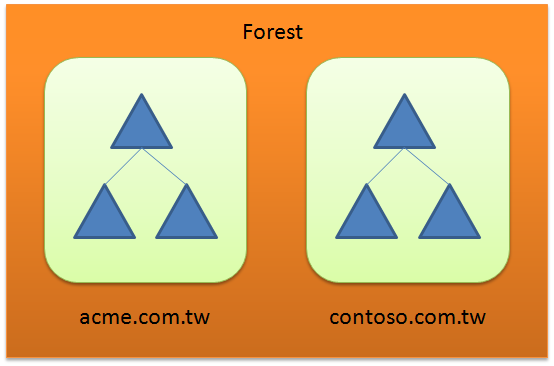
Forests are the highest level of organization. A forest is a collection of one or more domain trees that do not share a common namespace but trust each other. A large corporation that acquires another company might connect their separate AD trees to form a single forest, allowing for communication between them.
Now, let's test your understanding of these fundamental concepts.
What is the primary role of Active Directory in a Windows network?
An employee enters their username and password to log in to their computer. Which security task is Active Directory performing?
This structure allows Active Directory to scale from a small office with one server to a massive global enterprise with millions of users and devices.