Linux Process Virtual Machine Fundamentals
Introduction to Linux Processes
What is a Process?
Think of a program as a recipe. It’s a list of instructions—like 'chop vegetables' or 'preheat oven'—written down and stored in a cookbook. The recipe itself doesn't do anything. It just sits there.
A process is what happens when you decide to cook that recipe. It's the active, running instance of the program. You gather ingredients (memory), use the stove (CPU), and follow the steps one by one. The recipe (program) is passive, but the act of cooking (process) is dynamic.
In Linux, a process is a program in execution. It's the fundamental unit of work that the operating system manages.
When you double-click an icon or type a command in the terminal, you're telling the operating system to create a process from that program. You can run the same program multiple times, creating multiple processes. For example, opening two web browser windows means you have two separate browser processes running, each an independent execution of the same browser program.
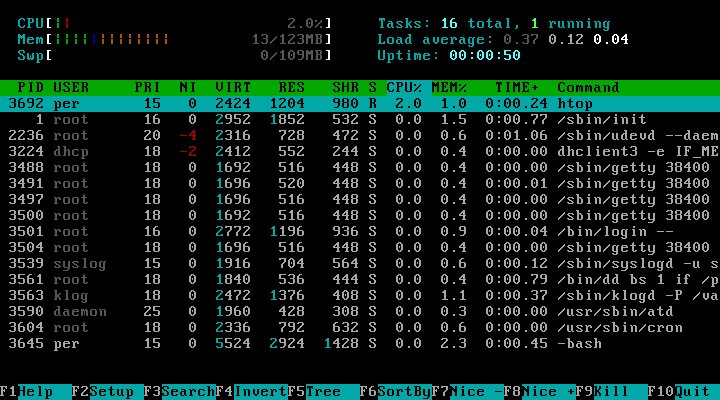
The Life of a Process
Every process has a lifecycle, much like a living thing. It is created, it lives its life by executing instructions, and eventually, it terminates.
-
Creation: A process is born when an existing process creates a new one. This initial process might be started by you, the user, or by the system itself. The original process is called the parent, and the new one is the child. This creates a family tree of processes, all tracing back to a single ancestor process that starts when the system boots up.
-
Execution: Once created, the process begins executing the program's instructions. The operating system's scheduler gives the process time on the CPU to do its work. It might read files, calculate numbers, or wait for input from your keyboard.
-
Termination: A process ends in one of two ways. It can complete its work and exit gracefully, or it can be terminated by the user or the operating system if something goes wrong.
Inside a Process
To keep things organized, the operating system gives each process its own private space in memory. This space is structured into a few key areas, each with a specific purpose.
Here’s what each part does:
-
Program Code: Also known as the text section, this is where the compiled machine code of the program resides. It’s typically read-only, so the process can’t accidentally modify its own instructions.
-
Data Section: This part stores global and static variables that are initialized when the program starts.
-
Heap: When a program needs to allocate memory dynamically while it's running, it does so from the heap. This area grows upward as more memory is requested.
-
Stack: The stack stores temporary data, like local variables inside functions, function parameters, and return addresses. Each time a function is called, a new frame is pushed onto the stack. When the function returns, its frame is popped off. The stack grows downward.
Process States
A process isn't always actively running on the CPU. An operating system juggles hundreds or thousands of processes at once, so each process moves through different states during its lifecycle. Think of it like a person's status: you can be working, sleeping, or waiting in line.
| State | Description |
|---|---|
| Running | The process is currently being executed by the CPU. |
| Ready | The process is ready to run but is waiting for the scheduler to give it a turn on the CPU. |
| Waiting | The process is paused, waiting for some event to happen, like data arriving from a network or a file to finish writing to the disk. |
| Terminated | The process has finished execution and is being cleaned up by the operating system. |
The operating system's scheduler is the traffic cop that decides which 'Ready' process gets to be 'Running' next. This rapid switching between processes is what allows a modern computer to multitask so effectively, even with only a single CPU core.
Using the analogy of a recipe in a cookbook, what does a 'process' represent?
What is the primary role of the operating system's scheduler?
Understanding processes is the first step to mastering how Linux works under the hood. It's the foundation for managing system resources, troubleshooting applications, and writing efficient software.