Linux Mastery for Cybersecurity Professionals
Kernel and Architecture
The Kernel's Protected Kingdom
Every operating system has a core, a central component that manages everything. In Linux, this is the kernel. It’s the ultimate gatekeeper, controlling the CPU, memory, and all connected devices. To maintain stability and security, the system is divided into two distinct realms: user space and kernel space.
User space is where your applications live—your web browser, your terminal, your code editor. These programs run with limited privileges. They can't just grab a chunk of memory or talk directly to the graphics card. Doing so would be chaotic and insecure.
Kernel space is the exclusive domain of the kernel. It has unrestricted access to all hardware and memory. When an application in user space needs to do something privileged, like opening a file or sending data over the network, it must ask the kernel for help. This formal request is called a system call, or syscall.
Securing the Bridge
System calls are the controlled bridges between user space and kernel space. An application says, "Hey kernel, please write these bytes to this file," and the kernel takes over, performs the action, and reports back. This model prevents a buggy or malicious application from crashing the entire system or accessing another program's data.
From a security perspective, this bridge is a critical chokepoint. If we can control which syscalls an application is allowed to make, we can drastically shrink its potential attack surface. This is where comes in. Short for secure computing mode, seccomp is a Linux kernel feature that allows a process to enter a state where it can only make a very limited set of syscalls: read(), write(), _exit(), and sigreturn(). Modern seccomp policies (seccomp-bpf) are much more flexible, letting administrators define exactly which syscalls a program can and cannot use. Container technologies like Docker use this heavily to isolate workloads.
// A simplified seccomp-bpf policy example in JSON format
{
    "defaultAction": "SCMP_ACT_ERRNO",
    "architectures": [
        "SCMP_ARCH_X86_64"
    ],
    "syscalls": [
        {
            "names": [
                "accept",
                "close",
                "read",
                "write"
            ],
            "action": "SCMP_ACT_ALLOW"
        }
    ]
}
This simple policy tells the kernel to block all syscalls by default (SCMP_ACT_ERRNO) but explicitly allows a few essential ones for network communication and file access. If the application tries to do anything else, like start a new process, the kernel will shut it down.
The Boot Up Process
A system's security posture is established the moment you press the power button. The boot sequence is a multi-stage process, with security checks at each step.
-
BIOS/UEFI and Secure Boot: The first code that runs is on a chip on the motherboard. Modern systems use UEFI, which includes a feature called Secure Boot. When enabled, the UEFI firmware will only load bootloaders that are digitally signed with a trusted key. This prevents rootkits from inserting themselves before the operating system even starts.
-
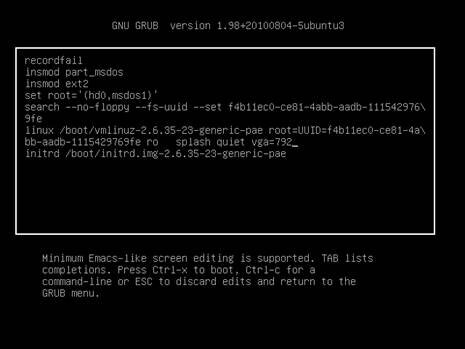
Bootloader (): The bootloader's job is to load the Linux kernel into memory. The most common one is the Grand Unified Bootloader, or GRUB. It presents a menu of operating systems or kernel versions to boot. GRUB itself can be password protected to prevent unauthorized users from editing boot parameters to, for example, bypass security or boot into a single-user mode.
-
Kernel Initialization: Once GRUB loads the kernel into memory and passes control to it, the kernel begins initializing the hardware. It also loads necessary kernel modules—pieces of code that extend the kernel's functionality, often for specific device drivers. On a secure system, the kernel can be configured to only load modules that have a valid digital signature.
-
Init Process (): The kernel's final job is to start the very first user-space process, which is almost always
systemdon modern Linux distributions. This process has Process ID 1.systemdis a system and service manager responsible for bringing the rest of the system online. It starts networking, mounts filesystems, and launches the login prompt, following a series of dependent "targets" or "runlevels".
Navigating the Secure Filesystem
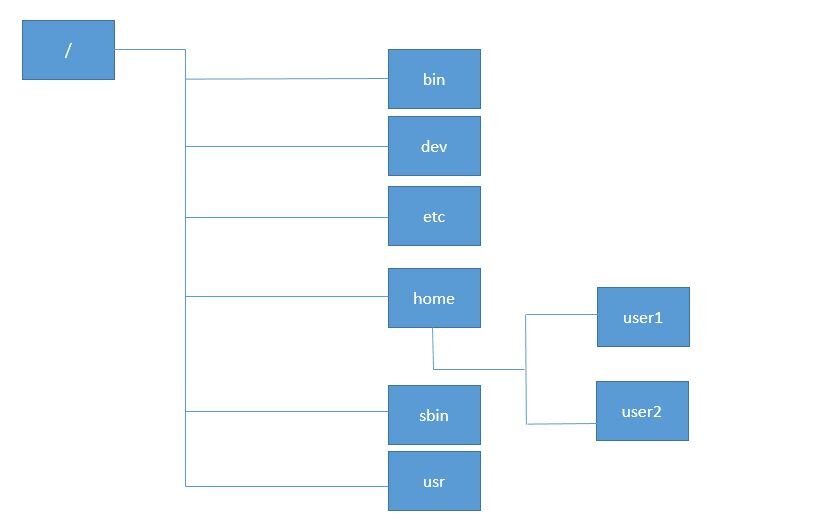
Once the system is running, the integrity of the filesystem is paramount. The (FHS) defines a standardized layout for Linux systems. Knowing this layout is crucial for security operations.
A few key locations for a Security Operations Center (SOC) analyst include:
/etc: Contains all core system configuration files. Unauthorized changes here could reconfigure services to be insecure./var/log: The home for most log files. This is a primary source of information for incident response and threat hunting./binand/sbin: These directories hold essential user and system binaries. Replacing a common command likelswith a malicious version is a classic attack technique./boot: Holds the Linux kernel and bootloader files. Its integrity is critical for a secure boot process.
Finally, we have kernel modules. You can see which ones are loaded with the lsmod command. These modules run in kernel space, so a malicious or vulnerable module can compromise the entire system. System administrators use modprobe to load or unload modules and can create blacklists in /etc/modprobe.d/ to prevent specific modules from ever being loaded, hardening the system by reducing the kernel's attack surface.
Now, let's test what you've learned about the core of Linux security.
What is the primary purpose of separating a Linux system into user space and kernel space?
A security engineer wants to restrict a containerized application, allowing it to only make a specific list of system calls like read() and write(). Which Linux security feature is designed for this task?
Understanding these foundational layers is the first step toward mastering Linux security. By controlling the bridges between spaces, securing the boot process, and knowing the layout of the land, you can build a formidable defense.