Learn to Code with Claude
Introduction to Programming
What is Programming?
Think of a computer as a hyper-literal assistant. It's incredibly fast and powerful, but it has no common sense. It will do exactly what you tell it to do, nothing more and nothing less. Programming is simply the act of writing a set of very precise instructions for this assistant to follow.
These instructions, written in a special language the computer can understand, are called code. When you run a program, you're just telling the computer to follow the instructions in your code.
Talking to Computers
At their core, computers only understand one language: machine code. It's a sequence of ones and zeros that's incredibly difficult for humans to read or write. To solve this, we created programming languages.
These languages act as a bridge, allowing us to write instructions in a way that’s closer to human language. A special program called a compiler or an interpreter then translates our code into the ones and zeros the computer’s processor can execute.
There are thousands of programming languages, each with its own strengths. Some are great for building websites, others for analyzing data, and others for creating video games. But they all share the same fundamental concepts.
The Rules of the Road
Every programming language has a strict set of rules, just like any human language. These rules are known as its syntax.
Syntax
noun
The set of rules that defines the combinations of symbols that are considered to be a correctly structured document or fragment in that language.
Think of syntax as the grammar and punctuation of code. If you write Let's eat grandma instead of Let's eat, grandma, the meaning changes completely. In programming, a small syntax error, like a missing parenthesis or a misspelled word, will usually prevent the program from running at all. The computer can't guess what you meant.
Storing Information
Programs need to work with information, like a user's name, the price of an item, or a game score. To do this, we use variables. A variable is like a labeled box where you can store a piece of information.
You give the box a name (the variable name) and put something inside it (the value). You can look at the value later or replace it with a new one.
For example, we could create a variable named userAge and store the number 25 in it. Later, the program can retrieve this value to check if the user is old enough to enter a site.
Every piece of information has a type. A person's name is text, their age is a number, and a statement like "is a subscriber" is either true or false. These are called data types.
| Data Type | Description | Example |
|---|---|---|
| Integer | Whole numbers | 42, -10 |
| String | Text (sequence of characters) | "Hello, world!" |
| Boolean | True or false value | true, false |
| Float | Numbers with decimal points | 3.14, -0.001 |
Knowing the data type is important because it tells the computer what you can do with the data. You can do math with numbers, for example, but you can't multiply two names together.
Making Decisions and Repeating Actions
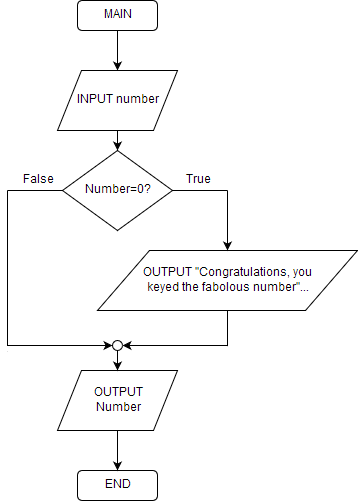
A program that just runs from top to bottom isn't very smart. The real power of programming comes from controlling the flow of execution. The two most basic ways to do this are with conditional statements and loops.
A conditional statement (usually an
ifstatement) lets a program make a choice. It checks if a certain condition is true, and if it is, it runs a specific block of code.
For example: IF the user's password is correct, THEN log them in. Otherwise, show an error message. This allows your program to react differently to different situations.
A loop lets a program repeat a block of code over and over again. This is useful for tasks that need to be done multiple times, like sending a personalized email to every person on a mailing list or drawing every frame of an animation.
For example:
WHILEthere are still items in the shopping cart,DOadd the price of the next item to the total. Once the cart is empty, the loop stops.
Without loops, you'd have to write the same line of code a thousand times to do something a thousand times. With a loop, you just write it once and tell the computer how many times to repeat it.
Input and Output
Finally, a program needs to interact with the outside world. This is done through input and output.
Input is any information that goes into the program. This could be a user typing on a keyboard, clicking a mouse, or data from a file or network.
Output is any information the program sends out. This could be text displayed on the screen, a file being saved, or a sound playing through the speakers.
Every useful program you've ever used, from a simple calculator to a complex web browser, is built from these fundamental building blocks: variables to store data, and control structures to decide what to do with it, all interacting with you through input and output.
What is the primary role of a programming language?
A programmer creates a piece of code to store a user's age. This labeled container for the number is best described as a ______.
These are the core ideas behind all programming. Once you understand them, learning any specific language is just a matter of learning its unique syntax.