JavaScript Fundamentals for Developers
Introduction to JavaScript
Making Webpages Come to Life
Think of a website as a house. HTML is the frame and the walls—the basic structure. CSS is the paint, furniture, and decorations that give it style. But what about the light switches, the doorbell, or the running water? That's where JavaScript comes in.
JavaScript is the programming language that makes websites interactive. When you click a button, see a pop-up message, or watch an image gallery slide across the screen, you're seeing JavaScript in action. It takes a static page and turns it into a dynamic, responsive experience.
While HTML provides the structure and CSS adds the style, JavaScript adds the behavior.
A Brief History
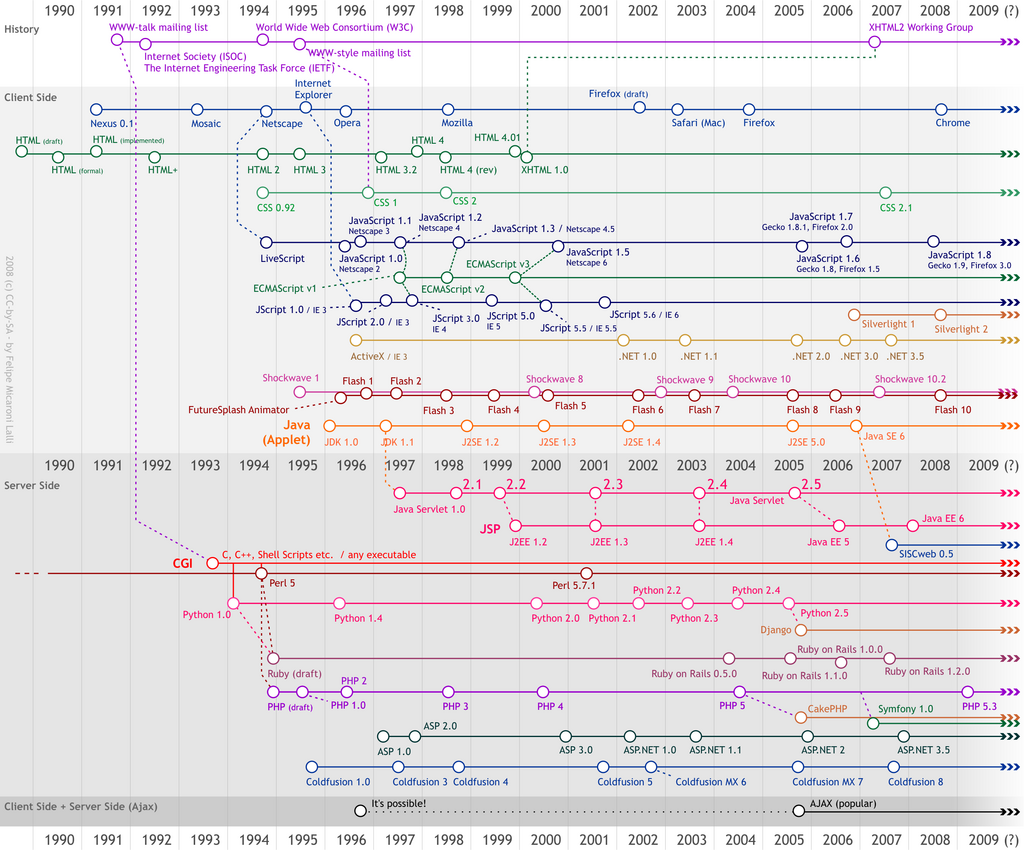
JavaScript was created in 1995 by a programmer named Brendan Eich at Netscape. It was originally called Mocha, then LiveScript, and was built in just 10 days. The name was changed to JavaScript as a marketing move to piggyback on the popularity of another language, Java, though the two are completely different.
In the early days of the web, different browsers had their own versions of scripting languages, which was a nightmare for developers. To solve this, JavaScript was submitted to ECMA International, a standards organization, to create a universal standard. This standard is called ECMAScript, and it ensures that JavaScript code you write works consistently across all modern browsers like Chrome, Firefox, and Safari.
Setting Up Your Workspace
Getting started with JavaScript is surprisingly simple. You don't need any fancy software. The only tool you absolutely need is the web browser you're already using.
Every modern browser comes with a built-in set of developer tools. These tools let you inspect the code of a webpage, diagnose problems, and, most importantly for us, write and test JavaScript code live. The most useful part of these tools for a beginner is the Console.
To open the developer tools in most browsers on a desktop computer, you can right-click anywhere on a webpage and select "Inspect," or press
Ctrl+Shift+I(Windows/Linux) orCmd+Option+I(Mac). Then, find and click on the "Console" tab.
The console is an interactive environment where you can type JavaScript code and see it run immediately. Let's try it. Open your browser's console and type the following line, then press Enter:
console.log("Hello, world!");
You should see the text "Hello, world!" printed out in the console. console.log() is a basic command used to print information. It's incredibly useful for checking your work and debugging code. You can also use the console as a quick calculator.
50 + 100
Press Enter, and the console will immediately show you the result: 150.
Adding JavaScript to a Webpage
While the console is great for testing, you'll eventually want to add JavaScript directly to your HTML files. You can do this by placing your code inside <script> tags.
Here’s a basic HTML file with a simple script. This code will create a pop-up alert box when the page loads.
<!DOCTYPE html>
<html>
<head>
  <title>My First JS Page</title>
</head>
<body>
  <h1>Welcome!</h1>

  <script>
    alert("This is an alert from JavaScript!");
  </script>

</body>
</html>
You can save this code as an index.html file and open it in your browser to see it work. The JavaScript code is executed as the browser parses the HTML document. As you learn more, you'll see how to make JavaScript run in response to user actions, like clicking a button.
Time to check what you've learned.
In the analogy of building a house, if HTML is the frame and CSS is the paint, what is JavaScript?
What is the name of the official standard that ensures JavaScript code works consistently across different web browsers?
Now you have a basic understanding of what JavaScript is, where it came from, and how to start experimenting with it. You've taken your first step into the world of interactive web development.