Java Socket Programming
Networking Basics
Models for Digital Conversation
When two computers talk to each other over a network, it’s not a simple, single event. It's a complex process with many steps. To manage this complexity, engineers created layered models that break down the communication process into smaller, more manageable tasks. Think of it like an assembly line, where each station has a specific job to do before passing the work along.
The most famous conceptual framework is the Open Systems Interconnection (OSI) model. It has seven layers, each with a distinct responsibility. While not strictly used in practice today, it's a fantastic tool for understanding how networks function from the physical wires all the way up to the applications you use.
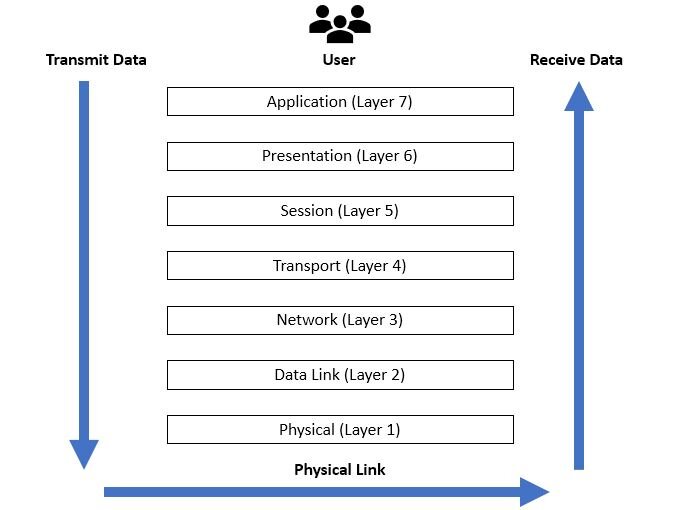
Here's a quick rundown of the OSI layers, from top to bottom:
- 7. Application: This is where your apps, like web browsers or email clients, create data.
- 6. Presentation: This layer translates data into a standard format, handling things like encryption and compression.
- 5. Session: It manages the conversation, establishing, maintaining, and ending the connection between two devices.
- 4. Transport: This layer ensures data is delivered reliably and in the correct order.
- 3. Network: It handles routing, figuring out the best path for data to travel across the network.
- 2. Data Link: This layer manages communication between devices on the same local network.
- 1. Physical: This is the actual hardware—cables, Wi-Fi signals—that carries the data.
The model the internet actually runs on is the TCP/IP model. It's more practical and condenses the OSI model's seven layers into four.
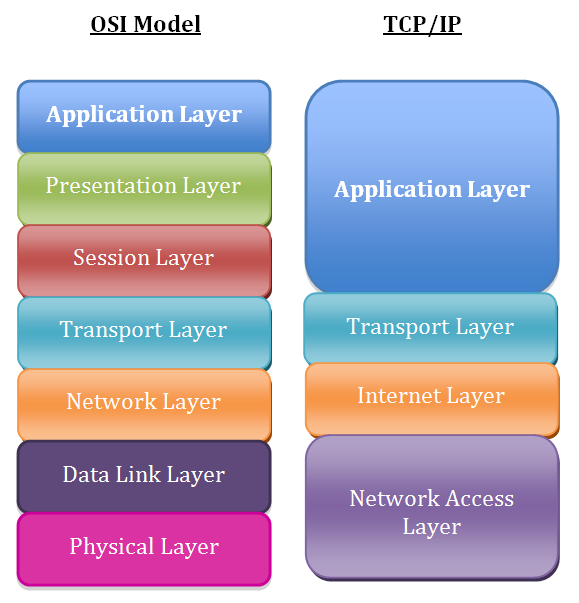
The TCP/IP layers are:
- Application: Combines the OSI Application, Presentation, and Session layers. It’s where protocols like HTTP (for web browsing) and SMTP (for email) live.
- Transport: This maps directly to the OSI Transport layer. It controls the flow of data.
- Internet: Corresponds to the OSI Network layer. It's responsible for addressing and routing packets using Internet Protocol (IP).
- Network Access: Merges the OSI Data Link and Physical layers. It deals with the physical hardware and transmission of data.
Network Addresses
For data to get to the right place, it needs an address, just like a letter sent through the mail. In networking, we use two kinds of addresses: IP addresses and port numbers.
IP Address
noun
A unique string of numbers that identifies each device connected to a network, like the internet.
An IP address gets your data to the correct device on the network. But once the data arrives at your computer, how does it know whether to go to your web browser, your music streaming app, or a video game? That's where port numbers come in.
A port number is an extension to the address that specifies a particular application or service running on the device. If an IP address is like the street address of an apartment building, the port number is the specific apartment number. Without it, the mail carrier (your operating system) wouldn't know which mailbox to put the letter in.
An IP address gets data to the right computer. A port number gets it to the right application on that computer.
Choosing Your Delivery Service
At the Transport layer, data can be sent using one of two main protocols: TCP or UDP. They both get the job done, but they work very differently. Choosing between them is like deciding between sending a certified letter and sending a postcard.
The Network Layer is like the postal system of the internet—it makes sure each data “letter” gets from your computer to exactly the right computer, even if it has to hop through several routers (post offices).
TCP (Transmission Control Protocol) is the certified letter. It's reliable and connection-oriented. Before sending any data, TCP establishes a connection through a process called a three-way handshake. It guarantees that every piece of data you send arrives intact and in the correct order. If a piece gets lost, TCP will resend it. This reliability makes it perfect for things like loading web pages, sending emails, and transferring files, where every bit of data is crucial.
UDP (User Datagram Protocol) is the postcard. It’s connectionless and fast. You just write your message and send it off without establishing a connection first. There's no guarantee it will arrive, or that multiple postcards will arrive in the order you sent them. This might sound bad, but it's great for applications where speed is more important than perfect accuracy, like live video streaming, online gaming, or voice calls. Losing a tiny bit of data here and there is often unnoticeable and is a worthy trade-off for a smooth, low-lag experience.
| Feature | TCP (Transmission Control Protocol) | UDP (User Datagram Protocol) |
|---|---|---|
| Connection | Connection-oriented (requires handshake) | Connectionless |
| Reliability | High (guaranteed delivery & order) | Low (no guarantees) |
| Speed | Slower, due to error-checking | Faster, with less overhead |
| Use Case | Web browsing, file transfer, email | Streaming, online gaming, VoIP |
Now that you understand the basic rules of the road for network communication, let's test your knowledge.
Which layer of the OSI model is responsible for routing data and determining the best path for it to travel across a network?
The Application layer of the TCP/IP model combines the responsibilities of which three layers from the OSI model?
Understanding these core networking concepts—the communication models, addressing, and transport protocols—is the foundation for building any application that communicates over a network.