Java Programming Fundamentals
Java Basics
What is Java?
Java is one of the world's most popular and versatile programming languages. Created in the mid-1990s by Sun Microsystems, it's used for everything from web applications and mobile apps (it's the foundation of Android) to large-scale enterprise systems.
Its core philosophy is "write once, run anywhere." This means a program written on a Mac can run without changes on a Windows PC or a Linux server. This magic is possible because of a special piece of software that acts as a bridge between the code and the computer's hardware.
Java's 'write once, run anywhere' principle means your code isn't tied to a specific operating system, making it incredibly portable.
The Java Toolkit
To understand how Java works, you need to know about three key acronyms: JVM, JRE, and JDK. They all build on each other.
JVM
noun
The Java Virtual Machine. It's an abstract machine that runs on your actual computer. The JVM is what executes your compiled Java code. It's the component that makes 'write once, run anywhere' possible.
Think of the JVM as a universal adapter. You write one program, and the JVM on each different device knows how to translate it for that specific machine.
JRE
noun
The Java Runtime Environment. This is what you need on your computer to run a Java application. It includes the JVM and other essential libraries and files. If you aren't a programmer but want to use a Java program, you install the JRE.
JDK
noun
The Java Development Kit. This is the full toolkit for Java developers. It contains everything in the JRE, plus the tools needed to write and compile Java code, like the compiler and debugger.
So, the JDK includes the JRE, and the JRE includes the JVM. As a developer, you'll always install the JDK.
Setting Up Your Workspace
To start writing Java code, you need two things:
- The JDK: This gives your computer the ability to compile and run Java programs.
- An IDE: An Integrated Development Environment is a text editor built specifically for coding. It helps by highlighting syntax, catching errors, and providing buttons to easily compile and run your code.
Popular IDEs for Java include IntelliJ IDEA, Eclipse, and Visual Studio Code (with Java extensions). The setup process is straightforward: you download and install the JDK first, then install the IDE of your choice. Most modern IDEs will automatically detect your JDK installation.
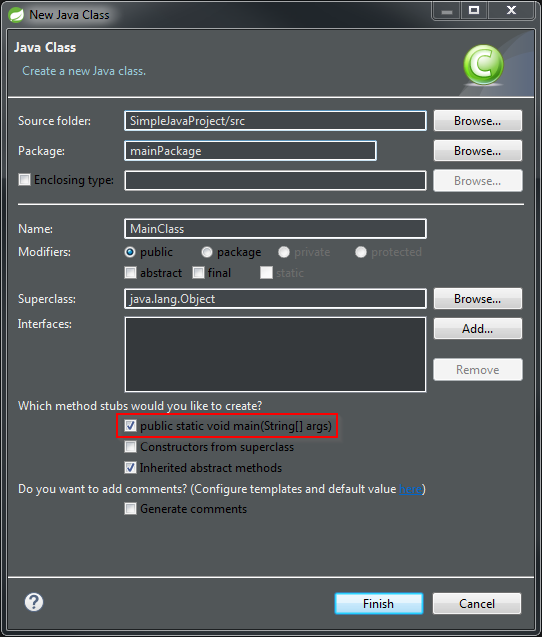
Your First Java Program
Let's write the traditional first program for any new language: "Hello, World!" This simple program just prints that phrase to the screen.
// This is a simple Java program.

public class HelloWorld {
    // The main method is the entry point of the program.
    public static void main(String[] args) {
        // Prints "Hello, World!" to the console.
        System.out.println("Hello, World!");
    }
}
Let's break that down.
public class HelloWorld { ... }: Every Java program is contained within aclass. You can think of a class as a blueprint or container for your code. The name of the class,HelloWorld, must match the filename (HelloWorld.java).public static void main(String[] args) { ... }: This is a special method that the JVM looks for to start the program. It's the official entry point. For now, you can just memorize this line; its individual parts will make more sense later.- `System.out.println(
Let's break that down.
-
public class HelloWorld { ... }: Every Java program is contained within aclass. You can think of a class as a blueprint or container for your code. The name of the class,HelloWorld, must match the filename (HelloWorld.java). -
public static void main(String[] args) { ... }: This is a special method that the JVM looks for to start the program. It's the official entry point. For now, you can memorize this line; its individual parts will make more sense later. -
System.out.println("Hello, World!");: This is the instruction that does the work.System.outrefers to the system's output console, andprintlntells it to print a line of text. The text we want to print goes inside the parentheses and quotes. The semicolon at the end marks the end of the statement, like a period in a sentence.
When you run this code in your IDE, a console window will appear with the output:
Hello, World!
Congratulations! You've just seen the basic structure of a Java program. Now you're ready to learn about the building blocks of the language.
What does Java's core philosophy, "write once, run anywhere," primarily refer to?
Which of the following contains the tools needed to compile Java code (like a compiler) in addition to the components needed to run it?