Java Fundamentals for Aspiring Developers
Introduction to Programming
The Building Blocks of Code
Every complex machine, from a car to a skyscraper, is built from fundamental parts like screws, beams, and wires. Programming is no different. While there are hundreds of programming languages, they all share a common set of building blocks. Once you understand these core ideas, learning any specific language becomes much easier.
Variables and Data Types
Think of a variable as a labeled box where you can store information. You give the box a name, and inside, you place a piece of data. You can look at what's in the box, or you can replace it with something new.
For example, we can create a variable called userAge and store the number 25 in it. Later, we can change the value in that box to 26. The name userAge stays the same, but the data it holds can change, which is why it's called a "variable."
DECLARE userAge AS NUMBER
SET userAge = 25

DECLARE userName AS TEXT
SET userName = "Alex"
Of course, you can store more than just numbers. The type of data you're storing matters. You wouldn't store a sentence in a box designed for a single number. In programming, these categories are called data types.
| Data Type | Description | Example |
|---|---|---|
| Integer | Whole numbers, without decimals. | 10, -5, 0 |
| Float | Numbers that have a decimal point. | 98.6, -0.001 |
| String | A sequence of characters, like text. | "Hello, world!" |
| Boolean | Represents a state of true or false. | true, false |
Defining the data type helps the computer understand how to work with the information correctly. You can do math with integers and floats, but you can't multiply a sentence.
Control Structures
By default, a computer reads code one line at a time, from top to bottom. But that's not always what we want. We need ways to make decisions and repeat actions. That's where control structures come in. They control the flow of the program.
The two most common control structures are conditionals and loops.
Conditionals are like forks in the road. They use if-then-else logic to perform different actions based on whether a condition is true or false. For example: If it is raining, then I will take an umbrella, else I will wear sunglasses.
DECLARE isRaining = true

IF isRaining == true THEN
  PRINT "Take an umbrella."
ELSE
  PRINT "Wear sunglasses."
END IF
Loops are for repeating a task multiple times without having to write the same code over and over. Imagine you need to send a happy birthday message to ten people. Instead of writing the send message command ten times, you can use a loop.
A loop will run a block of code again and again until a certain condition is met, like a counter reaching a specific number.
FOR count FROM 1 TO 5
  PRINT "This is loop number " + count
END FOR

// Output:
// This is loop number 1
// This is loop number 2
// This is loop number 3
// This is loop number 4
// This is loop number 5
Input and Output
A program isn't very useful if it can't communicate with the outside world. This communication is handled through input and output (often shortened to I/O).
Input is any information a program receives from a user or another system. This could be text you type, a file you upload, or a button you click.
Output is what the program sends back. This could be text displayed on the screen, an image, a sound, or data sent to another program.
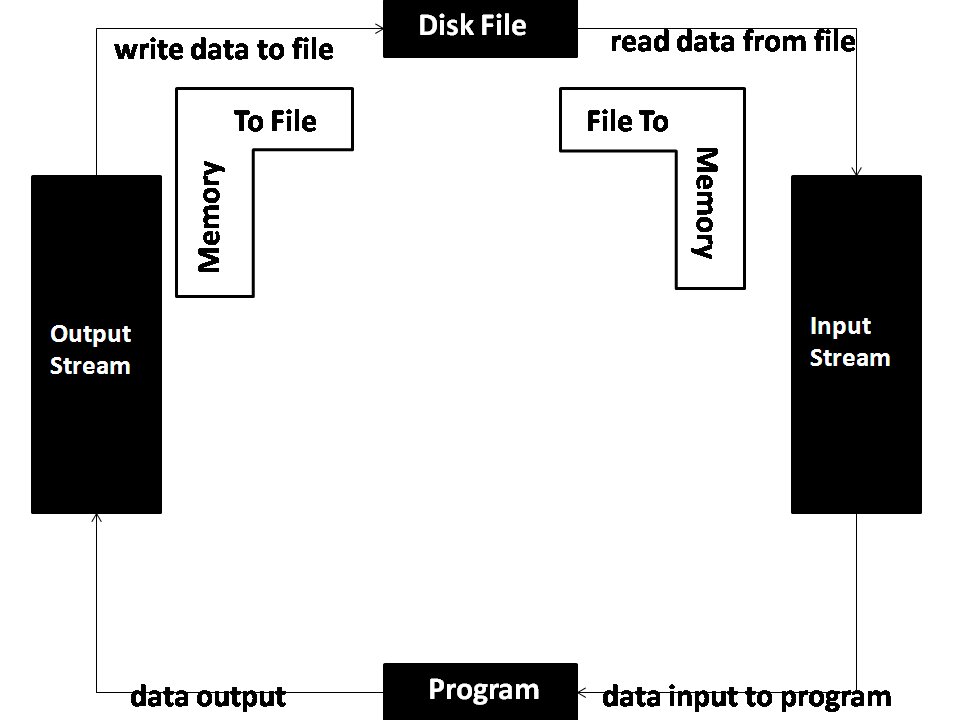
A simple example combines these concepts. A program can ask for your name (input), store it in a variable, and then use it to print a personalized greeting (output).
PRINT "What is your name?"

DECLARE userName AS TEXT
SET userName = GET_INPUT_FROM_USER()

PRINT "Hello, " + userName + "!"
These three concepts—variables and data types, control structures, and I/O—form the foundation of almost every program ever written. Mastering them is the first big step on your programming journey.
What is the primary purpose of a variable in programming?
A program needs to perform a different action depending on whether a user is logged in or not. Which programming concept is best suited for this task?